
Picture Audio Maker
PicAudio converts video/audio to a still video with picture and original audio.
- Installs
- 297K
- Measured
- Rating
- 2.28
- Ratings
- 584
- 43 reviews
- Version
- 1.4.4
- Updated 26 Oct 2023
- Released
- 16 Oct 2016
- Tracked since 13 May 2026
- Size
- 116 MB
- Needs 7.0
Screenshots


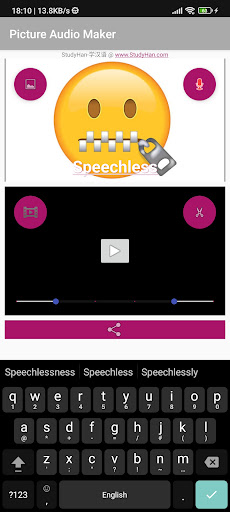


About Picture Audio Maker
The description on the store listing
Privacy Policy:
https://www.studyhan.com/privacy-policy
PicAudio File is a video file that consists of a still picture/image/photo and a normal audio/music/voice/sound.
The tool helps you:
# to record your audio/music/voice/sound, and generate a video file with a picture you chose.
# to add a picture/image/photo with title into an existing audio/music/voice/sound file.
# to replace your original video with a still picture/image/photo, and keep the original audio. It eliminates the concerns of exposure of visual privacy recorded in a video.
Use cases:
# In WeChat/WhatsApp/Telegram, you may record a video/audio with voice, and convert it into a PicAudio file, then share it to …
Read the full description
Privacy Policy: https://www.studyhan.com/privacy-policy PicAudio File is a video file that consists of a still picture/image/photo and a normal audio/music/voice/sound. The tool helps you: # to record your audio/music/voice/sound, and generate a video file with a picture you chose. # to add a picture/image/photo with title into an existing audio/music/voice/sound file. # to replace your original video with a still picture/image/photo, and keep the original audio. It eliminates the concerns of exposure of visual privacy recorded in a video. Use cases: # In WeChat/WhatsApp/Telegram, you may record a video/audio with voice, and convert it into a PicAudio file, then share it to any groups as you do for a normal video file, which could be forward and save without any limitations. # If you have a music video, the size is too big to share, you may convert it into a much smaller PicAudio file and share it as a normal video file. # To add a cover on a music audio, and share it as a video to friends. # To crop an audio/video file into pieces. # To record audio/music/voice/sound and share it as a video. Steps to record a Picture Audio File # Click the [Gallery] icon located at left-top, to pick a main picture # Click the [PicAudio] word in upper box, to edit the title of the picture # Click the [Record] icon located at right-top, to record your voice into a Picture Audio File # Click the [Play] icon at center of lower box, to play the recorded audio # Click the [Share] button located at bottom, to share your recording to WeChat/WhatsApp etc. Steps to convert existing audio/video file into a Picture Audio File # Click the [Gallery] icon located at left-top, to pick a picture # Click the [PicAudio] word in upper box, to edit the title for the picture # Click the [Record] icon located at left-bottom, to pick a audio/video # Drag the left/right pin of the range bar, to define the range of audio/video for trim/crop # Click the [Cut] icon located at right-bottom, to trim/crop and convert the audio/video file into a Picture Audio File # Click the [Share] button located at bottom, to share the Picture Audio File to WeChat/WhatsApp etc. Rating: The app focuses on a niche area for specific usage only, please do not give a low rate if it does not fit your usage. If you encountered any problem, please send email to support. Technical Info: # The app supports all kinds of video/audio formats e.g. mp3, wav, aac, amr, mp4, 3gp, m4v, m4a, avi and etc. It converts the file into a standard mp4(h264+aac) video file. # There is no limitation on size and length of video/audio files, the loading and processing time depends your mobile device, be patient when you process a big file. # All PicAudio files are added into System Gallery and stored in folder [/sdcard/Movies/picaudio/] only. # Temporary files are stored in the local storage folder [/sdcard/Android/data/com.netsdo.picaudio/cache] only, if you want to free up space, you may remove these files. # The app requires permission to record screen. It is used to capture the still picture and its timing only, it it will not record any other parts of screen. # The app does not collect any personal or device data. # Google Analytic may collect app usage data for quality improvement purpose only. Privileges Required: Record audio (RECORD_AUDIO) : to record an audio/music/voice/sound. Record Screen (FOREGROUND_SERVICE) : to supply picture when recording audio/music/voice/sound. Permanent notification : It is required by Android for Screen Recording. Access and change files/media on internal storage (READ_EXTERNAL_STORAGE, WRITE_EXTERNAL_STORAGE) : to store the recorded or converted PicAudio files. Below privileges are required by Google Analytic ACCESS_NETWORK_STATE, INTERNET, WAKE_LOCK, BIND_GET_INSTALL_REFERRER_SERVICE
Installs since 29 Aug 2026 Measured
Exact Google Play install counts, collected daily
Ratings
584 ratings, 43 reviews
- 5 ★24%
- 4 ★3.3%
- 3 ★8.4%
- 2 ★8.4%
- 1 ★56%
Recent reviews
Latest public reviews from the store
- 14 Jan 2026
The game has excellent graphics with bright colors and smooth animations. The rooms are well designed and easy to join, making it fun to play with friends or online players. Gameplay is very smooth with no lag, and the voice chat feature makes matches more exciting and interactive. Overall, a fun and enjoyable Ludo experience!
- 14 Jan 2026
awesome voice chat features, i would recommend all to download and play the game with their loved ones.
- 14 Jan 2026
perfect for quick games , the voice chat makes it feel like we are all around. very simple to create a room and play. classic
- 14 Jan 2026
Great way to connect with friends. The interface is clean, the matchmaking is fast, and the chat features make it really fun and competitive
What reviewers bring up
Topics mentioned in the latest 10 reviews, by how many reviews mention them
Liked in good reviews (9 reviews)
- voice 6
- friends 5
- ludo 5
- chat 4
- graphics 3
- gameplay 2
- features 2
- download 2
Raised in bad reviews (1 reviews)
No topic comes up twice.
Top chart positions
Latest Google Play chart ranks by country, last 10 days
Not in any tracked top chart in the last 10 days.
Picture Audio Maker history
Release, install milestones, listing and store changes
- Reached 100,000+ installs 19 Jul 2020
- Reached 50,000+ installs 12 Oct 2019
- Reached 10,000+ installs 28 Sep 2018
- Reached 5,000+ installs 17 Aug 2018
- Reached 1,000+ installs 17 Jun 2018
- Reached 500+ installs 15 Apr 2018
- Reached 100+ installs 14 Dec 2017
- Reached 50+ installs 4 Apr 2017
Update frequency
How often Picture Audio Maker ships a new version, month by month
0 updates in the last 12 months. Less often than most similar apps: they shipped a median of 1 updates in the same year.
Recent versions
Current version 1.4.4
- Version 1.4.426 Oct 2023
* compliant with Android 33 requirement. work with Android 34 * quality and performance improvement
- Version 1.3.119 Oct 2020
- Version 1.3.015 Sep 2020
- Version 1.2.325 May 2018
Listing keywords
Words and phrases Picture Audio Maker repeats most in its store listing
Top phrases: video file (8), audio music voice (6), music voice sound (6), audio music (6), music voice (6).
Highlighted words also appear in the title. Counts cover the title, short description and description.
Business model and tech
From the store listing, the SDKs in the app package and its declared permissions
- Business model
- Free to download
- Built with
- No cross-platform framework or game engine detected
- Ad networks (0)
- None detected
- Analytics and crash reports
- Firebase
- Sensitive access
- MicrophonePhotos, videos and files
1 ad, attribution and analytics SDKs detected. SDKs are read from the app package and permissions from the store listing, so code that loads later is not seen.
Technology
12 SDKs found in the app package
9 permissions
0 special access, 3 sensitive, 6 standard
- Record audioSensitive
- Change or delete shared storageSensitive
- Read shared storageSensitive
- Read how it was installed (install referrer)BIND_GET_INSTALL_REFERRER_SERVICEStandard
- Keep the phone awakeStandard
- Run a foreground serviceFOREGROUND_SERVICEStandard
- Full internet accessStandard
- See network connectionsStandard
- Read Google service settingsStandard
Compliance
What the listing and the app package show
- Store status
- Live
- Upkeep
- No update since 26 Oct 2023
- Privacy policy
- Linked on the listing
- Advertising
- No ads declared
- In-app purchases
- None declared
- Age rating
- Everyone
- Sensitive permissions
- 3 sensitive of 9
- Location access
- No
- Camera and microphone
- Microphone
Apps like Picture Audio Maker
Screen Recorder | Video RecInfinity Tech Systems260K installs★ 4.8
IttOtt TvLevels Média50.7K installs★ 3.33
Holy Quran RecitationGuide To Islam178K installs★ 4.6
Baby Video Maker with SongZing Ping300K installs★ 4.67
Photo Video Slideshow Maker FXThirra Labs290K installs★ 3.4
Video Crop - Cut Video, VideoTechtalks202K installs★ 2.71
Love Video MakerPhoto frame intira145K installs★ 4.08
Video Downloader & HD DownloadHD Downloads.4.6M installs★ 3.58
HOTTEST IPTVHOTTEST474K installs★ 3.44
Picture Audio Maker: questions and answers
How many downloads does Picture Audio Maker have?
Picture Audio Maker has 296,540 installs on Google Play, measured from the store's own count on 14 Nov 2026.
Who makes Picture Audio Maker?
Picture Audio Maker is published by John.P.Eagle.
When was Picture Audio Maker last updated?
The latest version (1.4.4) was released on 26 Oct 2023.
Is Picture Audio Maker free?
Yes. Picture Audio Maker is free to download.
Is Picture Audio Maker still available?
Yes. Picture Audio Maker is live on Google Play as of 14 Nov 2026.
Track Picture Audio Maker and its competitors
Watch any app for new versions, rating drops, chart moves and removals. Free plan, no card.