
Pie Controls Gestures
Everything just one swipe away.
- Installs
- 4.33K
- Measured
- Rating
- 4.44
- Ratings
- 253
- 57 reviews
- Version
- 10384
- Updated 6 Nov 2026
- Released
- 21 Mar 2018
- Tracked since 13 May 2026
- Size
- 3 MB
- Needs 5.0
Screenshots
About Pie Controls Gestures
The description on the store listing
"Pie Control" is the perfect companion for your day to day phone usage.
It gives you the ability to use your phone with just one hand via gestures.
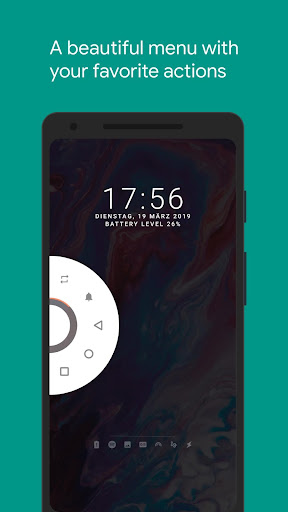
Simply swipe from one of the edges of your screen to reveal a functional and visually pleasing menu which shows your favorite actions, notifications and status information.
<b>Features</b>
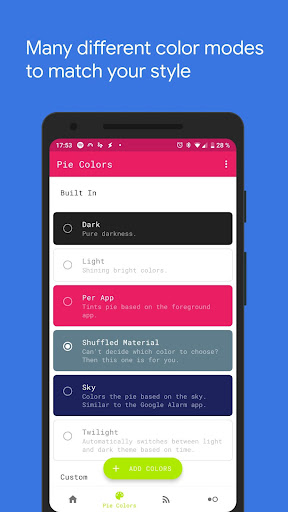
• Color settings to make the "Pie Control" yours
• You can view all of your notifications inside the "Pie Control"
• Multiple pies
• Two Rows
• Pie Points
• Stateful icons
• Trigger area settings
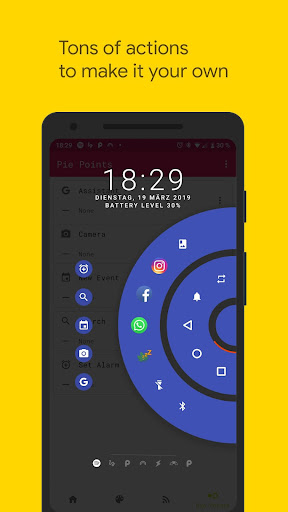
• Tons of customization options to fine grain your "Pie Control" experience
• Material Design
• Custom icons
• Broadcast support to toggle pie …
Read the full description
"Pie Control" is the perfect companion for your day to day phone usage. It gives you the ability to use your phone with just one hand via gestures. Simply swipe from one of the edges of your screen to reveal a functional and visually pleasing menu which shows your favorite actions, notifications and status information. <b>Features</b> • Color settings to make the "Pie Control" yours • You can view all of your notifications inside the "Pie Control" • Multiple pies • Two Rows • Pie Points • Stateful icons • Trigger area settings • Tons of customization options to fine grain your "Pie Control" experience • Material Design • Custom icons • Broadcast support to toggle pie from "Tasker" and other automation apps • "Xposed Framework" support to enhance functionality and compatibility • It's possible to hide the navigation bar without root by using the integration with "Hide Navigation Bar" <b>Actions</b> • Back • Home • Recents • Torch • Lock Screen • Screenshot • Open notification shade • Open quick settings • Open power dialog • Launch apps • App Shortcuts • Nougat App Shortcuts • Open camera • Open dialer • Open call log • Open contacts • Screenshot • Switch to last app • Toggle Bluetooth • Toggle WiFi <b>Colors</b> • Custom colors • Light and Dark • Per App which tints the "Pie Control" in the colors of the foreground app • Shuffled Material which tints the "Pie Control" in random colors • Twilight which automatically switches between light and dark • Sky which matches the color of the sky <b>Special thanks</b> A special thanks goes out to the "Paranoid Android" team. Their beautiful pie redesign inspired me to built this application. <b>Accessibility services<b></b> This app uses accessibility services to programmatically execute actions such as back, home or quick settings. This app does not collect any data via accessibility services <b>Hide the navigation bar<b></b> "Vivid Navigation Gestures" allows you to hide your stock nav bar as long as the gestures are enabled. You need ADB or Root in order to use that feature. <b>Android ADB PC instructions<b></b> 1 - Enable Developer Mode in the Android settings. 2 - Enable USB Debugging 3 - Setup ADB on your PC 4 - Run the following adb command to grant the permission: adb shell pm grant com.ivianuu.pie android.permission.WRITE_SECURE_SETTINGS To restore the navigation keys disable the app or run this command: adb shell wm overscan 0,0,0,0 <b>How to install ADB<b></b> Gadget Hacks - https://youtu.be/CDuxcrrWLnY Lifehacker - https://lifehacker.com/the-easiest-way-to-install-androids-adb-and-fastboot-to-1586992378 Xda developers - https://www.xda-developers.com/install-adb-windows-macos-linux/ <b>Links</b> Reddit: https://www.reddit.com/r/manuelwrageapps/</b></b></b></b>
Installs since 29 Aug 2026 Measured
Exact Google Play install counts, collected daily
Ratings
253 ratings, 57 reviews
- 5 ★79%
- 4 ★6.2%
- 3 ★7.9%
- 2 ★1.2%
- 1 ★6.2%
Recent reviews
Latest public reviews from the store
- 8 May 2020
This app makes shopping so simple and easy. It is comfort and safety coz i will make shopping from home. With these unprecedented time of worldwide pandemic, this app is a must have . Hope will not be worries and problems with return policy and customer service
Top chart positions
Latest Google Play chart ranks by country, last 10 days
Not in any tracked top chart in the last 10 days.
Pie Controls Gestures history
Release, install milestones, listing and store changes
- First released on the store 21 Mar 2018
Update frequency
How often Pie Controls Gestures ships a new version, month by month
7 updates in the last 12 months. More often than most similar apps: they shipped a median of 1 updates in the same year.
Recent versions
Current version 10384
- Version 102076 Nov 2026
• Added link to new custom Nav Bar app
- Version 2.7.72 Sep 2026
• Stability improvements
- Version 2.7.626 Aug 2026
• Stability improvements
- Version 2.7.09 Jul 2026
• Stability improvements
Listing keywords
Words and phrases Pie Controls Gestures repeats most in its store listing
Top phrases: pie control (6), accessibility services (3), navigation bar (3), hide the navigation (2), light and dark (2).
Highlighted words also appear in the title. Counts cover the title, short description and description.
Business model and tech
From the store listing, the SDKs in the app package and its declared permissions
- Business model
- Paid, $3.49
- Built with
- No cross-platform framework or game engine detected
- Ad networks (0)
- None detected
- Analytics and crash reports
- Firebase
- Sensitive access
- Photos, videos and filesNearby devicesDraws over other appsAdvertising ID
1 ad, attribution and analytics SDKs detected. SDKs are read from the app package and permissions from the store listing, so code that loads later is not seen.
Technology
29 SDKs found in the app package
17 permissions
3 special access, 2 sensitive, 12 standard
- Change system settingsSpecial access
- Draw over other appsSpecial access
- See every installed appQUERY_ALL_PACKAGESSpecial access
- Change or delete shared storageSensitive
- Read shared storageSensitive
- Read the advertising IDAD_IDStandard
- Control vibrationStandard
- Run a foreground serviceFOREGROUND_SERVICEStandard
- Access Bluetooth settingsStandard
- Pair with Bluetooth devicesStandard
- Connect to and disconnect from Wi-FiStandard
- Full internet accessStandard
Compliance
What the listing and the app package show
- Store status
- Live
- Upkeep
- Updated 6 Nov 2026
- Registered in
- Germany
- Privacy policy
- Linked on the listing
- Advertising
- No ads declared
- In-app purchases
- None declared
- Age rating
- Everyone
- Sensitive permissions
- 2 sensitive, 3 special access of 17
- Location access
- No
- Camera and microphone
- Neither
Apps like Pie Controls Gestures
Fit Tolerance ISOYaşar Yücel Yeşilbağ151K installs★ 4.83
ADL DMX CalculatorKirill Trofimov62K installs★ 5.0
Screenshot Expert: Markup ToolTasakiApps12.2K installs★ 4.25
TV Remote - Control Roku & AllLyra mob110K installs★ 4.03
Battery barABC.21.1K installs★ 3.18
Bubble LevelCrydata13.2K installs★ 4.85
M Calendar(calendar, schedule)Sunguy257K installs★ 3.56
Easy Homescreen LauncherSimple Palace studio69.2K installs★ 3.94
Battery AlarmRHS.Dev25.3K installs★ 3.61
Pie Controls Gestures: questions and answers
How many downloads does Pie Controls Gestures have?
Pie Controls Gestures has 4,328 installs on Google Play, measured from the store's own count on 14 Nov 2026.
Who makes Pie Controls Gestures?
Pie Controls Gestures is published by Manuel Wrage, a developer based in DE.
When was Pie Controls Gestures last updated?
The latest version (10384) was released on 6 Nov 2026.
Is Pie Controls Gestures free?
No. Pie Controls Gestures is a paid app priced at $3.49.
Is Pie Controls Gestures still available?
Yes. Pie Controls Gestures is live on Google Play as of 14 Nov 2026.
Track Pie Controls Gestures and its competitors
Watch any app for new versions, rating drops, chart moves and removals. Free plan, no card.