
Ping It
Ping It shows you the internet quality with a color coded icon in Status Bar.
- Installs
- 94.04K
- Measured
- Rating
- 4.3
- Ratings
- 2.1K
- 39 reviews
- Version
- 2.2.5
- Updated 5 Apr 2018
- Released
- 22 Dec 2013
- Tracked since 13 May 2026
- Size
- 2 MB
- Needs 3.0
Also on App Store: Ping It! (4 ratings)
Screenshots


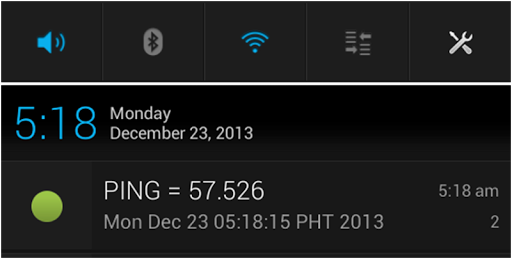


About Ping It
The description on the store listing
<b>Why wait for that "loading icon", if you already know that there's no internet? Now you can check the quality of your internet connection by just looking at the Ping It icon in Status Bar! And not waste your time!</b>
<b><u>What is Ping It?</u></b>
<b>Ping It</b> is a network utility that checks the quality of your internet connection. <b>Ping It</b> shows a color coded icon in the status bar.
<b>Ping It</b> measures the time from the moment a message was sent to an IP address or web address until a reply was received by the app. The time measured is called <b>ping value</b>.
<b>The lower the <i>ping value</i> the greater quality of internet connection you have.</b> …
Read the full description
<b>Why wait for that "loading icon", if you already know that there's no internet? Now you can check the quality of your internet connection by just looking at the Ping It icon in Status Bar! And not waste your time!</b> <b><u>What is Ping It?</u></b> <b>Ping It</b> is a network utility that checks the quality of your internet connection. <b>Ping It</b> shows a color coded icon in the status bar. <b>Ping It</b> measures the time from the moment a message was sent to an IP address or web address until a reply was received by the app. The time measured is called <b>ping value</b>. <b>The lower the <i>ping value</i> the greater quality of internet connection you have.</b> <b><u>What's In It For You?</u></b> • <b>Ping value</b> will be shown to the user in different forms: - Notification Icon (Enabled by Default) - Message in Notification or Ticker (Accessible from Settings) - Pop-up Notification (Accessible from Settings) <b><u>How To Check The Quality Of Your Internet Connection?</u></b> • By looking at the color of the Notification Icon. - Green indicates good connection and red indicates bad connection. - A red with an exclamation point (!) indicates no internet connection. • By looking at the Ping value of Notification Message or Pop-up Message. - The lower the Ping value the better internet connection. • By looking at the graph for Ping values. <b><u>How To Check The Internet Status?</u></b> • By looking at the Internet Status Notification - The user will only be notified every time the internet connection is lost or recovered. - The user will be notified with vibrate and/or LED notification. - Internet Status Notification is enabled by default. This can be disabled from Settings. <b><u>Start Using It Now!</u></b> • Tap the button at the center of the screen to start or stop the Ping Service. <b><u>DISCLAIMER</u></b> • Ping It may not work in some cases when you are connected with either VPN, a company controlled WiFi connection, or a mobile data connection for a specific mobile service provider. • You will notice that there is "No network connection" notification even if you have access to the internet. • This happens because the "ping" command is being blocked by the internet provider. • Please don't leave low ratings because of this. <b>Tags</b>: Ping It IdleMinds internet connection quality connectivity 3g 4g lte mobile data
Installs, last 30 days Measured
Exact Google Play install counts, collected daily
Ratings
2,128 ratings, 39 reviews
- 5 ★68%
- 4 ★17%
- 3 ★5.8%
- 2 ★1.4%
- 1 ★7.2%
Recent reviews
Latest public reviews from the store
- 16 Mar 2026
worst game
- 5 Feb 2026
fun. (^^)b
- 17 Oct 2025
perfect for spending free time,keep up with good updates
- 28 May 2025
nice game I like it was pretty good you can download it that is on you
What reviewers bring up
Topics mentioned in the latest 31 reviews, by how many reviews mention them
Liked in good reviews (24 reviews)
- mechanics 2
- honestly 2
- far 2
Raised in bad reviews (6 reviews)
- screen 3
- idle master 2
- stuck 2
Top chart positions
Latest Google Play chart ranks by country, last 10 days
Not in any tracked top chart in the last 10 days.
Ping It history
Release, install milestones, listing and store changes
- Reached 10,000+ installs 5 Apr 2018
- Reached 5,000+ installs 30 Jun 2017
- Reached 1,000+ installs 5 Mar 2015
- Reached 500+ installs 4 Sep 2014
- First released on the store 22 Dec 2013
Update frequency
How often Ping It ships a new version, month by month
0 updates in the last 12 months. Less often than most similar apps: they shipped a median of 1 updates in the same year.
Recent versions
Current version 2.2.5
- Version 2.2.514 Jul 2016
v2.2.5 - Added option to run Ping It service on startup! Wohoo finally! - Ping It service will run on startup by default, you can change this in settings
- Version 2.2.423 Oct 2014
- Version 2.2.316 Oct 2014
- Version 2.2.19 Oct 2014
Listing keywords
Words and phrases Ping It repeats most in its store listing
Top phrases: internet connection (8), ping value (5), connection by looking (3), internet status (3), status bar (3).
Highlighted words also appear in the title. Counts cover the title, short description and description.
Business model and tech
From the store listing, the SDKs in the app package and its declared permissions
- Business model
- Free to downloadShows ads
- Built with
- No cross-platform framework or game engine detected
- Ad networks (1)
- AdMob
- Analytics and crash reports
- Google Analytics
- Sensitive access
- No sensitive permission declared
2 ad, attribution and analytics SDKs detected. SDKs are read from the app package and permissions from the store listing, so code that loads later is not seen.
Technology
5 SDKs found in the app package
Ad network libraries
Development tools
Ad networks
Advertising and install-attribution SDKs found in the app package
- AdMob
4 permissions
0 special access, 0 sensitive, 4 standard
- Control vibrationStandard
- Start when the phone turns onStandard
- Full internet accessStandard
- See network connectionsStandard
Compliance
What the listing and the app package show
- Store status
- Live
- Upkeep
- No update since 5 Apr 2018
- Registered in
- Philippines
- Privacy policy
- Linked on the listing
- Advertising
- Shows ads
- In-app purchases
- None declared
- Age rating
- Everyone
- Sensitive permissions
- 0 sensitive of 4
- Location access
- No
- Camera and microphone
- Neither
Apps like Ping It
Day & Date Calendar Widgetoxdb.net439K installs★ 3.95
Calculator Volt/Amp/Watt/OhmAktham Ahmed486K installs★ 4.5
AI Poem GeneratorAllMath73.7K installs★ 4.62
Pixolor - Live Color PickerHanping293K installs★ 4.14
DNS Changer Pro (No Root)GreatStuffApps172K installs★ 4.24
Safe Clean Browsermusicchamsmobile111K installs★ 4.33
Megaphone & Voice AmplifierJan Augustyniak110K installs★ 4.0
Multi Timer with AdsCatfantom232K installs★ 4.28
SmartCleaner--Photo&FileWH1546HHMM2.7M installs★ 3.98
Ping It: questions and answers
How many downloads does Ping It have?
Ping It has 94,041 installs on Google Play, measured from the store's own count on 20 Nov 2026.
Who makes Ping It?
Ping It is published by IdleMinds, a developer based in PH.
When was Ping It last updated?
The latest version (2.2.5) was released on 5 Apr 2018.
Is Ping It free?
Yes. Ping It is free to download, and it shows ads.
Is Ping It still available?
Yes. Ping It is live on Google Play as of 20 Nov 2026.
Track Ping It and its competitors
Watch any app for new versions, rating drops, chart moves and removals. Free plan, no card.