Pixel art graphic editor
Pixel art graphic editor, drawing by cells
- Installs
- 46.34K
- Measured
- Rating
- 3.1
- Ratings
- 167
- 5 reviews
- Version
- Varies with device
- Updated 12 Jul 2023
- Released
- 16 Oct 2018
- Tracked since 14 May 2026
- Size
- 3 MB
- Needs 4.1
Screenshots




About Pixel art graphic editor
The description on the store listing
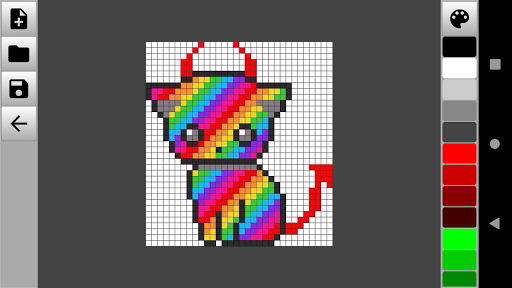
Pixel art is a pixel image editor for drawing and editing simple pictures. Thanks to Pixel art, you will learn how to create pixel drawings and develop graphics for games.
The graphic editor helps to draw pictures by pixels and has all the necessary tools for this. Pixel art editor has a wide range of actions and gives its user unlimited possibilities and spaces for creativity. In the app you can:
- Change the color palette, manually adjust the desired shade and paint pixel drawings in any color;
- Adjust the transparency of the selected color;
- Choose a color model (RGB or HSV);
- Insert images from the gallery in JPG, JPEG, PNG and other formats
- Use drawing by cells with a touch …
Read the full description
Pixel art is a pixel image editor for drawing and editing simple pictures. Thanks to Pixel art, you will learn how to create pixel drawings and develop graphics for games. The graphic editor helps to draw pictures by pixels and has all the necessary tools for this. Pixel art editor has a wide range of actions and gives its user unlimited possibilities and spaces for creativity. In the app you can: - Change the color palette, manually adjust the desired shade and paint pixel drawings in any color; - Adjust the transparency of the selected color; - Choose a color model (RGB or HSV); - Insert images from the gallery in JPG, JPEG, PNG and other formats - Use drawing by cells with a touch of your finger; - Draw lines and geometric shapes; - Manage image blur; - Change the scale of the drawing; - Use editing and drawing tools (eyedropper, brush, pencil, fill, eraser); - Take a step back and undo the last committed action; - Save the resulting pixel art to any folder and share your results with friends on social networks. Pixel image editor is quite minimalistic and easy to learn. After opening the application, you will immediately go to the workspace. To start drawing, it is enough to create a new canvas, adjust the size and type of background. Use a brush or pencil to draw dots and lines of different colors. You can also use existing photos and images from the gallery as a background. You can save the finished drawings in any folder on your mobile device. The application will allow you to create simple or complex drawings from pixels of any color for free. A graphic editor will be a great way to spend your free time usefully. Install Pixel art editor, create unique pixel drawings and share them with friends and family!
Installs since 27 Aug 2026 Measured
Exact Google Play install counts, collected daily
Ratings
167 ratings, 5 reviews
- 5 ★30%
- 4 ★20%
- 3 ★10%
- 2 ★10%
- 1 ★30%
Recent reviews
Latest public reviews from the store
- 16 May 2026
this is a great app for my mobile phone. but the problem with this app is that it doesn't seek permission for storage access, That's why when I tried to sideload this app in android tv, it didn't work. another Thing I want to add that it should be text highlight feature. (Only Text portion should be highlighted) that will make it useful for me.
- 10 May 2026
After Simple PDF/Falcon became enshittified, I had to look for a new simple PDF viewer. This one was tried. 10/10. Beautiful, simple, clean design, no ads, no clutter, no AI, nothing that you don't need.
- 6 May 2026
Very good 👍 very fast
- 6 May 2026
simple and easy
What reviewers bring up
Topics mentioned in the latest 50 reviews, by how many reviews mention them
Liked in good reviews (41 reviews)
- pdf 13
- small 6
- fast 6
- ads 6
- reader 4
- developer 3
- size 3
- zoom 3
Raised in bad reviews (7 reviews)
No topic comes up twice.
Top chart positions
Latest Google Play chart ranks by country, last 10 days
Not in any tracked top chart in the last 10 days.
Pixel art graphic editor history
Release, install milestones, listing and store changes
- Reached 10,000+ installs 24 Mar 2022
- Reached 5,000+ installs 22 Mar 2021
- Reached 1,000+ installs 24 Dec 2019
- Reached 500+ installs 16 Aug 2019
- Reached 100+ installs 2 May 2019
- Reached 50+ installs 3 Mar 2019
- Reached 10+ installs 21 Dec 2018
- Reached 5+ installs 21 Nov 2018
Update frequency
How often Pixel art graphic editor ships a new version, month by month
0 updates in the last 12 months. Less often than most similar apps: they shipped a median of 1 updates in the same year.
Recent versions
Current version Varies with device
- Version 1.0.811 Jul 2023
Thank you for supporting Pixel art! In the new version carried out: 🪛 Error correction 🎨 Improved work with the image editor 💡 Optimization for new devices
- Version 1.0.714 Oct 2022
- Version 1.0.55 Apr 2022
- Version 1.0.221 Jun 2019
Listing keywords
Words and phrases Pixel art graphic editor repeats most in its store listing
Top phrases: pixel art (7), graphic editor (4), pixel drawings (3), art graphic editor (2), drawing by cells (2).
Highlighted words also appear in the title. Counts cover the title, short description and description.
Business model and tech
From the store listing and declared permissions
- Business model
- Free to downloadShows ads
- Sensitive access
- No sensitive permission declared
Compliance
What the listing and the app package show
- Store status
- Live
- Upkeep
- No update since 12 Jul 2023
- Registered in
- Russia
- Privacy policy
- Linked on the listing
- Advertising
- Shows ads
- In-app purchases
- None declared
- Age rating
- Everyone
Apps like Pixel art graphic editor
Draw Gacha: Ideas and PicturesZaidDev33.2K installs★ 4.0
Face Change - AI Art GeneratorTelor App139K installs★ 3.8
AppLock Live Theme AbstractAppLock@DoMobile112K installs★ 3.4
Banner Maker for channelsChristopher Enim95.8K installs★ 1.67
T Shirt Design -Custom t shirtKreation Apps18.3K installs★ 4.93
Romantic Heart Coloring BookAulaul apps46.2K installs★ 3.96
CutLabXDongguan Xinjia Laser Technology Co., Ltd33K installs★ 1.84
Collage Wallpaper AestheticRice Fragrance66.2K installs★ 4.1
Mpix: Prints and Photo BooksMiller's Professional Imaging79.4K installs★ 2.33
Pixel art graphic editor: questions and answers
How many downloads does Pixel art graphic editor have?
Pixel art graphic editor has 46,339 installs on Google Play, measured from the store's own count on 7 Nov 2026.
Who makes Pixel art graphic editor?
Pixel art graphic editor is published by Android Tools (ru), a developer based in RU.
When was Pixel art graphic editor last updated?
The latest version (Varies with device) was released on 12 Jul 2023.
Is Pixel art graphic editor free?
Yes. Pixel art graphic editor is free to download, and it shows ads.
Is Pixel art graphic editor still available?
Yes. Pixel art graphic editor is live on Google Play as of 7 Nov 2026.
Track Pixel art graphic editor and its competitors
Watch any app for new versions, rating drops, chart moves and removals. Free plan, no card.