PocketBook reader - any books
Read PDF, EPUB, DjVu, FB2, CHM, CBR, MOBI, mp3, m4b, AZW and other
- Installs
- 10.89M
- Measured
- Rating
- 4.23
- Ratings
- 102K
- 2.7K reviews
- Version
- 5.66.1.43997.release
- Updated 28 Jul 2026
- Released
- 23 May 2013
- Tracked since 10 May 2026
- Size
- —
- Needs 4.1
Screenshots

About PocketBook reader - any books
The description on the store listing
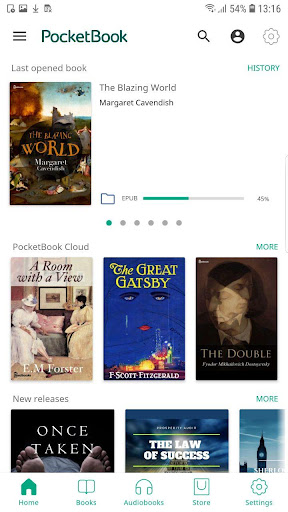
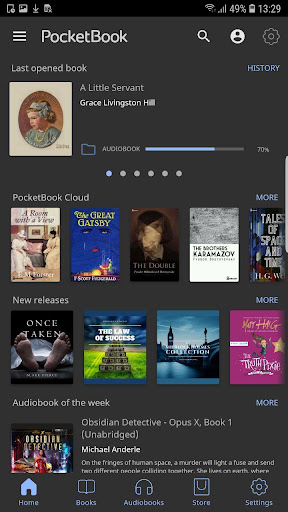
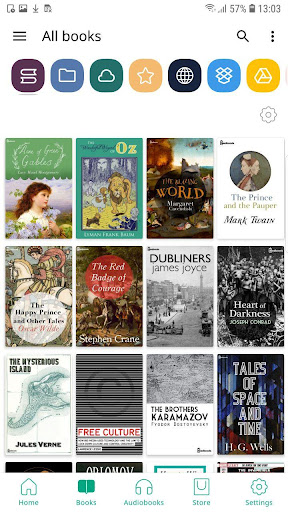
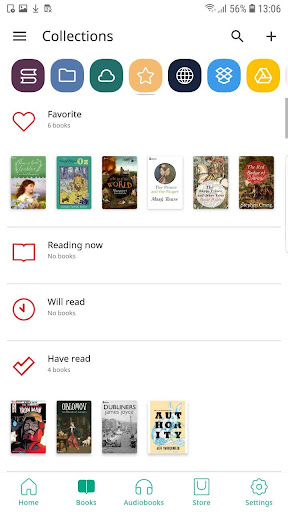
PocketBook Reader is a free app for reading any e-content (books, magazines, textbooks, comic books, etc.) and listening to audiobooks! The application supports 26 book and audio formats, including mobi, epub, fb2, cbz, cbr. Read without ads and with total comfort!
Choose any content - any format!
• Support of 19 book formats, including the most popular - EPUB, FB2, MOBI, PDF, DJVU, DOCX, RTF, TXT, HTML;
• Comic book formats CBR and CBZ;
• Open books protected with Adobe DRM (PDF, EPUB);
• PDF Reflow function (reflow text in PDF files).
Listen to audiobooks!
• You can listen to audiobooks and other audio files in MP3, M4B, and take notes in them;
• Built-in TTS (Text-to-speech) …
Read the full description
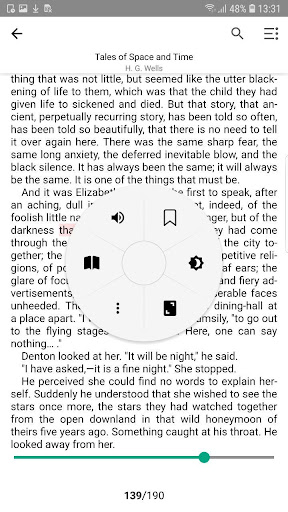
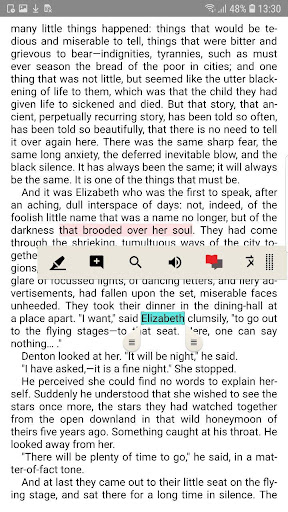
PocketBook Reader is a free app for reading any e-content (books, magazines, textbooks, comic books, etc.) and listening to audiobooks! The application supports 26 book and audio formats, including mobi, epub, fb2, cbz, cbr. Read without ads and with total comfort! Choose any content - any format! • Support of 19 book formats, including the most popular - EPUB, FB2, MOBI, PDF, DJVU, DOCX, RTF, TXT, HTML; • Comic book formats CBR and CBZ; • Open books protected with Adobe DRM (PDF, EPUB); • PDF Reflow function (reflow text in PDF files). Listen to audiobooks! • You can listen to audiobooks and other audio files in MP3, M4B, and take notes in them; • Built-in TTS (Text-to-speech) engine for the voicing of the text files. If necessary, you can replace the pre-installed TTS with any other one presented in the Play Market. Download and sync content easily! The app is a reader and book explorer application; • Manage file access: Book files stored on your device (such as EPUB) can be conveniently viewed, read and managed in the app. You can choose which locally stored files the app has access to; • Free PocketBook Cloud service for synchronizing all your books, including audiobooks, as well as reading positions, notes and bookmarks on all your devices; • Your files from Dropbox, Google Drive, Google Books services are easily connected to the app to create one consolidated library. You can even connect multiple accounts of the same service at the same time; • Support for OPDS catalogs - get access to network libraries; • ISBN scanner, for quick search of electronic versions of books by barcode; • Opportunity to borrow books and periodicals; • If you have a E Ink e-reader PocketBook, you can easily synchronize all your books and accounts just by scanning a QR code. Ready to switch from another app? No problem! Getting started with PocketBook Reader is easy! With an intuitive interface, the application provides you with unprecedented freedom – lots of options for settings and no restrictions. Choose, change, customize, and personalize! • Intuitive interface, easy navigation, and minimalistic design; • Opportunity to choose one of the seven interface color themes, reassign the buttons and display areas; • Two night-reading modes - for better reading comfort anytime; • You can customize the home screen with widgets, navigation and calling functions; • Adjust the font style, font size, line spacing, and margin size; • Customizable animation of turning pages; • Opportunity to crop margins – make the page look exactly the way you want. Get fast file access and easy search! • Create widgets on the home page for quick access to cloud services and libraries in one click. Manage widgets as you like; • All files are quickly found and instantly opened, even with built-in audio and video fragments; • Smart search, scanning files on your tablet or smartphone is a matter of seconds. PocketBook Reader will find any file on the device or only file from a specific folder/folders and pull them into the library. Any file or document can be found in a few clicks! • The app allows you to sort books, create collections, filter and mark files as you like; Make bookmarks, take notes, add comments! • You can quickly find all your notes and share them with friends via email or messengers; • Collect all your notes, bookmarks, and comments into separate files for even greater convenience. And that’s not all! • Built-in dictionaries and translator; • Convenient search in Google and Wikipedia; • Ability to download custom fonts; • Quick feedback and prompt assistance in the Play Market, guaranteed help via the User Technical Support Service. FAQ and old versions https://pocketbook.ch/en-ch/faq?hide_nav=1 FAQ -video https://www.youtube.com/playlist?list=PL_YSlYgOUl8QTee46afeeNxECEt7_rgz1
Installs, last 30 days Measured
Exact Google Play install counts, collected daily
Ratings
102,493 ratings, 2,731 reviews
- 5 ★67%
- 4 ★13%
- 3 ★6.0%
- 2 ★3.8%
- 1 ★11%
Recent reviews
Latest public reviews from the store
- 28 Jun 2023
Lindo
Top chart positions
Latest Google Play chart ranks by country, last 10 days
- Countries ranked
- 12
- Best rank
- #25
- Top 10 placements
- 0
- of 14 chart placements
- Average rank
- #132.6
Best countries on Google Play
- 🇩🇪 Germany · Top grossing, Books & Reference#25
- 🇲🇽 Mexico · Top free, Books & Reference#106
- 🇫🇷 France · Top free, Books & Reference#106
- 🇨🇦 Canada · Top free, Books & Reference#112
- 🇬🇧 United Kingdom · Top free, Books & Reference#120
- 🇯🇵 Japan · Top free, Books & Reference#135
| Country | Chart | Category | Rank | Best (10 days) | Date |
|---|---|---|---|---|---|
| 🇩🇪 Germany | Top grossing | Books & Reference | #25 | #25 | 22 Nov 2026 |
| 🇩🇪 Germany | Top free | Books & Reference | #74 | #71 | 22 Nov 2026 |
| 🇲🇽 Mexico | Top free | Books & Reference | #106 | #94 | 22 Nov 2026 |
| 🇫🇷 France | Top free | Books & Reference | #106 | #106 | 22 Nov 2026 |
| 🇨🇦 Canada | Top free | Books & Reference | #112 | #99 | 22 Nov 2026 |
| 🇬🇧 United Kingdom | Top free | Books & Reference | #120 | #120 | 22 Nov 2026 |
| 🇯🇵 Japan | Top free | Books & Reference | #135 | #135 | 18 Nov 2026 |
| 🇦🇺 Australia | Top free | Books & Reference | #145 | #126 | 22 Nov 2026 |
| 🇮🇳 India | Top grossing | Books & Reference | #153 | #148 | 22 Nov 2026 |
| 🇮🇩 Indonesia | Top grossing | Books & Reference | #157 | #152 | 22 Nov 2026 |
PocketBook reader - any books history
Release, install milestones, listing and store changes
- Reached 10,000,000+ installs 28 Mar 2026
- Reached 5,000,000+ installs 29 Jan 2022
- First released on the store 23 May 2013
Update frequency
How often PocketBook reader - any books ships a new version, month by month
7 updates in the last 12 months. About as often as similar apps, which shipped a median of 7 updates in the same year.
Recent versions
Current version 5.66.1.43997.release
- Version 5.65.0.39561.release28 Jul 2026
This release focuses on the sale of e-readers and accessories. We've also improved checkout stability, enhanced the shopping cart and order flow, updated store payments, expanded LCPL file support, and fixed several high-priority issues identified during beta testing. LCPL support now includes opening files from both the Store and local storage, with improved handling of edge cases. Enjoy your reading and shopping!
- Version 5.63.2.36061.release7 May 2026
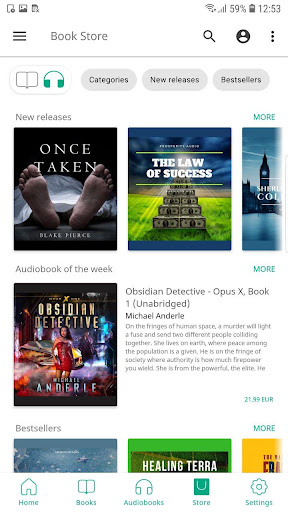
We’re excited to bring you the latest updates! New Features & Improvements: * New Burger Menu: fresh and more intuitive hamburger menu for easier navigation. * Book Store: now supports List and Grid (Tile) views. * LCP Books: added password prompt when opening protected books. Bug Fixes: * Fixed various bugs in the Store for improved stability. Thank you for using our app! Keep reading! 📖
- Version 5.63.1.35252.release22 Apr 2026
- Version 5.62.7.32679.release5 Mar 2026
Listing keywords
Words and phrases PocketBook reader - any books repeats most in its store listing
Top phrases: pocketbook reader (4), listen to audiobooks (2), book formats (2), epub fb2 (2), file access (2).
Highlighted words also appear in the title. Counts cover the title, short description and description.
Business model and tech
From the store listing and declared permissions
- Business model
- Free to downloadIn-app purchases
- Subscriptions and payments
- Google Play billing
- Sensitive access
- CameraPhotos, videos and filesAdvertising ID
25 permissions
2 special access, 4 sensitive, 19 standard
- Change system settingsWRITE_SETTINGSSpecial access
- Manage all filesMANAGE_EXTERNAL_STORAGESpecial access
- Take photos and videosSensitive
- Change or delete shared storageSensitive
- Read shared storageSensitive
- Show notificationsPOST_NOTIFICATIONSSensitive
- Ad attribution (Privacy Sandbox)ACCESS_ADSERVICES_ATTRIBUTIONStandard
- Read how it was installed (install referrer)BIND_GET_INSTALL_REFERRER_SERVICEStandard
- Read the advertising IDAD_IDStandard
- Read the advertising ID (Privacy Sandbox)ACCESS_ADSERVICES_AD_IDStandard
- Add home screen shortcutsStandard
- App icon badge countsBADGE_COUNT_READStandard
Compliance
What the listing and the app package show
- Store status
- Live
- Upkeep
- Updated 28 Jul 2026
- Registered in
- Switzerland
- Privacy policy
- Linked on the listing
- Advertising
- No ads declared
- In-app purchases
- Offered
- Age rating
- Everyone
- Sensitive permissions
- 4 sensitive, 2 special access of 25
- Location access
- No
- Camera and microphone
- Camera
Apps like PocketBook reader - any books
Storyaholic-Novel & FictionHK IReader Technology Limited813K installs★ 4.51
AlphaNovel — Books & StoriesBrailion Ventures Limited2.2M installs★ 4.64
English Hindi DictionaryInnnovative-Software11.7M installs★ 4.68
Inkitt: Books, Novels, StoriesInkitt Inc7.6M installs★ 4.59
Bangla Calendar 2026: পঞ্জিকাapk kajal13.5M installs★ 4.41
Al Quran Kareem: القران الكريمE-ALIM TECHNOLOGY LIMITED13.9M installs★ 4.41
Full Quran Sharif Offline AppDictionary World1112.4M installs★ 4.21
আল হাদিস (Al Hadith)IRD Foundation3.1M installs★ 4.74
SERIESNAVER WEBTOON16.9M installs★ 4.38
PocketBook reader - any books: questions and answers
How many downloads does PocketBook reader - any books have?
PocketBook reader - any books has 10,885,830 installs on Google Play, measured from the store's own count on 22 Nov 2026.
Who makes PocketBook reader - any books?
PocketBook reader - any books is published by Pocketbook International SA, a developer based in CH.
When was PocketBook reader - any books last updated?
The latest version (5.66.1.43997.release) was released on 28 Jul 2026.
Is PocketBook reader - any books free?
Yes. PocketBook reader - any books is free to download and offers in-app purchases.
Is PocketBook reader - any books still available?
Yes. PocketBook reader - any books is live on Google Play as of 22 Nov 2026.
Track PocketBook reader - any books and its competitors
Watch any app for new versions, rating drops, chart moves and removals. Free plan, no card.