
PoissonRouge
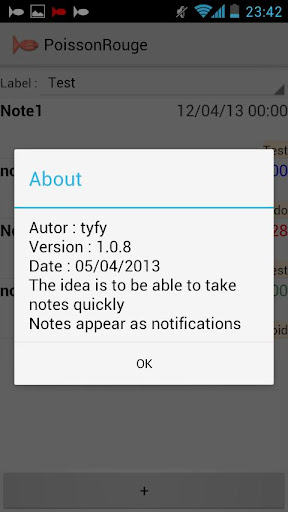
The application allows you to take notes quickly. Notes appears in notifications
- Installs
- 1.14K
- Measured
- Rating
- —
- Ratings
- —
- Version
- Varies with device
- Updated 26 Apr 2024
- Released
- 7 Feb 2013
- Tracked since 11 May 2026
- Size
- —
Screenshots


About PoissonRouge
The description on the store listing
The application allows you to take notes quickly. Notes appears in the notifications.
It is possible to plan a note. It will show up in notification when date is due.
* Languages :
english, french, spanish, german
* Help
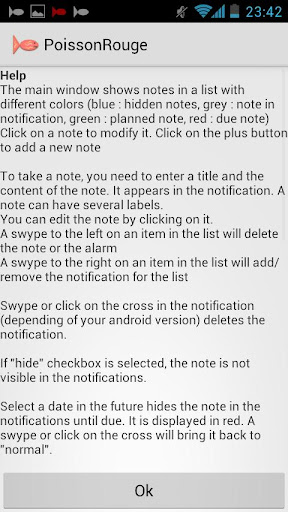
The main window shows notes in a list with different colors (blue : hidden notes, grey : note in notification, green : planned note, red : due note)
Click on a note to modify it. Click on the plus button to add a new note
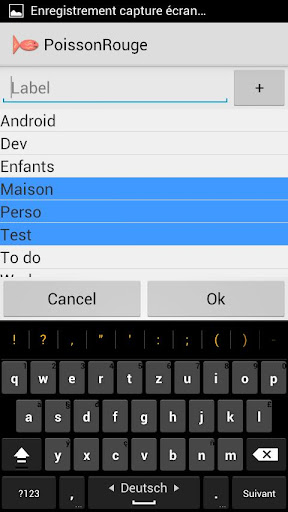
To take a note, you need to enter a title and the content (several lines) of the note. It appears in the notification. A note can have several labels. You can edit the note by clicking on it.
A swipe to the right or the left on an …
Read the full description
The application allows you to take notes quickly. Notes appears in the notifications. It is possible to plan a note. It will show up in notification when date is due. * Languages : english, french, spanish, german * Help The main window shows notes in a list with different colors (blue : hidden notes, grey : note in notification, green : planned note, red : due note) Click on a note to modify it. Click on the plus button to add a new note To take a note, you need to enter a title and the content (several lines) of the note. It appears in the notification. A note can have several labels. You can edit the note by clicking on it. A swipe to the right or the left on an item in the list will add/remove the notification for the list A long click on an element in the list shows a menu to edit or delete the note Swipe or click on the cross in the notification (depending of your android version) deletes the notification (if permanent is not selected) A click on the cross button in the notification delete the alarm or the notification (≥ ICS) If "hide" checkbox is selected, the note is not visible in the notifications. If "permanent" checkbox is selected, the notification is not deleted by a click on "delete all". When a notification is deleted, an "undo" notification is created. A click on the "undo" notification cancel the deletion of the notification. The "undo" notification is deleted after 15 seconds Select a date in the future hides the note in the notifications until due. It is displayed in red. A swipe or click on the cross will bring it back to "normal". A long click on the date shows a menu to add one day or one week to the date A long click on the hour shows a menu to add one hour or one 15 minutes to the date At phone boot, the application starts and recreates the notifications. This behavior can be modified in the preferences. In that case, alarms will not show up until the launch of the application. Sound and/or vibrations and/or lights for the alarms can be disabled in the preferences. A screen allows the edition of labels. When a label is selected, it is possible to rename it By default, the notes in notifications (except alarms) are displayed in a group. This behavior can be modified in the preferences. A click on a group displays its content. A long click rolls notes titles. You can decide to group or not each individual note * Functions Take a note Edit a note Delete a note Hide a note Plan a note Add labels to a note Filter notes by labels Edit labels Launch the application at phone/tab boot Sound/light/vibration Permanent Notification Import/Export Group notes Search notes * Change log V1.0.0 First version - 27/12/12 V1.0.1 Added list - 23/01/13 V1.0.2 Swipe - 01/02/13 V1.0.3 Google play and website - 02/02/13 V1.0.4 Choose led color. Reload notes after changing swipe preferences - 27/02/13 V1.0.5 Fixed rotation problem - 09/03/13 V1.0.6 Holo light theme - 13/03/13 V1.0.7 Fixed list refresh when list is too long - 17/03/13 V1.0.8 Added labels - 05/04/13 V1.0.9 Fixed bugs with language and label selection - 14/04/13 V1.1.0 Permanent notification, undo, text on several lines, button X on notification in order to delete it (≥ ICS) -29/05/13 V1.1.1 Fixed bug, used icons - 05/06/13 V1.1.2 Added menu on list, date and hour - 09/06/13 V1.1.3 Added undo on list - 17/06/13 V1.1.4 Added import/export - 14/07/13 V1.1.5 Added multiple labels filter, new icons - 30/07/13 V1.2.0 Group notes displayed in notifications (except alarms). Improved code for activities exchanges - 22/01/14 V1.2.1 Added search function - 21/02/14 V1.2.2 Improved search - 04/03/14
Installs since 26 Aug 2026 Measured
Exact Google Play install counts, collected daily
Ratings
- 5 ★0.0%
- 4 ★0.0%
- 3 ★0.0%
- 2 ★0.0%
- 1 ★0.0%
Recent reviews
Latest public reviews from the store
No reviews in our sample for this app yet.
Top chart positions
Latest Google Play chart ranks by country, last 10 days
Not in any tracked top chart in the last 10 days.
PoissonRouge history
Release, install milestones, listing and store changes
- First released on the store 7 Feb 2013
Recent versions
Current version Varies with device
- Version 1.3.426 Apr 2024
Listing keywords
Words and phrases PoissonRouge repeats most in its store listing
Top phrases: v1 added (7), long click (4), v1 fixed (4), shows menu (3), undo notification (3).
Highlighted words also appear in the title. Counts cover the title, short description and description.
Business model and tech
From the store listing and declared permissions
- Business model
- Free to download
- Sensitive access
- No sensitive permission declared
7 permissions
0 special access, 1 sensitive, 6 standard
- Show notificationsPOST_NOTIFICATIONSSensitive
- Control vibrationStandard
- Keep the phone awakeStandard
- Run a foreground serviceFOREGROUND_SERVICEStandard
- Start when the phone turns onStandard
- See network connectionsStandard
- Internal app permissionDYNAMIC_RECEIVER_NOT_EXPORTED_PERMISSIONStandard
Compliance
What the listing and the app package show
- Store status
- Live
- Upkeep
- No update since 26 Apr 2024
- Registered in
- France
- Privacy policy
- Linked on the listing
- Advertising
- No ads declared
- In-app purchases
- None declared
- Age rating
- Everyone
- Sensitive permissions
- 1 sensitive of 7
- Location access
- No
- Camera and microphone
- Neither
Apps like PoissonRouge
영산강 안심 알림eICT융합소프트 & 스마트오더18.3K installs★ 4.0
JBLETRADOC Mobile10.3K installs★ 4.5
Two Point HeightOmega Centauri Software15.3K installs★ 2.22
Sheridan RecyclesCity of Sheridan634 installs★ 4.67
NAFNorges Automobil-Forbund200K installs★ 3.9
Ipsos Adria CAPIIpsos Serbia7.4K installs★ 3.9
Clock: Alarm Clock & TimerIntratech so36.1K installs★ 3.79
Süzme Sayaç HesaplamaNotsup30.3K installs★ 3.6
Cattle & Goat Record KeepingVetzKin10.3K installs★ 2.5
PoissonRouge: questions and answers
How many downloads does PoissonRouge have?
PoissonRouge has 1,141 installs on Google Play, measured from the store's own count on 18 Nov 2026.
Who makes PoissonRouge?
PoissonRouge is published by Tyfy, a developer based in FR.
When was PoissonRouge last updated?
The latest version (Varies with device) was released on 26 Apr 2024.
Is PoissonRouge free?
Yes. PoissonRouge is free to download.
Is PoissonRouge still available?
Yes. PoissonRouge is live on Google Play as of 18 Nov 2026.
Track PoissonRouge and its competitors
Watch any app for new versions, rating drops, chart moves and removals. Free plan, no card.