PowerTablet
PowerTablet - using android to tablet,touchpad,key [support WIFI,USB,Hovering]
- Installs
- 1.74K
- Measured
- Rating
- —
- Ratings
- —
- Version
- Varies with device
- Updated 2 Jul 2023
- Released
- 19 Aug 2020
- Tracked since 13 May 2026
- Size
- 2 MB
- Needs 5.0
Screenshots


About PowerTablet
The description on the store listing
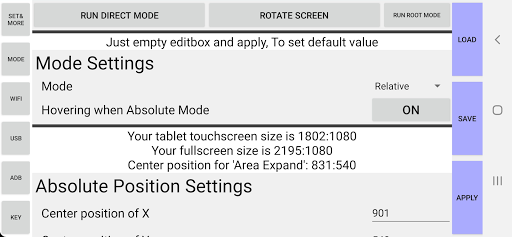
You can use your android device as tablet or touchpad, in Windows PC. PowerTablet supports various connection methods: WIFI, USB accessory, ADB. PowerTablet is optimized for low-latency. If your android deivce supports stylus pen which has hovering feature, you can use hovering like tablet. PowerTablet also supports keyboard too.
PowerTablet do not require Windows's device driver, instead PowerTablet use some Windows API to send mouse/keyboard events. To put it simply, PowerTablet tells Windows directly about mouse position/movement/click and keyboard click, rather sends real hardware signal. This is similar with most of keyboard macro programs. Due to this operation, PowerTablet mights …
Read the full description
You can use your android device as tablet or touchpad, in Windows PC. PowerTablet supports various connection methods: WIFI, USB accessory, ADB. PowerTablet is optimized for low-latency. If your android deivce supports stylus pen which has hovering feature, you can use hovering like tablet. PowerTablet also supports keyboard too. PowerTablet do not require Windows's device driver, instead PowerTablet use some Windows API to send mouse/keyboard events. To put it simply, PowerTablet tells Windows directly about mouse position/movement/click and keyboard click, rather sends real hardware signal. This is similar with most of keyboard macro programs. Due to this operation, PowerTablet mights be faster than driver-based method, mights be unstable a little if your PC is too busy therefore has no time to execute PowerTablet, and mights have compatibility issues for some environments (like UAC control windows or anti-cheat program). In order to use this app, you need PC side program. In this link, there is user manual and you can download PC program. https://github.com/Lumy0726/PowerTabletManual/blob/main/README.md Although PowerTablet is optimized for low-latency, there is limitation due to android itself. If you want lower latency, try to use 'Direct mode'. If you want best performance, you can use ADB connection method or Root mode. They support full-refresh rate of your device and low latency. Root mode is more faster (and fastest) than ADB connection method, but it requires rooted device. For more information, please read manual.
Installs since 14 Nov 2026 Measured
Exact Google Play install counts, collected daily
Daily history starts once this app is in our daily install sample.
Ratings
- 5 ★0.0%
- 4 ★0.0%
- 3 ★0.0%
- 2 ★0.0%
- 1 ★0.0%
Recent reviews
Latest public reviews from the store
No reviews in our sample for this app yet.
Top chart positions
Latest Google Play chart ranks by country, last 10 days
Not in any tracked top chart in the last 10 days.
PowerTablet history
Release, install milestones, listing and store changes
- Reached 1,000+ installs 12 Mar 2022
- Reached 500+ installs 19 Jul 2021
- Reached 100+ installs 4 Jan 2021
- Reached 50+ installs 5 Nov 2020
- Reached 10+ installs 4 Sep 2020
- First released on the store 19 Aug 2020
Recent versions
Current version Varies with device
- Version 1.82 Jul 2023
- Version 1.74 Oct 2020
Listing keywords
Words and phrases PowerTablet repeats most in its store listing
Top phrases: low latency (3), adb connection method (2), optimized for low (2), powertablet is optimized (2), adb connection (2).
Highlighted words also appear in the title. Counts cover the title, short description and description.
Business model and tech
From the store listing and declared permissions
- Business model
- Free to download
- Sensitive access
- No sensitive permission declared
2 permissions
0 special access, 0 sensitive, 2 standard
- Full internet accessStandard
- Internal app permissionDYNAMIC_RECEIVER_NOT_EXPORTED_PERMISSIONStandard
Compliance
What the listing and the app package show
- Store status
- Live
- Upkeep
- No update since 2 Jul 2023
- Registered in
- South Korea
- Privacy policy
- Linked on the listing
- Advertising
- No ads declared
- In-app purchases
- None declared
- Age rating
- Everyone
- Sensitive permissions
- 0 sensitive of 2
- Location access
- No
- Camera and microphone
- Neither
Apps like PowerTablet
들어서 화면켜기Won3.5K installs★ 4.0
Height PredictionEcliptic App Ventures45.9K installs★ 2.4
Speicers`Pro VPNEldiablolucifer202021.2K installs★ 4.14
Lightning Tracker with AlertsYaksh Software4.3K installs★ 3.0
Mana Pathi (Unit Converter)Shirish Koirala2.2K installs★ 4.6
Multi-tab Calc - A simple app.Naoyuki Rikiji1.3K installs★ 5.0
Just Silence. Scheduled.Akid Soft1.6K installs★ 5.0
- WoWp AssistantВиталий Робиновский2K installs★ 4.2
LINKa: напишиLINKa7.9K installs★ 4.4
PowerTablet: questions and answers
How many downloads does PowerTablet have?
PowerTablet has 1,738 installs on Google Play, measured from the store's own count on 14 Nov 2026.
Who makes PowerTablet?
PowerTablet is published by LumyLumyStudio, a developer based in KR.
When was PowerTablet last updated?
The latest version (Varies with device) was released on 2 Jul 2023.
Is PowerTablet free?
Yes. PowerTablet is free to download.
Is PowerTablet still available?
Yes. PowerTablet is live on Google Play as of 14 Nov 2026.
Track PowerTablet and its competitors
Watch any app for new versions, rating drops, chart moves and removals. Free plan, no card.