
한글 PPT - PPTX·프레젠테이션 뷰어
No ads. Quickly open PPTX and PPT presentation documents and save them as PDF.
- Installs
- 1.20K
- Measured
- Rating
- —
- Ratings
- —
- Version
- Varies with device
- Released
- 16 Aug 2026
- Tracked since 31 Aug 2026
- Size
- —
Screenshots



About 한글 PPT - PPTX·프레젠테이션 뷰어
The description on the store listing
Hangeul PPT is an ad-free PPT and PPTX viewer.
Using its proprietary rendering engine, it quickly renders slides in their original formatting, and allows you to save necessary documents as PDFs. It can open not only the latest PPTX files but also older PPT documents.
Check out the presentations you need instantly without complicated sign-ups, watching ads, or additional payments. You can gather PowerPoint files scattered across email, messengers, download folders, and file managers in one place within the app.
If you allow storage access, it automatically finds PowerPoint documents on your device, and even without permission, you can directly select and view the documents you need …
Read the full description
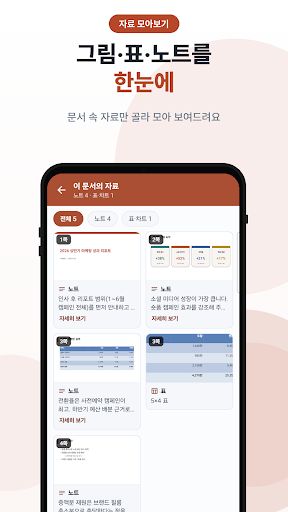
Hangeul PPT is an ad-free PPT and PPTX viewer. Using its proprietary rendering engine, it quickly renders slides in their original formatting, and allows you to save necessary documents as PDFs. It can open not only the latest PPTX files but also older PPT documents. Check out the presentations you need instantly without complicated sign-ups, watching ads, or additional payments. You can gather PowerPoint files scattered across email, messengers, download folders, and file managers in one place within the app. If you allow storage access, it automatically finds PowerPoint documents on your device, and even without permission, you can directly select and view the documents you need using the "Open File" button. View Slides as They Are - Displays original formatting exactly as it appears, including tables, shapes, bullet points, and accent colors - Skip to the desired page using the slide list below; the list is arranged side-by-side in landscape mode - View full-screen slides in Full View - Navigate to links within slides via the tab; images and GIFs support enlarged viewing and sharing Prepare for your presentation all at once - View presenter notes and memos (comments) alongside the slides - View aggregated materials: Select and view only the images, tables, charts, links, and notes within the document at a glance - Text search highlights not only slide content but also notes and memos - Skip to the desired page using the search results list Key Features - View documents without ads - Open PPTX and older PPT PowerPoint documents - Open password-protected documents directly by entering the password - Save PowerPoint as PDF - View simultaneously with other apps in a small window (floating) - Automatically search for PPT files in device storage - Quickly find necessary documents by searching by file name - Prioritize important documents with Favorites - View documents by folder; classify documents by tags - Sort by modification date, name, and size, and sort by folder - Check recently opened documents and safely delete them to the Trash - Select text to copy, share, search the web, and translate - Eye-friendly Dark Mode Recommended for: - Those looking for a clean, ad-free PowerPoint viewer - Those who frequently check presentation materials and proposals on their mobile phones - Those who want to review slides and presenter notes together before a presentation - Those who view lecture materials or seminar slides on their mobile phones - Those who need to open even old PPT files - Those who want to save PowerPoints as PDFs for sharing or archiving - Those who want to view documents scattered across download folders and various storage locations in one place Hangul PPT focuses on the experience of quickly finding and viewing slides rather than complex editing features. You can lightly use basic functions such as opening, searching, organizing, and saving necessary PPT files as PDFs without ads. Supported Formats - `.pptx`, `.ppt` Note: Formatting, fonts, animations, and embedded objects in some documents may appear differently from the original depending on the file structure or device environment. Videos and audio within the slides will play using the device's built-in player. As a document viewing-only app, editing and slideshow functions are not provided.
Installs Measured
Exact Google Play install counts, collected daily
Daily history starts once this app is in our daily install sample.
Ratings
- 5 ★0.0%
- 4 ★0.0%
- 3 ★0.0%
- 2 ★0.0%
- 1 ★0.0%
Recent reviews
Latest public reviews from the store
No reviews in our sample for this app yet.
Top chart positions
Latest Google Play chart ranks by country, last 10 days
Not in any tracked top chart in the last 10 days.
한글 PPT - PPTX·프레젠테이션 뷰어 history
Release, install milestones, listing and store changes
- First released on the store 16 Aug 2026
Listing keywords
Words and phrases 한글 PPT - PPTX·프레젠테이션 뷰어 repeats most in its store listing
Top phrases: ppt files (3), view documents (3), notes and memos (2), select and view (2), desired page (2).
Highlighted words also appear in the title. Counts cover the title, short description and description.
Business model and tech
From the store listing and declared permissions
- Business model
- Free to download
- Sensitive access
- No sensitive permission declared
Compliance
What the listing and the app package show
- Store status
- Live
- Privacy policy
- Linked on the listing
- Advertising
- No ads declared
- In-app purchases
- None declared
- Age rating
- Everyone
Apps like 한글 PPT - PPTX·프레젠테이션 뷰어
들어서 화면켜기Won3.5K installs★ 4.0
Height PredictionEcliptic App Ventures45.9K installs★ 2.4
Speicers`Pro VPNEldiablolucifer202021.2K installs★ 4.14
Lightning Tracker with AlertsYaksh Software4.3K installs★ 3.0
Mana Pathi (Unit Converter)Shirish Koirala2.2K installs★ 4.6
Multi-tab Calc - A simple app.Naoyuki Rikiji1.3K installs★ 5.0
Photo Recovery PlusBillApps7.1K installs★ 4.53
Just Silence. Scheduled.Akid Soft1.6K installs★ 5.0
- WoWp AssistantВиталий Робиновский2K installs★ 4.2
한글 PPT - PPTX·프레젠테이션 뷰어: questions and answers
How many downloads does 한글 PPT - PPTX·프레젠테이션 뷰어 have?
한글 PPT - PPTX·프레젠테이션 뷰어 has 1,203 installs on Google Play, measured from the store's own count on 31 Aug 2026.
Who makes 한글 PPT - PPTX·프레젠테이션 뷰어?
한글 PPT - PPTX·프레젠테이션 뷰어 is published by Security DNS Zone.
Is 한글 PPT - PPTX·프레젠테이션 뷰어 free?
Yes. 한글 PPT - PPTX·프레젠테이션 뷰어 is free to download.
Is 한글 PPT - PPTX·프레젠테이션 뷰어 still available?
Yes. 한글 PPT - PPTX·프레젠테이션 뷰어 is live on Google Play as of 31 Aug 2026.
Track 한글 PPT - PPTX·프레젠테이션 뷰어 and its competitors
Watch any app for new versions, rating drops, chart moves and removals. Free plan, no card.