
PrintHand Mobile Print
One-stop mobile print solution. Print via WiFi, Bluetooth, USB without computer.
- Installs
- 6.53M
- Measured
- Rating
- 3.6
- Ratings
- 33.4K
- 2K reviews
- Version
- 14.9.5
- Updated 5 Nov 2026
- Released
- 15 Jun 2012
- Tracked since 10 May 2026
- Size
- 6 MB
- Needs 4.1
Also on App Store: PrintHand Mobile Print (10 ratings)
Screenshots


About PrintHand Mobile Print
The description on the store listing
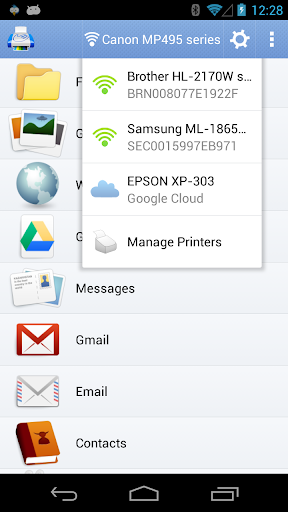
Print directly from your phone or tablet via WiFi, Bluetooth or USB cable without a computer. Direct mobile scanning is available for selected multifunction printers.
IMPORTANT: PrintHand app is NOT FREE. In order to print real pages, you’ll need to upgrade to Premium Mode by making in-app purchase.
We do recommend printing a free test page prior to upgrading.
NOTE: Unfortunately, we had to remove the SMS and Call log printing features from our app due to the update to the Permissions policy on Google Play. Dear customers, we are as much upset by this issue as you are. And we are doing our best to resolve the issue.
For this reason please stay tuned to the app updates. Once we …
Read the full description
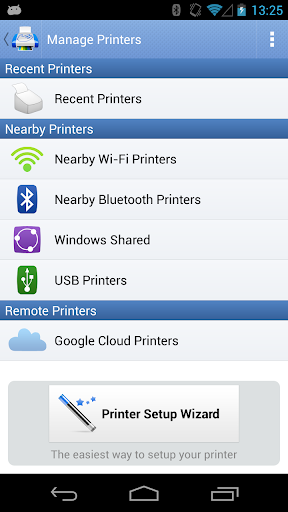
Print directly from your phone or tablet via WiFi, Bluetooth or USB cable without a computer. Direct mobile scanning is available for selected multifunction printers. IMPORTANT: PrintHand app is NOT FREE. In order to print real pages, you’ll need to upgrade to Premium Mode by making in-app purchase. We do recommend printing a free test page prior to upgrading. NOTE: Unfortunately, we had to remove the SMS and Call log printing features from our app due to the update to the Permissions policy on Google Play. Dear customers, we are as much upset by this issue as you are. And we are doing our best to resolve the issue. For this reason please stay tuned to the app updates. Once we obtain the necessary Messages and Call log permissions from Google, we are planning to bring the features back to the app. Using PrintHand you can print the following content: - Office documents, including MS Word, Excel, PowerPoint, PDF; - Text files and other popular file types; - Photos and images; - Web pages, emails and attachments; - Google Drive content; - Events from Calendar app; - Contacts; - Facebook albums; - Files from Dropbox; - Files from Box; - Files from OneDrive; - Files from Creative Cloud; - Files from SugarSync; - Notes from Evernote; - Content shared from other apps. Print to Mac or Windows shared printers, Workgroup, Domain and Active Directory. Print directly via USB cable from Android 4.0 and above. Share the printer with our free software for Mac and PC from printhand.com, and print to any printer as long as you can print from the computer. You can print via: - Wi-Fi (using a Wi-Fi Direct printer or using a Wi-Fi router as a middle man); - Bluetooth; - USB if USB OTG is fully supported by your device and it has Android 4.0+ installed. Please note that some of the mobile devices are unable to communicate with a printer properly even if USB Host mode is supported. This happens due to specific electrical design of the USB port. Sadly in such case the app is not likely to work properly. - PC or Mac (if your printer is shared using PrintHand desktop client or standard tools of your computer's OS); Here is the list of printers supported by PrintHand app: http://printhand.com/list_of_supported_printers.php?platform=android Aslo here is the list of supported portable printers: http://printhand.com/list_of_supported_portable_printers.php?platform=android Please make sure that your printer is supported. Our Printer Setup Wizard will detect your printers automatically and guide through the configuration process if needed. In a few clicks you’ll be able to print. You can now scan documents directly from the selected multifunction printers to your device. This feature is available in beta mode, please contact [email protected] for details. List of supported devices available at http://printhand.com/list_of_supported_scanners.php. You can try to print test page in our free app, but for unlimited printing you have to purchase premium app or make in-app purchase in free app. Have a good print!
Installs, last 30 days Measured
Exact Google Play install counts, collected daily
Ratings
33,442 ratings, 1,962 reviews
- 5 ★51%
- 4 ★11%
- 3 ★4.5%
- 2 ★4.0%
- 1 ★29%
Recent reviews
Latest public reviews from the store
No reviews in our sample for this app yet.
Top chart positions
Latest Google Play chart ranks by country, last 10 days
Not in any tracked top chart in the last 10 days.
PrintHand Mobile Print history
Release, install milestones, listing and store changes
- Reached 5,000,000+ installs 17 Feb 2024
- Moved from Business to Productivity 1 Jan 2019
- First released on the store 15 Jun 2012
Update frequency
How often PrintHand Mobile Print ships a new version, month by month
7 updates in the last 12 months. More often than most similar apps: they shipped a median of 4 updates in the same year.
Recent versions
Current version 14.9.5
- Version 14.9.55 Nov 2026
• Print to printers connected to a computer or a router, shared by Windows, macOS or Linux, or by our free PrintHand software • Redesigned print preview: see the actual sheets and adjust the job right there • Wi-Fi Direct works with more printers • Printer status at a glance for every connection type • Better language support, Turkish and Italian added • Miscellaneous fixes and improvements
- Version 14.9.223 Jul 2026
- Version 14.9.110 Apr 2026
Bug fixes
- Version 14.9.027 Mar 2026
Listing keywords
Words and phrases PrintHand Mobile Print repeats most in its store listing
Top phrases: wi fi (3), list of supported (2), selected multifunction printers (2), bluetooth usb (2), call log (2).
Highlighted words also appear in the title. Counts cover the title, short description and description.
Business model and tech
From the store listing and declared permissions
- Business model
- Free to downloadIn-app purchases
- Sensitive access
- No sensitive permission declared
Compliance
What the listing and the app package show
- Store status
- Live
- Upkeep
- Updated 5 Nov 2026
- Registered in
- United States
- Privacy policy
- Linked on the listing
- Advertising
- No ads declared
- In-app purchases
- Offered
- Age rating
- Everyone
Apps like PrintHand Mobile Print
RocketbookGeneral Printing & Design, Inc.2.6M installs★ 4.56
Hindi Calendar Panchang 2026Inditech bird2.9M installs★ 4.3
AAJI Mobile-ExamAAJI485K installs★ 4.86
BlackBerry Hub+ ServicesBlackBerry Limited5.7M installs★ 3.26
SólidesSólides Tecnologia2.3M installs★ 4.41
Root ExplorerSpeed Software1M installs★ 3.94
ROP - Royal Oman PoliceRoyal Oman Police-DGIT3.4M installs★ 4.19
UPCOPUttar Pradesh Police Technical Services8.2M installs★ 3.62
AI Translate - All languageDOSA Apps4.9M installs★ 4.72
PrintHand Mobile Print: questions and answers
How many downloads does PrintHand Mobile Print have?
PrintHand Mobile Print has 6,532,124 installs on Google Play, measured from the store's own count on 20 Nov 2026.
Who makes PrintHand Mobile Print?
PrintHand Mobile Print is published by PrintHand, a developer based in US.
When was PrintHand Mobile Print last updated?
The latest version (14.9.5) was released on 5 Nov 2026.
Is PrintHand Mobile Print free?
Yes. PrintHand Mobile Print is free to download and offers in-app purchases.
Is PrintHand Mobile Print still available?
Yes. PrintHand Mobile Print is live on Google Play as of 20 Nov 2026.
Track PrintHand Mobile Print and its competitors
Watch any app for new versions, rating drops, chart moves and removals. Free plan, no card.