
Procast
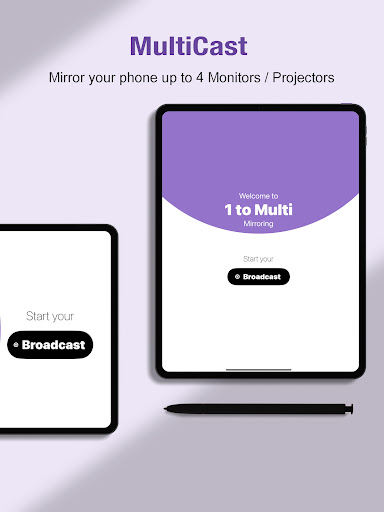
ProCast, paired with NimbleTech devices (such as EZCast Pro), can mirror mobile phone screens to 4 screens. It is widely used in conferences, education and corporate scenarios to effectively improve productivity.
- Installs
- 604
- Measured
- Rating
- —
- Ratings
- —
- Version
- Varies with device
- Released
- 4 Dec 2024
- Tracked since 13 May 2026
- Size
- —
Also on App Store: ProCast
Screenshots




About Procast
The description on the store listing
ProCast: a multi-screen mirroring solution that makes collaboration more efficient
Easily mirror your smartphone screen to up to 4 screens or projectors through the ProCast app paired with NimbleTech devices such as the EZCast Pro Dongle/Box. Its functions have been proven to effectively improve productivity in conference, education and enterprise scenarios.
ProCast’s core advantages:
- Easily solve multi-screen sharing needs
- Multi-screen mirroring: can synchronize mobile phone content to 4 display devices.
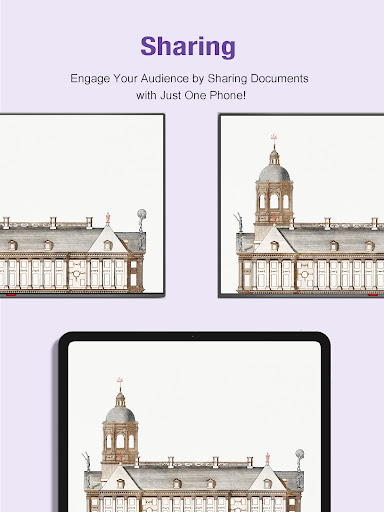
- Instant content sharing: supports projecting photos, videos, PPTs and files to meet the needs of various scenarios.
How to connect using ProCast devices:
1. Use …
Read the full description
ProCast: a multi-screen mirroring solution that makes collaboration more efficient Easily mirror your smartphone screen to up to 4 screens or projectors through the ProCast app paired with NimbleTech devices such as the EZCast Pro Dongle/Box. Its functions have been proven to effectively improve productivity in conference, education and enterprise scenarios. ProCast’s core advantages: - Easily solve multi-screen sharing needs - Multi-screen mirroring: can synchronize mobile phone content to 4 display devices. - Instant content sharing: supports projecting photos, videos, PPTs and files to meet the needs of various scenarios. How to connect using ProCast devices: 1. Use WebSetting to connect the NimbleTech device to the same network. 2. Mobile phone connection: Make sure your mobile phone is also connected to the same network environment. 3. Enable mirroring: Open the ProCast app, select the device you want to mirror, and start multi-screen sharing. Main features -One-to-four broadcast: supports multi-screen transmission, performance depends on network conditions. -Simple operation: Friendly user interface allows you to get started quickly. -Efficient productivity: Complete mirroring operations anytime, anywhere, effortlessly. -High definition and low latency: clear picture quality and smooth transmission, suitable for presentation documents or multimedia playback. Applicable scenarios 1. Business meeting Whether it is data display or team discussion, ProCast's multi-screen function makes communication more intuitive and efficient. 2. Education and training Teachers can display course content and real-time interactive materials at the same time to enhance students' learning concentration and sense of participation. 3. Corporate promotion At trade shows or in-house training, quickly mirror your product videos or PPTs to make messaging more engaging.
Installs since 29 Aug 2026 Measured
Exact Google Play install counts, collected daily
Ratings
- 5 ★0.0%
- 4 ★0.0%
- 3 ★0.0%
- 2 ★0.0%
- 1 ★0.0%
Recent reviews
Latest public reviews from the store
No reviews in our sample for this app yet.
Top chart positions
Latest Google Play chart ranks by country, last 10 days
Not in any tracked top chart in the last 10 days.
Procast history
Release, install milestones, listing and store changes
- First released on the store 4 Dec 2024
Listing keywords
Words and phrases Procast repeats most in its store listing
Top phrases: multi screen (6), mobile phone (4), effectively improve productivity (2), multi screen mirroring (2), multi screen sharing (2).
Highlighted words also appear in the title. Counts cover the title, short description and description.
Business model and tech
From the store listing and declared permissions
- Business model
- Free to download
- Sensitive access
- No sensitive permission declared
Compliance
What the listing and the app package show
- Store status
- Live
- Privacy policy
- Linked on the listing
- Advertising
- No ads declared
- In-app purchases
- None declared
- Age rating
- Everyone
Apps like Procast
들어서 화면켜기Won3.5K installs★ 4.0
Height PredictionEcliptic App Ventures45.9K installs★ 2.4
Speicers`Pro VPNEldiablolucifer202021.2K installs★ 4.14
Lightning Tracker with AlertsYaksh Software4.3K installs★ 3.0
Mana Pathi (Unit Converter)Shirish Koirala2.2K installs★ 4.6
Multi-tab Calc - A simple app.Naoyuki Rikiji1.3K installs★ 5.0
Photo Recovery PlusBillApps7.1K installs★ 4.53
Just Silence. Scheduled.Akid Soft1.6K installs★ 5.0
- WoWp AssistantВиталий Робиновский2K installs★ 4.2
Procast: questions and answers
How many downloads does Procast have?
Procast has 604 installs on Google Play, measured from the store's own count on 7 Nov 2026.
Who makes Procast?
Procast is published by NimbleTech Digital Inc..
Is Procast free?
Yes. Procast is free to download.
Is Procast still available?
Yes. Procast is live on Google Play as of 7 Nov 2026.
Track Procast and its competitors
Watch any app for new versions, rating drops, chart moves and removals. Free plan, no card.