
PushMe - Notification Reminder
Create discreet, timed, notifications as a reminder or note - super fast
- Installs
- 21.03K
- Measured
- Rating
- 3.9
- Ratings
- 180
- 18 reviews
- Version
- 3.1
- Updated 6 Jul 2025
- Released
- 3 Oct 2017
- Tracked since 13 May 2026
- Size
- 4 MB
- Needs 4.4
Screenshots



About PushMe - Notification Reminder
The description on the store listing
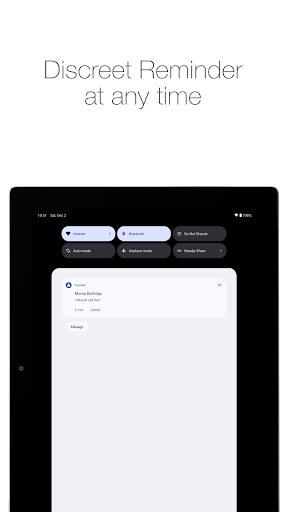
Never forget anything again! Just notify yourself with a reminder!
Sometimes you don’t want to use an alarm because it disturbs the people around you.
But you need to remind yourself in a few hours / days to do something.
PushMe lets you write notes, and sends them to you as a notification or message at a specific time or right now.
Super quick and simple.
<b>Just 3 steps! (or 1 step)</b>
<b>1.</b> Set title and message (both optional)
<b>2.</b> Set a time and date (both optional - if you don’t set a time you get your notification right now)
<b>3.</b> Hit the save button
<b>Additional Features:</b>
• Set default settings for vibration and sound
• Open your keyboard …
Read the full description
Never forget anything again! Just notify yourself with a reminder! Sometimes you don’t want to use an alarm because it disturbs the people around you. But you need to remind yourself in a few hours / days to do something. PushMe lets you write notes, and sends them to you as a notification or message at a specific time or right now. Super quick and simple. <b>Just 3 steps! (or 1 step)</b> <b>1.</b> Set title and message (both optional) <b>2.</b> Set a time and date (both optional - if you don’t set a time you get your notification right now) <b>3.</b> Hit the save button <b>Additional Features:</b> • Set default settings for vibration and sound • Open your keyboard automatically on app launch • Cancel Notifications before they appear • Choose your own notify ringtone • Remind yourself again in 5min via notification button below your message (or get the premium version to unlock more repetition settings) <b>Premium Features:</b> • No ads • Set a different repeat time for the notification button (default is 5 min) (available times: 5min, 10min, 15min, 30min, 1h, 2h, 3h, 6h, 12h, 24h, 48h) • Edit already set notifications (title, message, sound, vibration and persistent) Very easy and fast. Wether it is a memo, checklist, to-do, message or just a quick note. You can remind yourself with a notification instead of using a loud and disturbing alarm or calendar event. You can write down your grocery list or a quick message to not forget what to buy. Set up simple reminders for online auctions or tasks, appointments and upcoming events like a barbershop or doctors appointment. Get reminded to send a text for your friends birthday or message your coworker for a lunch date. Many successful people write down lists, notes or messages to stay organised and to never forget important tasks or events. Simple and effective reminder with PushMe. New: Write lists of all sorts with multiline support for the message field. Notify yourself with a quick reminder by writing your grocery list and shopping notes and receive it when you are at the grocery store. If you are still in the car simply repeat the note with the re-schedule button to get the same notification again in a few minutes. PushMe is the simplest way to notify yourself with a reminder to not forget anything again. Supported languages: English, German, Spanish, Vietnamese, Greek FAQ: Q: I bought Premium but I still see ads. Why? A: Open PushMe and tap on the settings icon on the top right. Try to change the repeat time. If you can change the time, then you have Premium. Close PushMe and swipe it away from recent apps. Then open PushMe again. If you still see ads please contact me (Email below). Q: I don't get notifications in the status bar after I set them up. Why? A: If you don't receive your notes or reminders as notifications, try to go to your system settings and give Push Me "priority display" permission. Not all phones have this setting. You should now be able to receive your messages. Still not working? Send me an E-Mail (see below). Q: Does this kill my battery? A: No. The android OS will tell Push Me when it is time to do its work, meaning when to send the notification. So Push Me doesn't have to run in the background when your phone is not being used. Suggestions or Bugs, or you want to help translate PushMe? Send me an E-Mail: [email protected]
Installs since 29 Aug 2026 Measured
Exact Google Play install counts, collected daily
Ratings
180 ratings, 18 reviews
- 5 ★60%
- 4 ★10%
- 3 ★10%
- 2 ★0.0%
- 1 ★20%
Recent reviews
Latest public reviews from the store
- 18 Jul 2025
Does what it says on the tin. Super simple app that allows you to schedule reminders as push notifications. You can set them daily or as a one off. To improve you could add custom schedules.
- 16 Oct 2023
Simple straightforward reminder app, you just add a reminder and set the time, and a notification comes up, and there's even an option to make the notification persistent, which is the main thing that seems hard to find in other reminder apps. I also really appreciate that premium is just one purchase, rather than a subscription model. Overall I really love the simplicity of this app and the fact that it just does exactly what it's supposed to. More apps need to be like this, honestly.
- 29 Sep 2022
Needs ability to schedule repeating reminders. Also took me a bit of trial and error to figure out what "persistent" did
- 4 Aug 2022
Simples e útil. A única coisa é que alterar a notificação poderia ser gratuito mas dá pra usar tranquilo mesmo assim.
What reviewers bring up
Topics mentioned in the latest 31 reviews, by how many reviews mention them
Liked in good reviews (22 reviews)
- notifications 3
- set 3
- reminder 2
- premium 2
- exactly 2
- dismiss 2
- option 2
- useful 2
Raised in bad reviews (5 reviews)
No topic comes up twice.
Top chart positions
Latest Google Play chart ranks by country, last 10 days
Not in any tracked top chart in the last 10 days.
PushMe - Notification Reminder history
Release, install milestones, listing and store changes
- Reached 10,000+ installs 1 Feb 2020
- Reached 5,000+ installs 15 Feb 2019
- Reached 1,000+ installs 8 Aug 2018
- Reached 500+ installs 24 Jul 2018
- Moved from Tools to Productivity 28 Mar 2018
- Reached 100+ installs 16 Dec 2017
- Reached 10+ installs 26 Oct 2017
- Reached 5+ installs 13 Oct 2017
Update frequency
How often PushMe - Notification Reminder ships a new version, month by month
0 updates in the last 12 months. Less often than most similar apps: they shipped a median of 3 updates in the same year.
Recent versions
Current version 3.1
- Version 3.16 Jul 2025
Note: To make PushMe work correctly, please make sure to not restrict it by any battery optimisation if your phone has these. Check your system settings app to give PushMe high priority status. New: - Support for Android 15 and Android 16
- Version 3.029 Nov 2023
- Version 2.822 Nov 2020
- Version 2.727 Feb 2020
Listing keywords
Words and phrases PushMe - Notification Reminder repeats most in its store listing
Top phrases: notify yourself (3), remind yourself (3), forget anything again (2), yourself with reminder (2), grocery list (2).
Highlighted words also appear in the title. Counts cover the title, short description and description.
Business model and tech
From the store listing, the SDKs in the app package and its declared permissions
- Business model
- Free to downloadIn-app purchasesShows ads
- Built with
- No cross-platform framework or game engine detected
- Ad networks (1)
- AdMob
- Subscriptions and payments
- Google Play billing
- Analytics and crash reports
- FirebaseCrashlytics
- Sensitive access
- Advertising ID
2 ad, attribution and analytics SDKs detected. SDKs are read from the app package and permissions from the store listing, so code that loads later is not seen.
Technology
14 SDKs found in the app package
Ad networks
Advertising and install-attribution SDKs found in the app package
- AdMob
14 permissions
1 special access, 1 sensitive, 12 standard
- Set exact alarmsSCHEDULE_EXACT_ALARMSpecial access
- Show notificationsPOST_NOTIFICATIONSSensitive
- Ad attribution (Privacy Sandbox)ACCESS_ADSERVICES_ATTRIBUTIONStandard
- Ad topics (Privacy Sandbox)ACCESS_ADSERVICES_TOPICSStandard
- Read how it was installed (install referrer)BIND_GET_INSTALL_REFERRER_SERVICEStandard
- Read the advertising IDAD_IDStandard
- Read the advertising ID (Privacy Sandbox)ACCESS_ADSERVICES_AD_IDStandard
- Keep the phone awakeStandard
- Run a foreground serviceFOREGROUND_SERVICEStandard
- Start when the phone turns onStandard
- Full internet accessStandard
- See network connectionsStandard
Compliance
What the listing and the app package show
- Store status
- Live
- Upkeep
- Updated 6 Jul 2025
- Registered in
- Germany
- Privacy policy
- Linked on the listing
- Advertising
- Shows ads
- In-app purchases
- Offered
- Age rating
- Everyone
- Sensitive permissions
- 1 sensitive, 1 special access of 14
- Location access
- No
- Camera and microphone
- Neither
Apps like PushMe - Notification Reminder
AI Prompts: AI Image GeneratorPixel Crafts7.6K installs★ 4.33
Bluedot Al Note TakerTwiso Inc.11.8K installs★ 4.71
BI LifeBI Digital16.3K installs★ 4.8
Drift: Notification TickerLight Source Labs5.5K installs★ 4.52
Magnifying Glass with FlashligOne Music Player42.1K installs★ 3.34
Mowazzi: AI Tools DirectoryKhalid Saied19.5K installs★ 4.57
Meeting Summary - AI NotesGODHITECH JSC20.7K installs★ 2.4
Speco GraySpeco Technologies10.9K installs★ 3.67
PI mPowerPI Industries16.9K installs★ 4.5
PushMe - Notification Reminder: questions and answers
How many downloads does PushMe - Notification Reminder have?
PushMe - Notification Reminder has 21,029 installs on Google Play, measured from the store's own count on 13 Nov 2026.
Who makes PushMe - Notification Reminder?
PushMe - Notification Reminder is published by SNAD, a developer based in DE.
When was PushMe - Notification Reminder last updated?
The latest version (3.1) was released on 6 Jul 2025.
Is PushMe - Notification Reminder free?
Yes. PushMe - Notification Reminder is free to download and offers in-app purchases, and it shows ads.
Is PushMe - Notification Reminder still available?
Yes. PushMe - Notification Reminder is live on Google Play as of 13 Nov 2026.
Track PushMe - Notification Reminder and its competitors
Watch any app for new versions, rating drops, chart moves and removals. Free plan, no card.