- Installs
- 65
- Measured
- Rating
- —
- Ratings
- —
- Version
- Varies with device
- Updated 22 May 2023
- Released
- 31 Jan 2017
- Tracked since 13 May 2026
- Size
- —
Screenshots
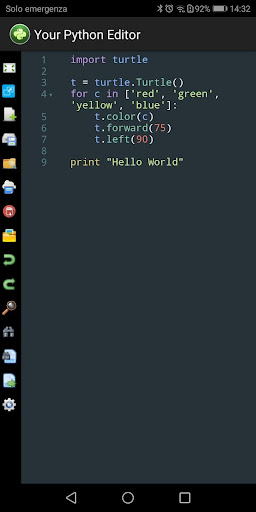
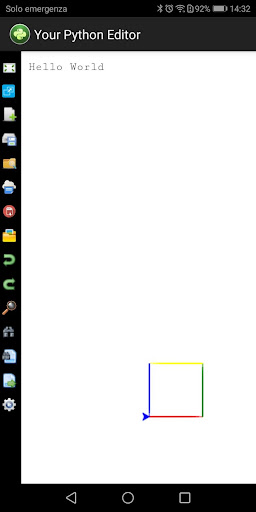
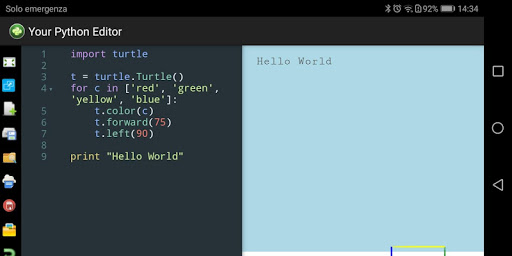


About PyCode Editor (Beta)
The description on the store listing
Edit & run Python code (Beta release).
Offline Python Editor based on Skulpt, entirely client side with display result & validation code
========
Release 1.3.0 - Introduced the new toggle button to display output area in full-screen mode
Release 1.2.5 - Updated python standard library and now the editor supporting partially pygal library
Release 1.0.5 - New full-screen button in sidebar for code editor
Note: sidebar with tools is now positioned to the left of your screen
========
* Edit, run and validate Python code
* Save code in your Android storage as Python application and as txt format
* Print result as pdf format
* Drag & Drop to open python and txt file (Chromebooks). You …
Read the full description
Edit & run Python code (Beta release). Offline Python Editor based on Skulpt, entirely client side with display result & validation code ======== Release 1.3.0 - Introduced the new toggle button to display output area in full-screen mode Release 1.2.5 - Updated python standard library and now the editor supporting partially pygal library Release 1.0.5 - New full-screen button in sidebar for code editor Note: sidebar with tools is now positioned to the left of your screen ======== * Edit, run and validate Python code * Save code in your Android storage as Python application and as txt format * Print result as pdf format * Drag & Drop to open python and txt file (Chromebooks). You can use button toolbar too (For all devices) * Undo & Redo buttons * Bluetooth keyboard shortcuts Ctrl-Space to autocomplete the code * Search/Replace string and jump to line (Using advanced functions with bluetooth keyboard shortcuts too) * Save Python code as pdf format * Bluetooth keyboard shortcuts to save project as Python application (CTRL-SHIFT-S for Windows - CMD-SHIFT-S for Mac) * Bluetooth keyboard shortcuts to save code as txt format (CTRL-S for Windows - CMD-S for Mac) * Numpy, matplotlib libraries partially supported Details about bluetooth keyboard shortcuts: * Ctrl-F / Cmd-F (Mac): Search * Ctrl-G / Cmd-G (Mac): Search next * Shift-Ctrl-G / Shift-Cmd-G (Mac): Search previous * Shift-Ctrl-F / Cmd-Option-F (Mac): Search and Replace * Shift-Ctrl-R / Shift-Cmd-Option-F (Mac): Replace All * ALT-G: Jump to line * Ctrl-Z and Ctrl-Y / Cmd-Z and Cmd-Y (Mac): Undo & Redo Here is the list of libraries you can use: - arduino; - document; - image; - led matrix; - math; - matplotlib (partially supported); - numpy (partially supported); - operator; - plot; - processing; - random; - re; - string; - time; - turtle; - urlib; - webgl; - pygal (partially supported) ============= Important notice To view files saved in your Phone file system I suggest you use the Files by Google application. Unfortunately, the native file systems of some smartphones limit the complete display of folders and files Thank you for your patience =============
Installs since 14 Nov 2026 Measured
Exact Google Play install counts, collected daily
Daily history starts once this app is in our daily install sample.
Ratings
- 5 ★0.0%
- 4 ★0.0%
- 3 ★0.0%
- 2 ★0.0%
- 1 ★0.0%
Recent reviews
Latest public reviews from the store
- 27 Nov 2021
Como lanço menos de uma hora de voo no tempo de voo? É possível uma fórmula onde o tempo de voo x valor da hora te de um total?
- 26 Nov 2021
Top
Top chart positions
Latest Google Play chart ranks by country, last 10 days
Not in any tracked top chart in the last 10 days.
PyCode Editor (Beta) history
Release, install milestones, listing and store changes
- Reached 50+ installs 5 Oct 2019
- Reached 10+ installs 7 Jun 2017
- Reached 5+ installs 3 May 2017
- Reached 1+ installs 29 Mar 2017
- First released on the store 31 Jan 2017
Recent versions
Current version Varies with device
- Version 1.4.622 May 2023
- Version 1.4.519 Aug 2020
- Version 1.4.020 Feb 2020
- Version 1.3.28 Aug 2019
Listing keywords
Words and phrases PyCode Editor (Beta) repeats most in its store listing
Top phrases: bluetooth keyboard shortcuts (5), bluetooth keyboard (5), keyboard shortcuts (5), cmd mac (4), ctrl cmd (4).
Highlighted words also appear in the title. Counts cover the title, short description and description.
Business model and tech
From the store listing and declared permissions
- Business model
- Paid, $6.49
- Sensitive access
- Photos, videos and files
3 permissions
0 special access, 2 sensitive, 1 standard
- Change or delete shared storageSensitive
- Read shared storageSensitive
- Full internet accessStandard
Compliance
What the listing and the app package show
- Store status
- Live
- Upkeep
- No update since 22 May 2023
- Registered in
- Italy
- Privacy policy
- Linked on the listing
- Advertising
- No ads declared
- In-app purchases
- None declared
- Age rating
- Everyone
- Sensitive permissions
- 2 sensitive of 3
- Location access
- No
- Camera and microphone
- Neither
Apps like PyCode Editor (Beta)
영산강 안심 알림eICT융합소프트 & 스마트오더18.3K installs★ 4.0
JBLETRADOC Mobile10.3K installs★ 4.5
Two Point HeightOmega Centauri Software15.3K installs★ 2.22
Sheridan RecyclesCity of Sheridan634 installs★ 4.67
NAFNorges Automobil-Forbund200K installs★ 3.9
Ipsos Adria CAPIIpsos Serbia7.4K installs★ 3.9
Clock: Alarm Clock & TimerIntratech so36.1K installs★ 3.79
Süzme Sayaç HesaplamaNotsup30.3K installs★ 3.6
Cattle & Goat Record KeepingVetzKin10.3K installs★ 2.5
PyCode Editor (Beta): questions and answers
How many downloads does PyCode Editor (Beta) have?
PyCode Editor (Beta) has 65 installs on Google Play, measured from the store's own count on 14 Nov 2026.
Who makes PyCode Editor (Beta)?
PyCode Editor (Beta) is published by UlmDesign, a developer based in IT.
When was PyCode Editor (Beta) last updated?
The latest version (Varies with device) was released on 22 May 2023.
Is PyCode Editor (Beta) free?
No. PyCode Editor (Beta) is a paid app priced at $6.49.
Is PyCode Editor (Beta) still available?
Yes. PyCode Editor (Beta) is live on Google Play as of 14 Nov 2026.
Track PyCode Editor (Beta) and its competitors
Watch any app for new versions, rating drops, chart moves and removals. Free plan, no card.