
PyTool Modbus
Modbus tool with Python script feature.
- Installs
- 34
- Measured
- Rating
- —
- Ratings
- —
- Version
- Varies with device
- Updated 4 Jul 2021
- Released
- 18 Jul 2019
- Tracked since 13 May 2026
- Size
- —
Screenshots


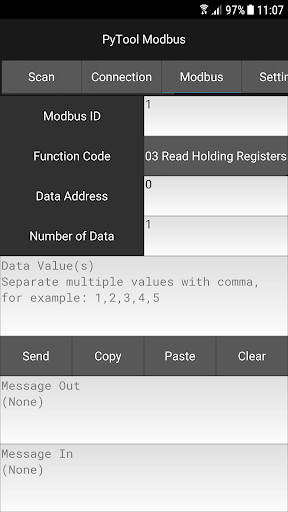


About PyTool Modbus
The description on the store listing
PyTool Modbus is a great tool for Modbus developing, debugging and monitoring.
It features Python script capability that gives you the greatest flexibility.
Why script capability is desirable for Modbus tool?
Electrical engineers find it handy to use a hand held device like Android phone or tablet to debug or monitor Modbus communication in the field, factory or lab.
But nearly every Modbus communication system got its own data format.
Searching in a sea of hex data like "02a5b4ca....ff000803" and trying to figure out what is happening is not pleasant at all.
That is where PyTool Modbus comes to help.
With the ability to run custom Python script, PyTool Modbus can read and parse …
Read the full description
PyTool Modbus is a great tool for Modbus developing, debugging and monitoring. It features Python script capability that gives you the greatest flexibility. Why script capability is desirable for Modbus tool? Electrical engineers find it handy to use a hand held device like Android phone or tablet to debug or monitor Modbus communication in the field, factory or lab. But nearly every Modbus communication system got its own data format. Searching in a sea of hex data like "02a5b4ca....ff000803" and trying to figure out what is happening is not pleasant at all. That is where PyTool Modbus comes to help. With the ability to run custom Python script, PyTool Modbus can read and parse any received data, display it in the way you want, and even act accordingly when it is needed. There are script examples for quick start. Just copy and paste one of them to try them out. There is also a handy Modbus control interface for general use. It supports main stream USB serial drivers, including: FTDI driver CDC ACM driver CP210x driver CH34x driver PL2303 driver Script General Guide ================= * The Python version used in this app is 3.8. * This app is not designed as script editor although script can be edited in the script field. The best way is to use your favorite script editor and then copy and paste the script. * Always use 4 spaces for indentation to avoid weird errors. * Most of the packages in standard Python library are available to import. * If while loop is needed, always use `app.running_script` as condition in order to stop the script properly. * Use `app.version` to get the app version string. * Use `app.get_output()` to get the script output field as string. * Use `app.set_output(object)` to display `object` in the script output field as string. * Use `app.print_text(object)` as a shortcut for `app.set_output(app.get_output() + str(object))` to append text to the script output field. * Use `app.clear_text()` as a shortcut for `app.set_output("")` to clear the script output field. * Use `app.fc01_read_coils(mbid, addr, num)` to send function code 01 request. mbid (int): Modbus ID addr (int): Data Address num (int): Number of Data return (list of int): Requested Data List * Use `app.fc02_read_discrete_inputs(mbid, addr, num)` to send function code 02 request. mbid (int): Modbus ID addr (int): Data Address num (int): Number of Data return (list of int): Requested Data List * Use `app.fc03_read_holding_registers(mbid, addr, num)` to send function code 03 request. mbid (int): Modbus ID addr (int): Data Address num (int): Number of Data return (list of int): Requested Data List * Use `app.fc04_read_input_registers(mbid, addr, num)` to send function code 04 request. mbid (int): Modbus ID addr (int): Data Address num (int): Number of Data return (list of int): Requested Data List * Use `app.fc05_write_single_coil(mbid, addr, val)` to send function code 05 request. mbid (int): Modbus ID addr (int): Data Address val (int): Data Value return (int): Number of Data (always 1) * Use `app.fc06_write_single_register(mbid, addr, val)` to send function code 06 request. mbid (int): Modbus ID addr (int): Data Address val (int): Data Value return (int): Number of Data (always 1) * Use `app.fc15_write_multiple_coils(mbid, addr, vals)` to send function code 15 request. mbid (int): Modbus ID addr (int): Data Address vals (list of int): Data Value List return (int): Number of Data * Use `app.fc16_write_multiple_registers(mbid, addr, vals)` to send function code 16 request. mbid (int): Modbus ID addr (int): Data Address vals (list of int): Data Value List return (int): Number of Data * Use `app.msg_out` and `app.msg_in` to check request and response messages. * Use `app.log_file(text)` to save a log file in storage. The log file is located here [Storage Directory]/PyToolModbus/log_[UTC Timestamp].txt. text (str): Text Content return (str): Full File Path
Installs since 14 Nov 2026 Measured
Exact Google Play install counts, collected daily
Daily history starts once this app is in our daily install sample.
Ratings
- 5 ★0.0%
- 4 ★0.0%
- 3 ★0.0%
- 2 ★0.0%
- 1 ★0.0%
Recent reviews
Latest public reviews from the store
No reviews in our sample for this app yet.
Top chart positions
Latest Google Play chart ranks by country, last 10 days
Not in any tracked top chart in the last 10 days.
PyTool Modbus history
Release, install milestones, listing and store changes
- Reached 10+ installs 14 Feb 2021
- Reached 5+ installs 17 Mar 2020
- First released on the store 18 Jul 2019
Recent versions
Current version Varies with device
- Version 0.34 Jul 2021
- Version 0.224 Jul 2019
Listing keywords
Words and phrases PyTool Modbus repeats most in its store listing
Top phrases: int data (12), addr int data (8), code request mbid (8), function code request (8), id addr int (8).
Highlighted words also appear in the title. Counts cover the title, short description and description.
Business model and tech
From the store listing and declared permissions
- Business model
- Paid, $2.49
- Sensitive access
- Photos, videos and files
6 permissions
0 special access, 2 sensitive, 4 standard
- Change or delete shared storageSensitive
- Read shared storageSensitive
- Keep the phone awakeStandard
- Full internet accessStandard
- See network connectionsStandard
- Receive push messagesStandard
Compliance
What the listing and the app package show
- Store status
- Live
- Upkeep
- No update since 4 Jul 2021
- Registered in
- Australia
- Privacy policy
- Linked on the listing
- Advertising
- No ads declared
- In-app purchases
- None declared
- Age rating
- Everyone
- Sensitive permissions
- 2 sensitive of 6
- Location access
- No
- Camera and microphone
- Neither
Apps like PyTool Modbus
들어서 화면켜기Won3.5K installs★ 4.0
Height PredictionEcliptic App Ventures45.9K installs★ 2.4
Speicers`Pro VPNEldiablolucifer202021.2K installs★ 4.14
Lightning Tracker with AlertsYaksh Software4.3K installs★ 3.0
Mana Pathi (Unit Converter)Shirish Koirala2.2K installs★ 4.6
Multi-tab Calc - A simple app.Naoyuki Rikiji1.3K installs★ 5.0
Just Silence. Scheduled.Akid Soft1.6K installs★ 5.0
- WoWp AssistantВиталий Робиновский2K installs★ 4.2
LINKa: напишиLINKa7.9K installs★ 4.4
PyTool Modbus: questions and answers
How many downloads does PyTool Modbus have?
PyTool Modbus has 34 installs on Google Play, measured from the store's own count on 14 Nov 2026.
Who makes PyTool Modbus?
PyTool Modbus is published by Quan Lin, a developer based in AU.
When was PyTool Modbus last updated?
The latest version (Varies with device) was released on 4 Jul 2021.
Is PyTool Modbus free?
No. PyTool Modbus is a paid app priced at $2.49.
Is PyTool Modbus still available?
Yes. PyTool Modbus is live on Google Play as of 14 Nov 2026.
Track PyTool Modbus and its competitors
Watch any app for new versions, rating drops, chart moves and removals. Free plan, no card.