
QR Code Reader: Scan, Create
Read, create and share a QR code in the easiest and fastest way possible.
- Installs
- 14.21K
- Measured
- Rating
- —
- Ratings
- —
- Version
- Varies with device
- Released
- 28 Feb 2022
- Tracked since 12 May 2026
- Size
- —
Screenshots
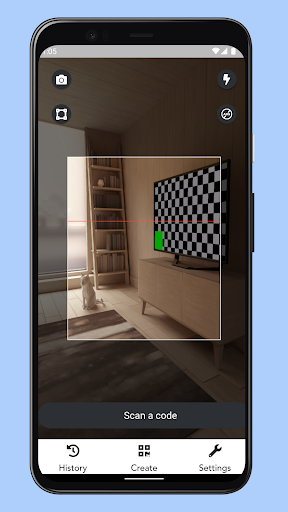


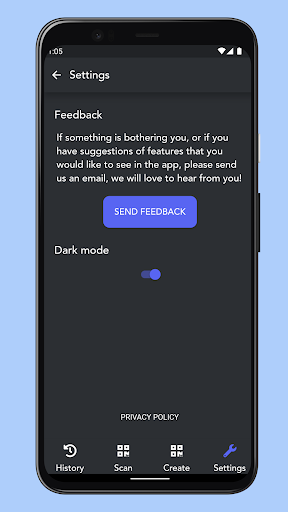
About QR Code Reader: Scan, Create
The description on the store listing
Scan QR and barcodes instantly. The app already opens with the scanner functionality to avoid wasting time and effort.
Create and share QRs no matter the format or technology. QR Code Reader is built with the latest technology and will work on your friends' phones too.
Scanned codes are automatically saved to your list of barcodes for easy reference later. All the QR codes you create are also saved to your library. No code you create is sent to our servers. You have complete privacy on your content.
Flashlight and full brightness control options are available for better QR visibility and readability on your phone and scanner. Copy and paste your own barcodes creations, share easily …
Read the full description
Scan QR and barcodes instantly. The app already opens with the scanner functionality to avoid wasting time and effort. Create and share QRs no matter the format or technology. QR Code Reader is built with the latest technology and will work on your friends' phones too. Scanned codes are automatically saved to your list of barcodes for easy reference later. All the QR codes you create are also saved to your library. No code you create is sent to our servers. You have complete privacy on your content. Flashlight and full brightness control options are available for better QR visibility and readability on your phone and scanner. Copy and paste your own barcodes creations, share easily with friends and family, and enjoy this optimized QR scanner. We'd love to hear from you about how we can make the app even better. Feel free to share the app with other people if you enjoy it! QR Code Reader scans all kinds of QR codes and barcodes, like restaurant menus, products, URLs in general, locations, general codes in stores to get benefits, etc. Unique and useful features include: • Automatic focus, never worry about tweaking the camera configurations • Easy scan of coupons • Flashlight for dark rooms • All history saved • History is stored locally • Your scan data does not go to any server, privacy first <b>Your privacy matters and we respect it</b> You only provide additional permission for the camera, your QR data stays in your phone and you delete it whenever you want to. <b>Dark mode</b> Save your battery by using dark mode, it is easily accessible and provides a great look to the app, especially for usage in dark rooms. <b>Flashlight available</b> You will not have problems scanning in ambients with no or little light, just use the flashlight and scan normally. <b>High brightness for reading from your phone</b> The screen will automatically change to high brightness when you show a QR code from your phone screen, so that the reader will be able to decode it easily and fast. <b>Multi language support</b> The app works in many languages, it will follow the language set in your phone, and in case it is not supported, the english default will be used. Reach out to us and ask for your language in case it is not available yet. From barcodes, you will have support for: • Data Matrix • Codabar • Article numbers (EAN, UPC, JAN, GTIN, ISBN) • Code 39, Code 93 and Code 128 • Interleaved 2 of 5 (ITF) • PDF417 • GS1 DataBar (RSS-14) • Aztec Code And from the QR codes, the app will support: • Website links (URL) • Geo locations • Calendar events • e-mail and SMS • People contact data • WiFi hotspot access information • Phone call info How to use the QR scanner: 1. Point your phone camera to the code 2. The app will auto focus, scan and decode immediately 3. You see the result and the possibility to follow the link, copy and save the content or direct to the specific app required to proceed. 4. Go back to your saved results if you want by accessing your local gallery How to create QR codes: 1. Input the content, any content 2. Click generate QR code 3. Choose from sharing on your favorite apps or saving and you are good to go! One of the most used features is to use the barcode reader in stores to compare prices with online stores to save money, try for yourself! QR Codes License: The use of QR code technology is freely licensed as long as users follow the standards for QR Code documented with JIS or ISO. Non-standardized codes may require special licensing. Denso Wave owns a number of patents on QR code technology, but has chosen to exercise them in a limited fashion. In order to promote widespread usage of the technology Denso Wave chose to waive its rights to a key patent in its possession for standardized codes only. The text QR Code itself is a registered trademark and wordmark of Denso Wave Incorporated.
Installs since 16 Nov 2026 Measured
Exact Google Play install counts, collected daily
Daily history starts once this app is in our daily install sample.
Ratings
- 5 ★0.0%
- 4 ★0.0%
- 3 ★0.0%
- 2 ★0.0%
- 1 ★0.0%
Recent reviews
Latest public reviews from the store
- 17 May 2021
Melhor app de reality shows do Brasil!
- 12 May 2021
Muito bom o aplicativo! Todas as notícias dos reality shows brasileiros em um só lugar! Tem Big Brother Brasil, No Limite, The Voice Brasil, Master Chef, Power Couple, A Fazenda e De Férias com o Ex! Recomendo a todos!
Top chart positions
Latest Google Play chart ranks by country, last 10 days
Not in any tracked top chart in the last 10 days.
QR Code Reader: Scan, Create history
Release, install milestones, listing and store changes
- First released on the store 28 Feb 2022
Listing keywords
Words and phrases QR Code Reader: Scan, Create repeats most in its store listing
Top phrases: qr code (10), qr codes (5), qr code reader (3), code reader (3), denso wave (3).
Highlighted words also appear in the title. Counts cover the title, short description and description.
Business model and tech
From the store listing and declared permissions
- Business model
- Free to downloadIn-app purchasesShows ads
- Sensitive access
- No sensitive permission declared
Compliance
What the listing and the app package show
- Store status
- Live
- Registered in
- United States
- Privacy policy
- Linked on the listing
- Advertising
- Shows ads
- In-app purchases
- Offered
- Age rating
- Everyone
Apps like QR Code Reader: Scan, Create
들어서 화면켜기Won3.5K installs★ 4.0
Height PredictionEcliptic App Ventures45.9K installs★ 2.4
Speicers`Pro VPNEldiablolucifer202021.2K installs★ 4.14
Lightning Tracker with AlertsYaksh Software4.3K installs★ 3.0
Mana Pathi (Unit Converter)Shirish Koirala2.2K installs★ 4.6
Multi-tab Calc - A simple app.Naoyuki Rikiji1.3K installs★ 5.0
Photo Recovery PlusBillApps7.1K installs★ 4.53
Just Silence. Scheduled.Akid Soft1.6K installs★ 5.0
- WoWp AssistantВиталий Робиновский2K installs★ 4.2
QR Code Reader: Scan, Create: questions and answers
How many downloads does QR Code Reader: Scan, Create have?
QR Code Reader: Scan, Create has 14,209 installs on Google Play, measured from the store's own count on 16 Nov 2026.
Who makes QR Code Reader: Scan, Create?
QR Code Reader: Scan, Create is published by Envision Technology, a developer based in US.
Is QR Code Reader: Scan, Create free?
Yes. QR Code Reader: Scan, Create is free to download and offers in-app purchases, and it shows ads.
Is QR Code Reader: Scan, Create still available?
Yes. QR Code Reader: Scan, Create is live on Google Play as of 16 Nov 2026.
Track QR Code Reader: Scan, Create and its competitors
Watch any app for new versions, rating drops, chart moves and removals. Free plan, no card.