
QR Code Scanner
QR Code Scanner is a great scanning app.
- Installs
- 975
- Measured
- Rating
- 5.0
- Ratings
- 11
- Version
- Varies with device
- Updated 14 Apr 2026
- Released
- 14 Sep 2019
- Tracked since 13 May 2026
- Size
- 10 MB
- Needs 4.1
Screenshots


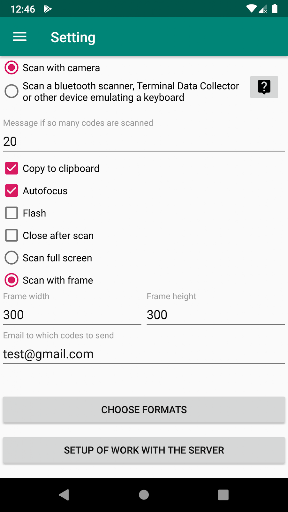


About QR Code Scanner
The description on the store listing
A new algorithm is used. Allows you to recognize curves, wrinkled, perspective, angled, simultaneously and quickly.
Much improved recognition of barcodes that were previously not recognized or recognized for a long time is now recognized faster.
QR Code Scanner Features:
- Scan QR Codes from Camera
- scans QR codes that fall into the frame, and without a frame - all that are visible on the screen. The frame size can be changed by moving your finger across the screen.
- Scan QR Codes from gallery
- can scan up to 20 QR codes within 10 seconds, with their good quality.
- Use Flash Camera Flash to Scan QR Codes in Dark
- Access History of Scanned QR Codes Instantly
- allows you …
Read the full description
A new algorithm is used. Allows you to recognize curves, wrinkled, perspective, angled, simultaneously and quickly. Much improved recognition of barcodes that were previously not recognized or recognized for a long time is now recognized faster. QR Code Scanner Features: - Scan QR Codes from Camera - scans QR codes that fall into the frame, and without a frame - all that are visible on the screen. The frame size can be changed by moving your finger across the screen. - Scan QR Codes from gallery - can scan up to 20 QR codes within 10 seconds, with their good quality. - Use Flash Camera Flash to Scan QR Codes in Dark - Access History of Scanned QR Codes Instantly - allows you to scan using an external Bluetooth code scanner, Terminal Data Collector or other device that emulates a keyboard. - have a function for executing a http get request to the server with data from the QR code or barcode QR code reader Features: - Enter your custom text - Enter your custom URL - Make Custom QR Code Instantly - Share your generated custom QR codes Supported Code Types: UPC_A UPC_E EAN_13 EAN_8 RSS_14 CODE_39 CODE_93 CODE_128 ITF CODABAR QR_CODE DATA_MATRIX PDF_417 Make classification of scanned QR codes - CONTACTS Understands the formats of VCARD, MECARD. Recognizes and displays fields of all types, name, address, url, email - even if there are several phone - even if there are several and others When you click on a field, an action associated with this field occurs - search the Internet, follow the link, call by phone, send a letter, and more. You can also add this contact to your smartphone’s notebook. WIFI - Also displays all fields, allows you to configure wifi on your phone by scanning the QR code. You need one additional permission. URL if the code contains http: // or https: // - then go to the specified url TEXT - if it does not fit into any category. Searching the Internet QR Code Scanner have a function for executing a http get request to the server with data from the QR code or barcode. Url is registered in the settings (there is now the default test server). The variable [qr] will be replaced by the scanned QR or barcode. The result received from the server is processed and the result is displayed on the screen, It is possible to configure 3 processing rules depending on the response received. In each rule, you can specify it: actively rule or not the text to be displayed background color, close the window automatically how long to close to utter a phrase phrase text. QR Code Scanner In the settings you can set: The number of QR codes at which there will be a warning that all codes are scanned. Copy scan result code to clipboard Use autofocus Use backlight Close the scanner window after successfully scanning the code or continue scanning. Scanning method - from QR codes in a frame or all QR codes that are visible on the screen Frame size. Email that will be automatically entered as the recipient if you decide to send the scanned QR codes by e-mail. Selection of formats for scanned QR codes Previously scanned QR codes are stored in history, they can be selected and deleted or sent by e-mail. If you tap on the QR code - if this url goes through it, otherwise just search the Internet.
Installs since 26 Aug 2026 Measured
Exact Google Play install counts, collected daily
Ratings
11 ratings
- 5 ★0.0%
- 4 ★0.0%
- 3 ★0.0%
- 2 ★0.0%
- 1 ★0.0%
Recent reviews
Latest public reviews from the store
No reviews in our sample for this app yet.
Top chart positions
Latest Google Play chart ranks by country, last 10 days
Not in any tracked top chart in the last 10 days.
QR Code Scanner history
Release, install milestones, listing and store changes
- Reached 500+ installs 14 Apr 2026
- Reached 100+ installs 20 Dec 2020
- Reached 50+ installs 21 Nov 2019
- Reached 10+ installs 27 Sep 2019
- Reached 5+ installs 22 Sep 2019
- First released on the store 14 Sep 2019
Recent versions
Current version Varies with device
- Version 1.48g29 Sep 2025
- Version 1.44g4 Sep 2024
- Version 1.41g6 Mar 2024
- Version 1.40g27 Nov 2023
Listing keywords
Words and phrases QR Code Scanner repeats most in its store listing
Top phrases: qr codes (14), qr code (12), code scanner (6), scanned qr (6), qr code scanner (5).
Highlighted words also appear in the title. Counts cover the title, short description and description.
Business model and tech
From the store listing and declared permissions
- Business model
- Free to downloadShows ads
- Sensitive access
- CameraPhotos, videos and filesAdvertising ID
23 permissions
1 special access, 3 sensitive, 19 standard
- Change system settingsWRITE_SETTINGSSpecial access
- Take photos and videosSensitive
- Read shared storageSensitive
- Show notificationsPOST_NOTIFICATIONSSensitive
- Ad attribution (Privacy Sandbox)ACCESS_ADSERVICES_ATTRIBUTIONStandard
- Ad topics (Privacy Sandbox)ACCESS_ADSERVICES_TOPICSStandard
- Read how it was installed (install referrer)BIND_GET_INSTALL_REFERRER_SERVICEStandard
- Read the advertising IDAD_IDStandard
- Read the advertising ID (Privacy Sandbox)ACCESS_ADSERVICES_AD_IDStandard
- App icon badge countsBADGE_COUNT_READStandard
- Control the flashlightStandard
- Control vibrationStandard
Compliance
What the listing and the app package show
- Store status
- Live
- Upkeep
- Updated 14 Apr 2026
- Privacy policy
- Linked on the listing
- Advertising
- Shows ads
- In-app purchases
- None declared
- Age rating
- Everyone
- Sensitive permissions
- 3 sensitive, 1 special access of 23
- Location access
- No
- Camera and microphone
- Camera
Apps like QR Code Scanner
들어서 화면켜기Won3.5K installs★ 4.0
Height PredictionEcliptic App Ventures45.9K installs★ 2.4
Speicers`Pro VPNEldiablolucifer202021.2K installs★ 4.14
Lightning Tracker with AlertsYaksh Software4.3K installs★ 3.0
Mana Pathi (Unit Converter)Shirish Koirala2.2K installs★ 4.6
Multi-tab Calc - A simple app.Naoyuki Rikiji1.3K installs★ 5.0
Photo Recovery PlusBillApps7.1K installs★ 4.53
Just Silence. Scheduled.Akid Soft1.6K installs★ 5.0
- WoWp AssistantВиталий Робиновский2K installs★ 4.2
QR Code Scanner: questions and answers
How many downloads does QR Code Scanner have?
QR Code Scanner has 975 installs on Google Play, measured from the store's own count on 18 Nov 2026.
Who makes QR Code Scanner?
QR Code Scanner is published by EvialinaLab.
When was QR Code Scanner last updated?
The latest version (Varies with device) was released on 14 Apr 2026.
Is QR Code Scanner free?
Yes. QR Code Scanner is free to download, and it shows ads.
Is QR Code Scanner still available?
Yes. QR Code Scanner is live on Google Play as of 18 Nov 2026.
Track QR Code Scanner and its competitors
Watch any app for new versions, rating drops, chart moves and removals. Free plan, no card.