
QR Code Scanner For Android
The fastest and most effective QR Code & Barcode Scanner.
- Installs
- 239K
- Measured
- Rating
- 4.09
- Ratings
- 4.5K
- 101 reviews
- Version
- Varies with device
- Updated 30 Aug 2015
- Released
- 10 Jul 2015
- Tracked since 14 May 2026
- Size
- 2 MB
- Needs 4.0
Screenshots


About QR Code Scanner For Android
The description on the store listing
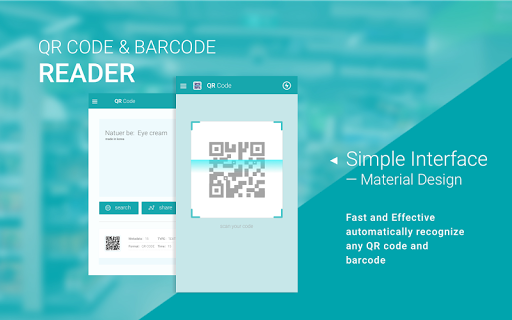
QR Code Reader is a professional QR code scanning and QR code generating tool which supports txt、contact、WiFi、SMS、 Email、url and so on. When the app opens, your device will change into real-time scanning mode instantly. QR Code Reader allows you to share anything digitally.
Features:
- Encoding library: EQS 、 QR Code、 Data Matrix、Barcode、EAN8、Code39、Code128
- Simple user interface: material design
- Support: QR Code and Barcode
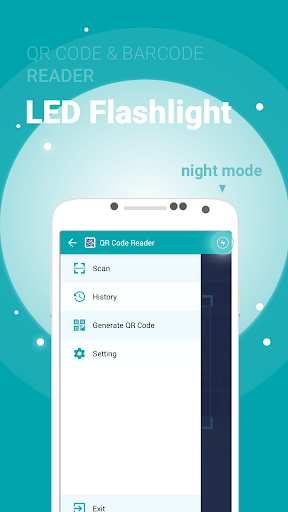
- Flashlight supported for low-light environments.
- View a history list of all of your past scans
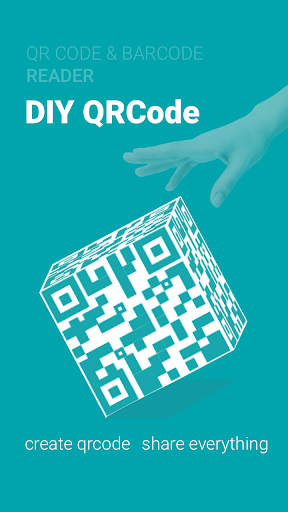
- Create your own QR codes and share them.
Tips:
Designed with security as a top priority, the QR Code Reader offers a simple interface with abundant …
Read the full description
QR Code Reader is a professional QR code scanning and QR code generating tool which supports txt、contact、WiFi、SMS、 Email、url and so on. When the app opens, your device will change into real-time scanning mode instantly. QR Code Reader allows you to share anything digitally. Features: - Encoding library: EQS 、 QR Code、 Data Matrix、Barcode、EAN8、Code39、Code128 - Simple user interface: material design - Support: QR Code and Barcode - Flashlight supported for low-light environments. - View a history list of all of your past scans - Create your own QR codes and share them. Tips: Designed with security as a top priority, the QR Code Reader offers a simple interface with abundant functionalities. Some functionalities to improve usability requires certain permissions to access your device. How to scan the QR code: Simply open the application, align the code, QR Code Reader will automatically recognize any QR code. When the QR code scanning finishes, if the code contains a URL, you can get access to the site via browser by pressing the browser button. If the code contains only text, you can read it directly. Download and have a try: 1, Create a code from a contact or bookmark and let friends scan it to their devices. 2, Scan retail items, compare prices, read product reviews. 3, Where you are going, share it with friends, colleagues and family. 4, Benefit from discounts and special offers by scanning barcodes on coupons and vouchers. 5, Scan a QR Code on a subway wall or from a catalog and have an item delivered directly to your home. 6, Create and share QR Codes in less than a second from maps, contacts,bookmarks, installed apps and more.
Installs, last 30 days Measured
Exact Google Play install counts, collected daily
Ratings
4,466 ratings, 101 reviews
- 5 ★74%
- 4 ★10%
- 3 ★0.0%
- 2 ★3.2%
- 1 ★13%
Recent reviews
Latest public reviews from the store
- 31 Aug 2020
Just what i needed thanks
- 28 Aug 2020
Easy to use.
- 21 Feb 2020
Fast and easy
- 21 Sep 2019
Nice and easy to use
Top chart positions
Latest Google Play chart ranks by country, last 10 days
Not in any tracked top chart in the last 10 days.
QR Code Scanner For Android history
Release, install milestones, listing and store changes
- Reached 100,000+ installs 30 Aug 2015
- Reached 50,000+ installs 3 Aug 2015
- Reached 10,000+ installs 26 Jul 2015
- Reached 5,000+ installs 16 Jul 2015
- Reached 1,000+ installs 13 Jul 2015
- First released on the store 10 Jul 2015
Update frequency
How often QR Code Scanner For Android ships a new version, month by month
0 updates in the last 12 months. Less often than most similar apps: they shipped a median of 2 updates in the same year.
Listing keywords
Words and phrases QR Code Scanner For Android repeats most in its store listing
Top phrases: qr code (14), qr code reader (4), code reader (4), qr code scanning (2), code contains (2).
Highlighted words also appear in the title. Counts cover the title, short description and description.
Business model and tech
From the store listing and declared permissions
- Business model
- Free to downloadShows ads
- Sensitive access
- No sensitive permission declared
Compliance
What the listing and the app package show
- Store status
- Live
- Upkeep
- No update since 30 Aug 2015
- Registered in
- China
- Privacy policy
- Linked on the listing
- Advertising
- Shows ads
- In-app purchases
- None declared
- Age rating
- Everyone
Apps like QR Code Scanner For Android
EZ Notes - Notes Voice NotesAlexander Madani438K installs★ 3.8
QSROnline SchedulingQSROnline.com, Inc.298K installs★ 4.01
Thai keyboardSimple Keyboard, theme & emoji1.4M installs★ 4.4
Pashto keyboard - پشتو کیبوردDOSA Apps1.9M installs★ 4.07
AR Drawing & Anime DrawingMonkey AI Studio2.5M installs★ 4.25
HourglassCongregation Software Foundation1.1M installs★ 4.62
МТС ПартнерMWS LLC242K installs★ 3.5
Glimpse NotificationsNullgrad Apps1.1M installs★ 4.04
UltrafastVPN: Private & SecureUltrafastVPN520K installs★ 4.22
QR Code Scanner For Android: questions and answers
How many downloads does QR Code Scanner For Android have?
QR Code Scanner For Android has 239,333 installs on Google Play, measured from the store's own count on 21 Nov 2026.
Who makes QR Code Scanner For Android?
QR Code Scanner For Android is published by Pix Team, a developer based in CN.
When was QR Code Scanner For Android last updated?
The latest version (Varies with device) was released on 30 Aug 2015.
Is QR Code Scanner For Android free?
Yes. QR Code Scanner For Android is free to download, and it shows ads.
Is QR Code Scanner For Android still available?
Yes. QR Code Scanner For Android is live on Google Play as of 21 Nov 2026.
Track QR Code Scanner For Android and its competitors
Watch any app for new versions, rating drops, chart moves and removals. Free plan, no card.