
Quick Buttons - Navigation Bar
Replace all your hard buttons with on-screen soft buttons and quick buttons.
- Installs
- 42.78K
- Measured
- Rating
- 4.06
- Ratings
- 258
- 8 reviews
- Version
- Varies with device
- Updated 2 Dec 2024
- Released
- 16 Nov 2023
- Tracked since 12 May 2026
- Size
- —
Screenshots
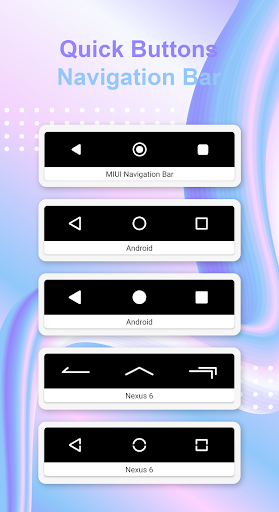
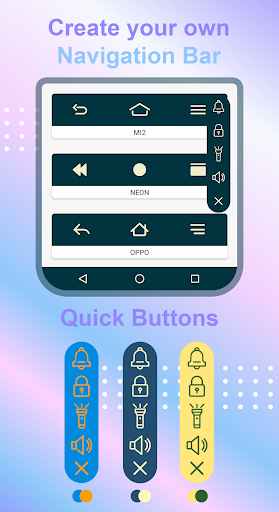
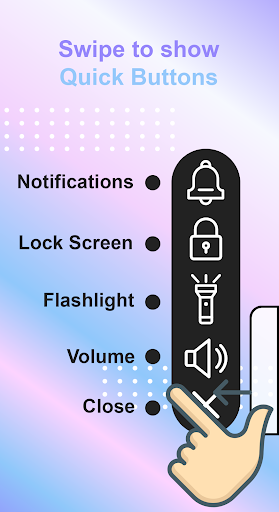


About Quick Buttons - Navigation Bar
The description on the store listing
Do you prefer a colorful navigation bar or using buttons for the power and volume instead of your device's hard phone buttons? Would you like to have navigation bar of other manufacturers in your phone? If so, you're in the right place!
Get two features in one! This app can replace hard navigation bar (back, home, recents button) with on-screen navigation bar. Additionally, this app can replace volume button with on-screen volume button.
This app offers a bottom navigation bar featuring the back, home, recent apps buttons, along with addition function buttons such as lock screen, flashlight, open notification panel, open volume panel. If your back button, home button, or volume …
Read the full description
Do you prefer a colorful navigation bar or using buttons for the power and volume instead of your device's hard phone buttons? Would you like to have navigation bar of other manufacturers in your phone? If so, you're in the right place! Get two features in one! This app can replace hard navigation bar (back, home, recents button) with on-screen navigation bar. Additionally, this app can replace volume button with on-screen volume button. This app offers a bottom navigation bar featuring the back, home, recent apps buttons, along with addition function buttons such as lock screen, flashlight, open notification panel, open volume panel. If your back button, home button, or volume button has stopped working or is damaged, this app is the solution for you. Quick Buttons - Navigation Bar features: * Quick Buttons: Swipe to show Quick Buttons panel, with this panel you can open notification, open volume panel, lock you screen, turn on flashlight. You can change color of panel, color of icons. * Navigation Bar: Active the on-screen keys to replace a failed or broken hard buttons. Additionally, you can create your own navigation bar. Ability to change home, back, recent button icon, color, position. * Vertical an horizontal support, auto rotation navigation bar, quick buttons icons when your phone in landscape mode. Accessibility Service Usage Quick Buttons - Navigation Bar requires accessibility service permission in order to enable core functionality and to show Quick Buttons - Navigation Bar view on mobile screen and start several Accessibility actions: action to Home, Back, show Recents Screen. The application will not read the sensitive data and any content on your screen. In addition, the application will not collect and share the data from accessibility service with any third-party. By enabling the service, the application will support commands for press actions with the following features: - Back action - Home action - Recent actions - Lock Screen - Popup notification If you disable the accessibility service, the main features cannot work properly. Thank you for your download, please give us feedback for better performance. Legal notice: E-mail: [email protected]
Installs since 27 Aug 2026 Measured
Exact Google Play install counts, collected daily
Ratings
258 ratings, 8 reviews
- 5 ★71%
- 4 ★0.0%
- 3 ★12%
- 2 ★5.6%
- 1 ★12%
Recent reviews
Latest public reviews from the store
- 18 May 2026
love it
- 18 May 2026
Who loves mandala for themThis a is the best app.
- 14 May 2026
Wow! So! So! So! Beautiful! This app..
- 12 May 2026
l love this game
What reviewers bring up
Topics mentioned in the latest 50 reviews, by how many reviews mention them
Liked in good reviews (44 reviews)
- relaxing 6
- mandala 6
- beautiful 3
- colouring 3
- coloring 3
- mind 3
- without 2
- options 2
Raised in bad reviews (5 reviews)
- ads 3
Top chart positions
Latest Google Play chart ranks by country, last 10 days
Not in any tracked top chart in the last 10 days.
Quick Buttons - Navigation Bar history
Release, install milestones, listing and store changes
- Reached 10,000+ installs 3 May 2024
- Reached 5,000+ installs 23 Feb 2024
- Reached 1,000+ installs 8 Dec 2023
- Reached 500+ installs 26 Nov 2023
- Reached 100+ installs 23 Nov 2023
- Reached 50+ installs 22 Nov 2023
- First released on the store 16 Nov 2023
Recent versions
Current version Varies with device
- Version 1.82 Dec 2024
- Version 1.78 Jul 2024
- Version 1.628 May 2024
- Version 1.54 Jan 2024
Listing keywords
Words and phrases Quick Buttons - Navigation Bar repeats most in its store listing
Top phrases: navigation bar (12), quick buttons (8), buttons navigation bar (4), quick buttons navigation (4), accessibility service (4).
Highlighted words also appear in the title. Counts cover the title, short description and description.
Business model and tech
From the store listing and declared permissions
- Business model
- Free to downloadShows ads
- Sensitive access
- Photos, videos and filesAdvertising ID
14 permissions
0 special access, 2 sensitive, 12 standard
- Change or delete shared storageSensitive
- Read shared storageSensitive
- Ad attribution (Privacy Sandbox)ACCESS_ADSERVICES_ATTRIBUTIONStandard
- Ad topics (Privacy Sandbox)ACCESS_ADSERVICES_TOPICSStandard
- Read the advertising IDAD_IDStandard
- Read the advertising ID (Privacy Sandbox)ACCESS_ADSERVICES_AD_IDStandard
- Control vibrationStandard
- Keep the phone awakeStandard
- Run a foreground serviceFOREGROUND_SERVICEStandard
- Full internet accessStandard
- See network connectionsStandard
- See Wi-Fi connectionsStandard
Compliance
What the listing and the app package show
- Store status
- Live
- Upkeep
- Updated 2 Dec 2024
- Privacy policy
- Linked on the listing
- Advertising
- Shows ads
- In-app purchases
- None declared
- Age rating
- Everyone
- Sensitive permissions
- 2 sensitive of 14
- Location access
- No
- Camera and microphone
- Neither
Apps like Quick Buttons - Navigation Bar
Wolfie for KWGT21MaRcO12 - Nativa design31.2K installs★ 4.47
Photo Lab - Photo BlendingDuoApptech104K installs★ 4.25
Running Watch Facethema8.3K installs★ 4.11
Wisteria Tunnel Theme +HOME+HOME by Ateam Entertainment35.3K installs★ 5.0
Girly Wallpaper Fancy Cat+HOME by Ateam Entertainment33.8K installs★ 5.0
Win10 Flat - Icon PackOlivera Onias Design56.4K installs★ 3.92
Fruit Launcher ThemeLive Locker21.6K installs★ 4.67
Samsung A70 Launcher & ThemesSmart Soft Company103K installs★ 3.43
Rainbow WallpaperEasy apps172K installs★ 4.65
Quick Buttons - Navigation Bar: questions and answers
How many downloads does Quick Buttons - Navigation Bar have?
Quick Buttons - Navigation Bar has 42,779 installs on Google Play, measured from the store's own count on 19 Nov 2026.
Who makes Quick Buttons - Navigation Bar?
Quick Buttons - Navigation Bar is published by Color Studios.
When was Quick Buttons - Navigation Bar last updated?
The latest version (Varies with device) was released on 2 Dec 2024.
Is Quick Buttons - Navigation Bar free?
Yes. Quick Buttons - Navigation Bar is free to download, and it shows ads.
Is Quick Buttons - Navigation Bar still available?
Yes. Quick Buttons - Navigation Bar is live on Google Play as of 19 Nov 2026.
Track Quick Buttons - Navigation Bar and its competitors
Watch any app for new versions, rating drops, chart moves and removals. Free plan, no card.