
Quick Volume Control
Volume slider just a swipe away, quickly control volume from notification bar
- Installs
- 107K
- Measured
- Rating
- 4.18
- Ratings
- 1.2K
- 32 reviews
- Version
- Varies with device
- Updated 31 Mar 2026
- Released
- 22 Jan 2020
- Tracked since 13 May 2026
- Size
- 0 MB
- Needs 4.4
Screenshots
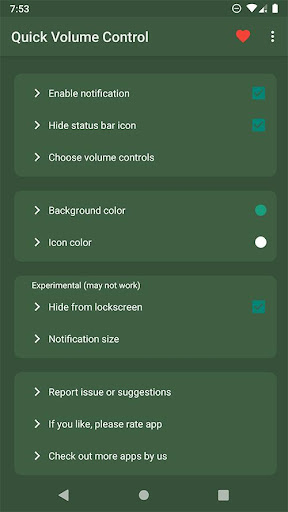
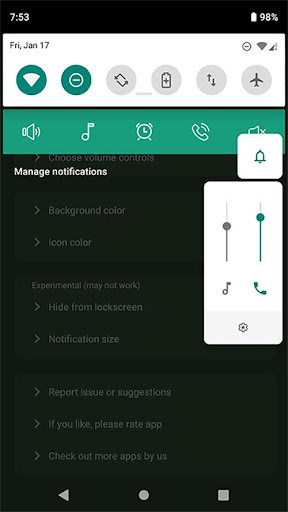
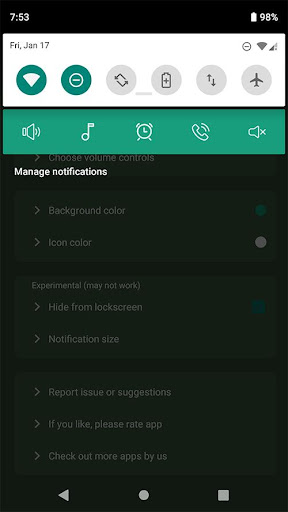
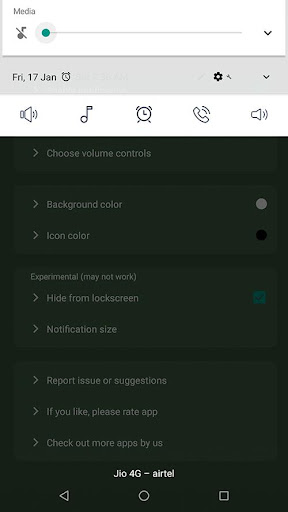


About Quick Volume Control
The description on the store listing
Essential and frequently used volume control on smart phone is Volume sliders.
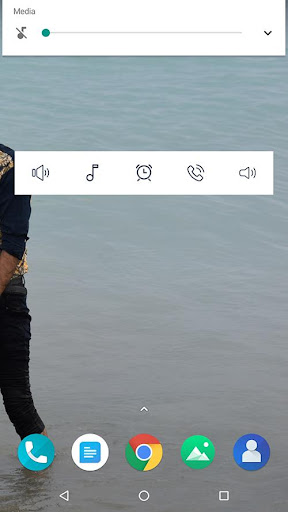
What if these volume sliders are directly available to you in notification bar ? Just swipe down and access volume in notification bar. isn't it quick and easy?
Control volume from notification bar without pressing physical volume keys.
This is the small little app (150 kb in size) without any nasty permissions or background services.
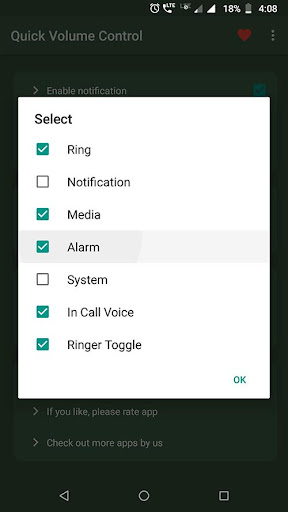
It provides maximum customisation options with clean simple UI. app allows notification toggles for volume sliders: Ring, Notification, Alarm, Music, In call and system(dial tone).
Notification toggles are customisable with background and icon colour.
Choose volume …
Read the full description
Essential and frequently used volume control on smart phone is Volume sliders. What if these volume sliders are directly available to you in notification bar ? Just swipe down and access volume in notification bar. isn't it quick and easy? Control volume from notification bar without pressing physical volume keys. This is the small little app (150 kb in size) without any nasty permissions or background services. It provides maximum customisation options with clean simple UI. app allows notification toggles for volume sliders: Ring, Notification, Alarm, Music, In call and system(dial tone). Notification toggles are customisable with background and icon colour. Choose volume toggles those you want to access from notification, Ringer mode toggle is available to control and change ringer modes quickly such as Silent, Vibrate and normal. Features: ☑ Quickly control volumes from notification bar ☑ Change back color and icon color for notification toggles ☑ Add/remove notification toggles ☑ Ringer mode notification toggle ☑ Widget on your home-screen ☑ No nasty permissions ☑ Small size (150 kb) Note: • App need do not disturb permission for changing ringer modes. • Not all device support Ring and notification volumes separately. so if your device belongs to that category, you can hide. notification toggle from option in app main screen. Please email us if you find any issues or if you have any suggestions. we works to improve user experiences and enhance app with best features. email us at [email protected] If you like the app, please leave your review on playstore.
Installs since 23 Jul 2026 Measured
Exact Google Play install counts, collected daily
Ratings
1,210 ratings, 32 reviews
- 5 ★60%
- 4 ★15%
- 3 ★13%
- 2 ★5.3%
- 1 ★6.6%
Recent reviews
Latest public reviews from the store
- 6 Sep 2025
Just what I was looking for a customizable text clock. Looks great, easy to read. thank you developers.
- 12 May 2025
Very stable app that does what it says.
- 16 Mar 2025
Love it, would give 5 stars but the time on the widget is 40 seconds out for. Some bizarre and twitch-enducing reason. Please fix and you can have 2 more stars.
- 30 Jan 2025
goood
What reviewers bring up
Topics mentioned in the latest 27 reviews, by how many reviews mention them
Liked in good reviews (22 reviews)
- clock 7
Raised in bad reviews (4 reviews)
- widget 2
- where 2
Top chart positions
Latest Google Play chart ranks by country, last 10 days
Not in any tracked top chart in the last 10 days.
Quick Volume Control history
Release, install milestones, listing and store changes
- Reached 100,000+ installs 31 Mar 2026
- Reached 50,000+ installs 22 Jan 2021
- Reached 10,000+ installs 1 Jul 2020
- Reached 5,000+ installs 8 Apr 2020
- Reached 1,000+ installs 17 Feb 2020
- Reached 500+ installs 12 Feb 2020
- First released on the store 22 Jan 2020
Recent versions
Current version Varies with device
- Version 1.516 Aug 2025
- Version 1.428 Jan 2024
- Version 1.223 Dec 2020
Listing keywords
Words and phrases Quick Volume Control repeats most in its store listing
Top phrases: notification bar (5), notification toggles (4), volume sliders (3), volume from notification (2), control volume (2).
Highlighted words also appear in the title. Counts cover the title, short description and description.
Business model and tech
From the store listing, the SDKs in the app package and its declared permissions
- Business model
- Paid, $0.99Shows ads
- Built with
- No cross-platform framework or game engine detected
- Ad networks (0)
- None detected
- Sensitive access
- No sensitive permission declared
0 ad, attribution and analytics SDKs detected. SDKs are read from the app package and permissions from the store listing, so code that loads later is not seen.
Technology
5 SDKs found in the app package
5 permissions
1 special access, 1 sensitive, 3 standard
- Change Do Not DisturbACCESS_NOTIFICATION_POLICYSpecial access
- Show notificationsPOST_NOTIFICATIONSSensitive
- Run a foreground serviceFOREGROUND_SERVICEStandard
- Start when the phone turns onStandard
- Internal app permissionDYNAMIC_RECEIVER_NOT_EXPORTED_PERMISSIONStandard
Compliance
What the listing and the app package show
- Store status
- Live
- Upkeep
- Updated 31 Mar 2026
- Privacy policy
- Linked on the listing
- Advertising
- Shows ads
- In-app purchases
- None declared
- Age rating
- Everyone
- Sensitive permissions
- 1 sensitive, 1 special access of 5
- Location access
- No
- Camera and microphone
- Neither
Apps like Quick Volume Control
BatteryAlarmGoldLokik Soni58.2K installs★ 3.33
Photo Watch Face ProTiny Watch21.4K installs★ 4.42
GPS Location Sharing & LocatorNeo Utilities796K installs★ 4.2
Views Fans: CommunityaAa Designer36.5K installs★ 3.67
Space Clean ToolkitStarlume Tech597K installs★ 3.85
Calculator+ Photo&Video vaultGreen Water420K installs★ 4.37
Red Panic ButtonUltimate Communication Software LTD257K installs★ 3.31
Cutting Paper CalculatorTasikWeb.com84.5K installs★ 3.92
FORMSThe App Master848K installs★ 2.78
Quick Volume Control: questions and answers
How many downloads does Quick Volume Control have?
Quick Volume Control has 107,094 installs on Google Play, measured from the store's own count on 19 Nov 2026.
Who makes Quick Volume Control?
Quick Volume Control is published by Power Mind Apps.
When was Quick Volume Control last updated?
The latest version (Varies with device) was released on 31 Mar 2026.
Is Quick Volume Control free?
No. Quick Volume Control is a paid app priced at $0.99.
Is Quick Volume Control still available?
Yes. Quick Volume Control is live on Google Play as of 19 Nov 2026.
Track Quick Volume Control and its competitors
Watch any app for new versions, rating drops, chart moves and removals. Free plan, no card.