
RadBeacon
Configuration utility for RadBeacon proximity beacons from Radius Networks
- Installs
- 22.19K
- Measured
- Rating
- 1.38
- Ratings
- 60
- 18 reviews
- Version
- 2.6.1
- Updated 27 Aug 2025
- Released
- 11 Mar 2015
- Tracked since 13 May 2026
- Size
- 4 MB
- Needs 4.3
Screenshots



About RadBeacon
The description on the store listing
The RadBeacon™ app is the configuration utility for RadBeacon proximity beacons from Radius Networks that support Apple's iBeacon™ proximity services and the AltBeacon proximity services for Android devices.
The RadBeacon app from Radius Networks requires an Android device running Android 4.3 or higher and equipped with Bluetooth 4.0 capabilities.
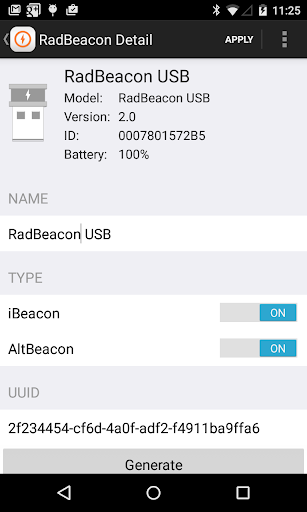
With the RadBeacon app you can scan for nearby Radius Networks beacons. Once discovered, if the beacon is configurable, you can display each beacon's operating settings and make modifications to those settings.
Scanning for RadBeacons
------------------------------
Scan for nearby configurable RadBeacons by pressing the SCAN button. …
Read the full description
The RadBeacon™ app is the configuration utility for RadBeacon proximity beacons from Radius Networks that support Apple's iBeacon™ proximity services and the AltBeacon proximity services for Android devices. The RadBeacon app from Radius Networks requires an Android device running Android 4.3 or higher and equipped with Bluetooth 4.0 capabilities. With the RadBeacon app you can scan for nearby Radius Networks beacons. Once discovered, if the beacon is configurable, you can display each beacon's operating settings and make modifications to those settings. Scanning for RadBeacons ------------------------------ Scan for nearby configurable RadBeacons by pressing the SCAN button. Each beacon discovered is displayed with the following summary details - Beacon Model (if available) - UUID - Major - Minor Reviewing RadBeacon Settings ------------------------------------ Select any RadBeacon in the table. If the RadBeacon is configurable, its detailed settings will be displayed. (If the RadBeacon is not configurable, then an "unable to connect" message will be displayed after approximately 15 seconds.) The settings displayed include: _Summary_ - Beacon Name - Beacon Model - Firmware Version - Hardware ID - Battery Level _Modifiable Settings_ - Beacon Name - Beacon Type - Advertised Organizational Identifier [ UUID ] - Advertised Group Identifier [ Major ] - Advertised Unit Identifier [ Minor ] - Advertised Measured Power - Advertisement Rate - Transmit Power Updating RadBeacon Settings ----------------------------------- Change any of the modifiable settings. Press the APPLY button. Submit a valid PIN to update the settings for this beacon. Calibrating Measured Power --------------------------------- Press the Action Menu button and select Calibrate. Calibrate the measured power value of the beacon settings to ensure optimal proximity events and ranging. Update the measured power value with the results of your calibration activity and update your settings. Range Your Beacon ----------------------- Press the Action Menu button and select Range. Validate the accuracy of your beacon settings by quickly verifying the ranging behavior of your device in proximity to your configured beacon. Update RadBeacon PIN ---------------------------- Press the Action Menu button and select Update PIN. Submit a new and existing PIN to update the PIN for your beacon. Reset to Factory Settings ----------------------------- Press the Action Menu button and select Reset. Reset the device to the original factory settings. Submit a valid PIN to reset the settings for your beacon to factory defaults. Lock Settings ---------------- Press the Action Menu button and select Lock. Submit a valid PIN to prevent connections from remote Bluetooth 4.0 devices to the beacon configuration service. The Lock feature is a security precaution to limit the possibility of third party manipulation of your beacons once they have been installed and configured. In order to re-enter configurable mode for a RadBeacon USB, remove and restore power to the device. In order to re-enter configurable mode for a RadBeacon Tag, remove the front cover and press the configuration push button switch near the coin cell battery. In order to re-enter configurable mode for a RadBeacon X2, remove the front cover and switch the beacon power switch to OFF and back to ON. A beacon set in configurable mode will be configurable for up to 30 minutes or until you lock the device again. Boot To DFU --------------- Press the Action Menu button and select DFU. Reboot the beacon into Direct Firmware Update mode. Contact Radius Networks support for information on the procedure for firmware update or replacement. In order to re-enter normal operational model, simply remove and replace power to the device.
Installs since 29 Aug 2026 Measured
Exact Google Play install counts, collected daily
Ratings
60 ratings, 18 reviews
- 5 ★3.8%
- 4 ★0.0%
- 3 ★0.0%
- 2 ★13%
- 1 ★83%
Recent reviews
Latest public reviews from the store
- 25 Apr 2016
Works fine! Will be great a message explaning how to set the beacon on setting mode
- 15 Mar 2016
Sorry about the earlier bad review - user error!
- 26 Jul 2015
Have the same "Calibrate" crashing issue as others.
- 20 Jul 2015
Unstable and unreliable. It crashes every time I pick the "Calibrate" option from the action menu. It will arbitrarily report that my beacons are unconfigurable. And when I pick the same beacon again a moment later, it will be configurable. So it sorta gets the job done for development purposes, but I wouldn't rely on this for production use.
What reviewers bring up
Topics mentioned in the latest 24 reviews, by how many reviews mention them
Liked in good reviews (2 reviews)
No topic comes up twice.
Raised in bad reviews (20 reviews)
- configure 5
- crashes 5
- beacon 5
- configuration 3
- support 3
- away 3
- scan 3
- documentation 2
Top chart positions
Latest Google Play chart ranks by country, last 10 days
Not in any tracked top chart in the last 10 days.
RadBeacon history
Release, install milestones, listing and store changes
- Reached 10,000+ installs 5 Oct 2017
- Reached 5,000+ installs 20 Jul 2016
- Reached 1,000+ installs 3 Aug 2015
- First released on the store 11 Mar 2015
Update frequency
How often RadBeacon ships a new version, month by month
0 updates in the last 12 months. Less often than most similar apps: they shipped a median of 1 updates in the same year.
Recent versions
Current version 2.6.1
- Version 2.6.114 Aug 2025
Performance improvements and bug fixes
- Version 2.5.42 Jan 2024
- Version 2.5.310 Oct 2023
- Version 2.5.27 Oct 2019
Listing keywords
Words and phrases RadBeacon repeats most in its store listing
Top phrases: action menu button (6), button and select (6), press the action (6), action menu (6), menu button (6).
Highlighted words also appear in the title. Counts cover the title, short description and description.
Business model and tech
From the store listing, the SDKs in the app package and its declared permissions
- Business model
- Free to download
- Built with
- No cross-platform framework or game engine detected
- Ad networks (0)
- None detected
- Sensitive access
- LocationNearby devices
0 ad, attribution and analytics SDKs detected. SDKs are read from the app package and permissions from the store listing, so code that loads later is not seen.
Technology
9 SDKs found in the app package
9 permissions
0 special access, 4 sensitive, 5 standard
- Approximate locationSensitive
- Precise locationSensitive
- Connect to paired Bluetooth devicesBLUETOOTH_CONNECTSensitive
- Find nearby Bluetooth devicesBLUETOOTH_SCANSensitive
- Start when the phone turns onStandard
- Access Bluetooth settingsStandard
- Pair with Bluetooth devicesStandard
- Full internet accessStandard
- Internal app permissionDYNAMIC_RECEIVER_NOT_EXPORTED_PERMISSIONStandard
Compliance
What the listing and the app package show
- Store status
- Live
- Upkeep
- Updated 27 Aug 2025
- Registered in
- United States
- Privacy policy
- Linked on the listing
- Advertising
- No ads declared
- In-app purchases
- None declared
- Age rating
- Everyone
- Sensitive permissions
- 4 sensitive of 9
- Location access
- Yes, while in use
- Camera and microphone
- Neither
Apps like RadBeacon
Smart talkieHangzhou Zhidou Technology Co., Ltd.4.1K installs★ 4.45
WiFi File Browser ProBytes Lounge2K installs★ 5.0
AI Puzzle SolverSolver Works8.8K installs★ 2.75
CharacterBookмакс апшер7.3K installs★ 3.42
Flashlight: LED Torch + ScreenApplab Studios8.6K installs★ 4.41
RUserLAnd Technologies2.6K installs★ 2.63
Onforu HomeOnforu19.1K installs★ 2.22
Countdown Calendar - WidgetTuxerito24.4K installs★ 1.8
CodeAssist - Android IDESketchub225K installs★ 5.0
RadBeacon: questions and answers
How many downloads does RadBeacon have?
RadBeacon has 22,192 installs on Google Play, measured from the store's own count on 16 Nov 2026.
Who makes RadBeacon?
RadBeacon is published by Radius Networks, Inc., a developer based in US.
When was RadBeacon last updated?
The latest version (2.6.1) was released on 27 Aug 2025.
Is RadBeacon free?
Yes. RadBeacon is free to download.
Is RadBeacon still available?
Yes. RadBeacon is live on Google Play as of 16 Nov 2026.
Track RadBeacon and its competitors
Watch any app for new versions, rating drops, chart moves and removals. Free plan, no card.