Radio Alarm Clock
Radio Player & Clock Radio - no app-side ads, stations may broadcast ads!
- Installs
- 572K
- Measured
- Rating
- 4.49
- Ratings
- 14.7K
- 390 reviews
- Version
- 25.08.7
- Updated 4 Sep 2025
- Released
- 14 Dec 2017
- Tracked since 13 May 2026
- Size
- 5 MB
- Needs 4.1
Screenshots




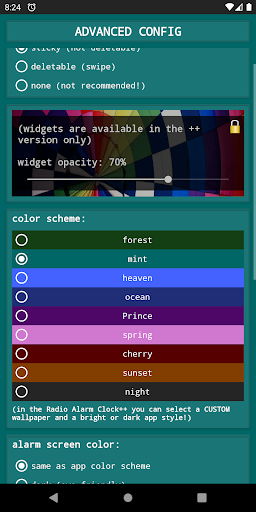
About Radio Alarm Clock
The description on the store listing
Simple and free alarm app, internet clock radio and radio player
<b><u><font color="#ff5353">IMPORTANT INFO about Energy Settings:</font></u></b>
-SAMSUNG
-HUAWEI
-XIAOMI
-OPPO
- ...
PLEASE check this website:
<a href="https://www.google.com/url?q=https%3A%2F%2Fandroid-co.de%2Fenergy-settings%2Fen&sa=D&sntz=1&usg=AOvVaw3n0BoMteUvLmFdzepu5Xm6">https://android-co.de/energy-settings/en</a>
<b><font color="#ff5353">and follow the tips in order to PREVENT THE ALARM FROM FAILING!!</font></b>
Thank you.
<b>Dear user,
this app is 100% ad-free! Sometimes I receive negative ratings due to radio stations playing advertisements. There is nothing I could do against that. The …
Read the full description
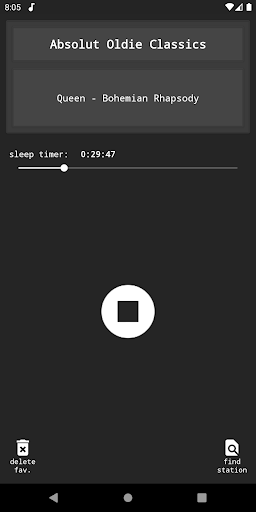
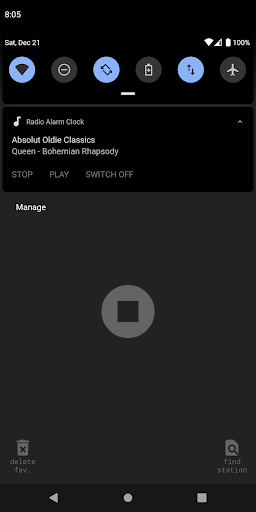
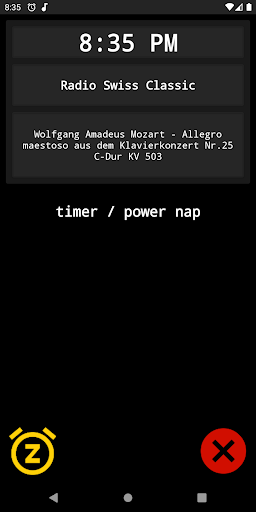
Simple and free alarm app, internet clock radio and radio player <b><u><font color="#ff5353">IMPORTANT INFO about Energy Settings:</font></u></b> -SAMSUNG -HUAWEI -XIAOMI -OPPO - ... PLEASE check this website: <a href="https://www.google.com/url?q=https%3A%2F%2Fandroid-co.de%2Fenergy-settings%2Fen&sa=D&sntz=1&usg=AOvVaw3n0BoMteUvLmFdzepu5Xm6">https://android-co.de/energy-settings/en</a> <b><font color="#ff5353">and follow the tips in order to PREVENT THE ALARM FROM FAILING!!</font></b> Thank you. <b>Dear user, this app is 100% ad-free! Sometimes I receive negative ratings due to radio stations playing advertisements. There is nothing I could do against that. The app itself is ad-free. <i>Advice: Use 1-2 minutes of increasing volume for your alarms. You won't hear the first commercial then.</i></b> <b>*Currently 40,000+ radio stations from all over the world!*</b> You will be prompted to accept the TERMS OF USE before you can use the app: <a href="https://www.google.com/url?q=https%3A%2F%2Fandroid-co.de%2Fclockradio-terms-of-use%2Fen&sa=D&sntz=1&usg=AOvVaw3TJx7moWECmoU5jd76T3Dq">https://android-co.de/clockradio-terms-of-use/en</a> <u><b>Description / Functions</b></u> <i>permissions: <b>read phone status and identity</b> is needed for muting alarms when calls are detected <b>read/write external storage</b> is needed for importing/exporting favourites</i> This is an online clock radio / radio alarm app. An <b>internet connection is required</b> in order to play an online stream. In case there is <b>no internet connection available, an integrated audio file will be played instead</b> to make sure the user will get woken up anyway. You can set <b>multiple repeating (weekly) or one time alarms per day</b>. On the main page you can find a <b>power napping timer</b> for short naps (1-120 min). You can add stations to your favourites and play them in the radio player. A <b>notification</b> in the notification bar <b>indicates the next alarm time</b>; tapping the notification will open the app. <u><b>Settings:</b></u> <b>•alarm volume</b> <b>•snooze duration: 1-30 min</b> <b>•alarm auto off: 0, 30, 60, 90, 120 min</b> <b>•safety dialog when disabling an alarm: on/off</b> <b>•increasing volume (standard alarm): 0-60 min</b> <b>•increasing volume (power nap): 0-5 min</b> <b>•vibration (standard alarm): on/off</b> <b>•vibration (power nap): on/off</b> <b>•notification type for next alarm: fixed / deletable / off</b> <b>•different color schemes</b> <b>•add a custom stream to favourites</b> <u><b>When the alarm time is reached, you may:</b></u> <b>•stop the alarm (X)</b> <b>•snooze the alarm for the set snooze duration (Z)</b> <b>•control the volume (if you want to continue listening), this switches off the vibration and the increase in volume stops, if switched on</b> -a <b>notification</b> in the notification bar indicates that the <b>radio is on</b> and a tap leads back to the "wake-up" screen The alarm will mute on any call and stop the vibration. After a call, the wake-up volume will be restored. <b>If you like the app, I would be truly grateful if you gave it a positive rating :-) For problems, questions, suggestions or critique feel free to contact me: [email protected] <i>There may be bugs and errors which may prevent the clock radio from waking you up as intended! Please consider using a 'normal' alarm clock in addition to this app.</i></b>
Installs, last 30 days Measured
Exact Google Play install counts, collected daily
Ratings
14,747 ratings, 390 reviews
- 5 ★78%
- 4 ★6.9%
- 3 ★5.9%
- 2 ★1.9%
- 1 ★6.9%
Recent reviews
Latest public reviews from the store
- 28 Oct 2021
Best App out there!
- 6 Jun 2020
Unsure what this does for radio ++ but I got it to be safe if it's important. :)
Top chart positions
Latest Google Play chart ranks by country, last 10 days
Not in any tracked top chart in the last 10 days.
Radio Alarm Clock history
Release, install milestones, listing and store changes
- Reached 500,000+ installs 4 Sep 2025
- Reached 100,000+ installs 1 Aug 2019
- Reached 50,000+ installs 5 Dec 2018
- Reached 10,000+ installs 16 May 2018
- Reached 5,000+ installs 3 Apr 2018
- Reached 1,000+ installs 19 Feb 2018
- Reached 500+ installs 5 Feb 2018
- Reached 100+ installs 21 Jan 2018
Update frequency
How often Radio Alarm Clock ships a new version, month by month
0 updates in the last 12 months. Less often than most similar apps: they shipped a median of 7 updates in the same year.
Recent versions
Current version 25.08.7
- Version 25.08.729 Aug 2025
-Reverted changes in the stream URL repair functionality which might have led to broken stream URLs at alarm time
- Version 25.07.112 Jul 2025
- Version 23.11.324 Nov 2023
- Version 23.11.211 Nov 2023
Listing keywords
Words and phrases Radio Alarm Clock repeats most in its store listing
Top phrases: clock radio (4), increasing volume (3), radio player (3), alarm on off (2), font color ff5353 (2).
Highlighted words also appear in the title. Counts cover the title, short description and description.
Business model and tech
From the store listing, the SDKs in the app package and its declared permissions
- Business model
- Free to download
- Built with
- No cross-platform framework or game engine detected
- Ad networks (0)
- None detected
- Sensitive access
- Phone and callsPhotos, videos and filesDraws over other apps
0 ad, attribution and analytics SDKs detected. SDKs are read from the app package and permissions from the store listing, so code that loads later is not seen.
Technology
7 SDKs found in the app package
16 permissions
2 special access, 4 sensitive, 10 standard
- Draw over other appsSpecial access
- Set exact alarmsSCHEDULE_EXACT_ALARMSpecial access
- Change or delete shared storageSensitive
- Read shared storageSensitive
- Show notificationsPOST_NOTIFICATIONSSensitive
- Read phone status and identitySensitive
- Control vibrationStandard
- Foreground service (media playback)FOREGROUND_SERVICE_MEDIA_PLAYBACKStandard
- Foreground service (special use)FOREGROUND_SERVICE_SPECIAL_USEStandard
- Keep the phone awakeStandard
- Run a foreground serviceFOREGROUND_SERVICEStandard
- Start when the phone turns onStandard
Compliance
What the listing and the app package show
- Store status
- Live
- Upkeep
- Updated 4 Sep 2025
- Registered in
- Germany
- Privacy policy
- Linked on the listing
- Advertising
- No ads declared
- In-app purchases
- None declared
- Age rating
- Everyone
- Sensitive permissions
- 4 sensitive, 2 special access of 16
- Location access
- No
- Camera and microphone
- Neither
Apps like Radio Alarm Clock
Alarm Clock LauncherAtomApplications2M installs★ 4.27
Porn Block PlusPixster Studio429K installs★ 4.46
My OptimumCSC Holdings, LLC.656K installs★ 4.11
File Manager - Expert ViewerSMARTWHO3.8M installs★ 4.1
Roubit: Daily Habit TrackerTsurutan2M installs★ 4.21
Najm | نجمNajm for Insurance Services3.6M installs★ 2.81
OmaPostiPosti2.1M installs★ 3.0
Win-X LauncherInternity Labs1.5M installs★ 4.5
App Lock: Lock App,FingerprintLitter Penguin5.1M installs★ 4.42
Radio Alarm Clock: questions and answers
How many downloads does Radio Alarm Clock have?
Radio Alarm Clock has 571,845 installs on Google Play, measured from the store's own count on 19 Nov 2026.
Who makes Radio Alarm Clock?
Radio Alarm Clock is published by Benjamin Laws, a developer based in DE.
When was Radio Alarm Clock last updated?
The latest version (25.08.7) was released on 4 Sep 2025.
Is Radio Alarm Clock free?
Yes. Radio Alarm Clock is free to download.
Is Radio Alarm Clock still available?
Yes. Radio Alarm Clock is live on Google Play as of 19 Nov 2026.
Track Radio Alarm Clock and its competitors
Watch any app for new versions, rating drops, chart moves and removals. Free plan, no card.