
Real Pi Benchmark
Benchmark your device's performance, calculate digits of Pi, search for patterns
- Installs
- 121K
- Measured
- Rating
- 4.67
- Ratings
- 927
- 110 reviews
- Version
- Varies with device
- Updated 25 Aug 2025
- Released
- 15 Jun 2011
- Tracked since 12 May 2026
- Size
- —
Screenshots

About Real Pi Benchmark
The description on the store listing
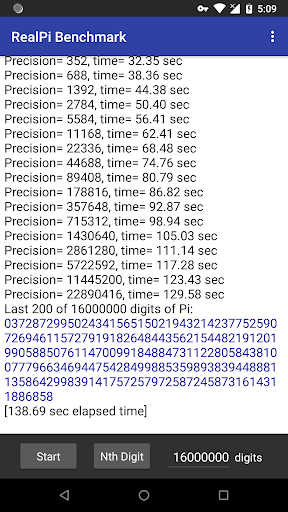
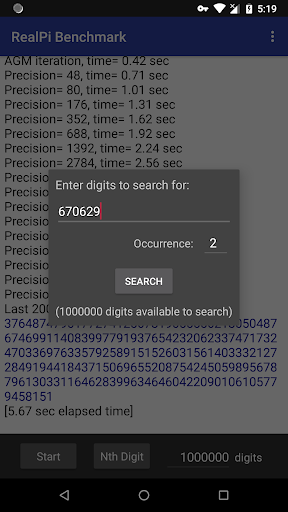
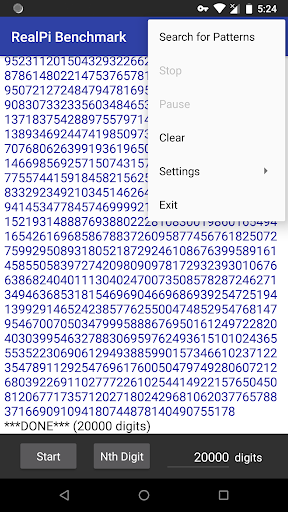
RealPi provides some of the best and most interesting Pi calculation algorithms out there. This app is a benchmark which tests your Android device's CPU and memory performance. It calculates the value of Pi to the number of decimal places you specify. You can view and search for patterns in the resulting digits to find your birthday in Pi or find famous digit sequences like the "Feynman Point" (six 9's in a row at the 762nd digit position). There are no hard limits on the number of digits, if you experience a freeze or crash please see "Warnings" below.
Leave comments with your Pi calculation time on the AGM+FFT formula for 1 million digits. Also the most digits you can calculate, which …
Read the full description
RealPi provides some of the best and most interesting Pi calculation algorithms out there. This app is a benchmark which tests your Android device's CPU and memory performance. It calculates the value of Pi to the number of decimal places you specify. You can view and search for patterns in the resulting digits to find your birthday in Pi or find famous digit sequences like the "Feynman Point" (six 9's in a row at the 762nd digit position). There are no hard limits on the number of digits, if you experience a freeze or crash please see "Warnings" below. Leave comments with your Pi calculation time on the AGM+FFT formula for 1 million digits. Also the most digits you can calculate, which tests your phone's memory. The author's Nexus 6p takes 5.7 sec for 1 million digits. Note that the AGM+FFT algorithm works in powers of 2, so calculating 10 million digits takes just as much time and memory as 16 million digits (the internal precision is shown in the output). On multi-core processors RealPi tests the performance of a single core. For accurate benchmark timing ensure that no other applications are running and your phone is not hot enough to throttle the CPU. Search function: Use this to find patterns in Pi like your birthday. For best results calculate at least one million digits using the AGM + FFT formula, then select the "Search for Patterns" menu option. Here's a summary of the available algorithms: -AGM + FFT formula (Arithmetic Geometric Mean): This is one of the fastest available methods to calculate Pi, and is the default formula used by RealPi when you press "Start". It runs as native C++ code and is based on Takuya Ooura's pi_fftc6 program. For many millions of digits it can require a lot of memory, which often becomes the limiting factor in how many digits you can calculate. -Machin's formula: This formula was discovered by John Machin in 1706. It's not as fast as AGM + FFT, but shows you all the digits of Pi accumulating in real time as the calculation proceeds. Choose this formula in the settings menu and then press "Start". It's written in Java using the BigDecimal class. Calculation times may start to get long around 200,000 digits, but on modern phones you can calculate and view 1 million digits using Machin if you're patient. -Nth digit of Pi formula by Gourdon: This formula shows that it's possible (surprisingly) to calculate decimal digits of Pi "in the middle" without calculating the preceding digits, and needs very little memory. When you press the "Nth Digit" button RealPi determines 9 digits of Pi ending with the digit position you specify. It runs as native C++ code and is based on Xavier Gourdon's pidec program. Although it's faster than Machin's formula it can't beat the AGM + FFT formula in speed. -Nth digit of Pi formula by Bellard: Gourdon's algorithm for the Nth digit of Pi can't be used for the first 50 digits, so this formula by Fabrice Bellard is used instead if digits < 50. Other Options: If you enable the "Calculate when in sleep" option RealPi will keep calculating while your screen is off, useful when calculating many digits of Pi. While not calculating or after the calculation finishes your device will go into deep sleep as usual. Warnings: This app can drain your battery quickly when doing a long calculation, especially if the "Calculate when in sleep" option is on. Calculation speed depends on your device's CPU speed and memory. At very large numbers of digits RealPi may terminate unexpectedly or not produce an answer. It could also take a very long time to run (years). This is due to the large amount of memory and/or CPU time needed. The upper limit on the number of digits you can calculate depends on your Android device. Changes to the "Calculate when in sleep" option take effect for the next Pi calculation, not in the middle of a calculation.
Installs since 29 Aug 2026 Measured
Exact Google Play install counts, collected daily
Ratings
927 ratings, 110 reviews
- 5 ★88%
- 4 ★5.6%
- 3 ★2.7%
- 2 ★0.0%
- 1 ★3.9%
Recent reviews
Latest public reviews from the store
- 2 Mar 2026
It literally cannot be installed. The only option I have is "refund" and there's no "install" button. I tried it on two different phones too. I'm not going to refund it yet because I am hoping it will fix itself, but know that I have a screen cast proving that I bought the app and that the free version links me to the play store to buy the full version which I obviously have already bought. Edit: it was a very serious bug with Google Play and I have found a workaround.
- 14 Aug 2025
got Bluetooth hearing aids wanted to stream audio from my pc without buying the $250+ tv streamer+. This worked so well i paid for the full version!
- 16 May 2025
Battery killing after Android 15/ One UI 7.0 update. S24 Ultra showing over 50% battery usage after software update. Other apps are down below 3%.
- 22 Apr 2025
Fair price for a product that does what it says on the tin. You can get into the nitty gritty if you want to, it's your choice. It's a breeze to set up and install both app and server, all you need to know is the IP's on your local network. Heck, you can even stream over the internet if you open the right port (default is 59010). Nothing to complain about and it was an easy decision to buy less than 10 minutes after trying the free version honestly. EDIT: PS: Works fine in linux as well.
What reviewers bring up
Topics mentioned in the latest 50 reviews, by how many reviews mention them
Liked in good reviews (36 reviews)
- audio 13
- stream 8
- quality 6
- computer 5
- android 5
- wifi 5
- buy 5
- set 5
Raised in bad reviews (11 reviews)
- server 4
- connect 3
- error 3
- settings 2
- several 2
- refund 2
- trying 2
- waste 2
Top chart positions
Latest Google Play chart ranks by country, last 10 days
Not in any tracked top chart in the last 10 days.
Real Pi Benchmark history
Release, install milestones, listing and store changes
- Reached 100,000+ installs 24 Jul 2020
- Reached 50,000+ installs 12 Oct 2017
- Reached 10,000+ installs 28 Apr 2012
- Reached 5,000+ installs 5 Dec 2011
- Reached 1,000+ installs 13 Jul 2011
- Reached 500+ installs 1 Jul 2011
- Reached 100+ installs 21 Jun 2011
- Reached 50+ installs 18 Jun 2011
Update frequency
How often Real Pi Benchmark ships a new version, month by month
0 updates in the last 12 months. Less often than most similar apps: they shipped a median of 1 updates in the same year.
Recent versions
Current version Varies with device
- Version 2.325 Aug 2025
- Version 2.217 May 2023
- Version 2.19 Mar 2022
- Version 2.026 Jan 2019
Listing keywords
Words and phrases Real Pi Benchmark repeats most in its store listing
Top phrases: agm fft (6), million digits (6), digits of pi (5), agm fft formula (4), fft formula (4).
Highlighted words also appear in the title. Counts cover the title, short description and description.
Business model and tech
From the store listing and declared permissions
- Business model
- Free to download
- Sensitive access
- No sensitive permission declared
Compliance
What the listing and the app package show
- Store status
- Live
- Upkeep
- Updated 25 Aug 2025
- Registered in
- Canada
- Privacy policy
- Linked on the listing
- Advertising
- No ads declared
- In-app purchases
- None declared
- Age rating
- Everyone
Apps like Real Pi Benchmark
Graffiti Battery Meter [WidgetTomoyuki Ono135K installs★ 4.46
Authenticator App - 2FAHoniry Xidoa799K installs★ 1.77
EasyBattery - Battery Managersteven he188K installs★ 4.44
Plant Identifier AI - CareAI Identifier Apps133K installs★ 4.32
How Long Widget - Time CounterRubén Mayayo195K installs★ 3.68
Aranet HomeSAF Tehnika A/S68.8K installs★ 4.79
RF Signal Tracker & DetectorMove More Solutions328K installs★ 2.68
LED Text ScrollerBlue Wave203K installs★ 3.5
Check VIN Number Lookup SearchCriminal Search Background4.6K installs★ 5.0
Real Pi Benchmark: questions and answers
How many downloads does Real Pi Benchmark have?
Real Pi Benchmark has 120,833 installs on Google Play, measured from the store's own count on 14 Nov 2026.
Who makes Real Pi Benchmark?
Real Pi Benchmark is published by GeorgieLabs, a developer based in CA.
When was Real Pi Benchmark last updated?
The latest version (Varies with device) was released on 25 Aug 2025.
Is Real Pi Benchmark free?
Yes. Real Pi Benchmark is free to download.
Is Real Pi Benchmark still available?
Yes. Real Pi Benchmark is live on Google Play as of 14 Nov 2026.
Track Real Pi Benchmark and its competitors
Watch any app for new versions, rating drops, chart moves and removals. Free plan, no card.