Remote Gamepad
Use your phone as a gamepad for your PC.
- Installs
- 3.11M
- Measured
- Rating
- 3.81
- Ratings
- 5.3K
- 113 reviews
- Version
- 1.22.2
- Updated 2 Oct 2026
- Released
- 21 Aug 2023
- Tracked since 13 May 2026
- Size
- —
Also on App Store: Remote Gamepad (113 ratings)
Screenshots

About Remote Gamepad
The description on the store listing
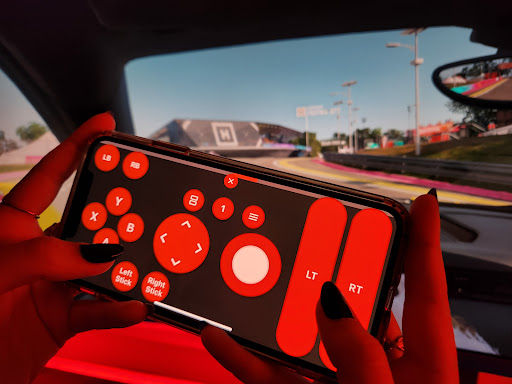
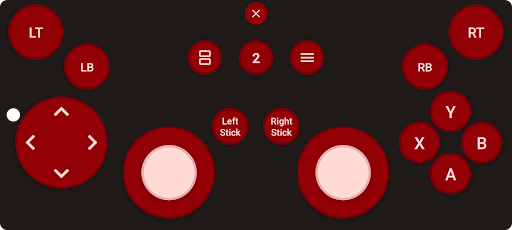
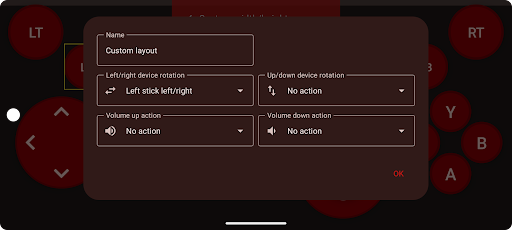
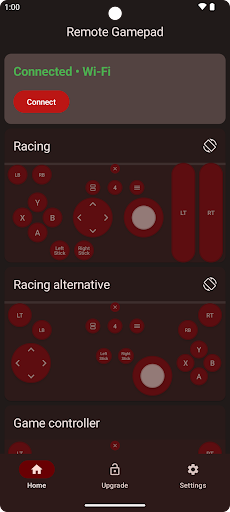
Play games on your PC using your phone as a game controller. Rotate your phone as the steering wheel in racing games. On-screen controls are available similar to a game controller.
Supported devices
• Windows 10/11
• Linux
• Android phone or tablet
• Google TV / Android TV
• Generic Bluetooth controller (BETA)
This app is compatible with all PC games which support game controllers. Use Wi-Fi, USB, or Bluetooth for the connection. No additional hardware is needed.
Button presses on game controllers connected to your phone are forwarded. This allows you to use mobile game controllers with your PC.
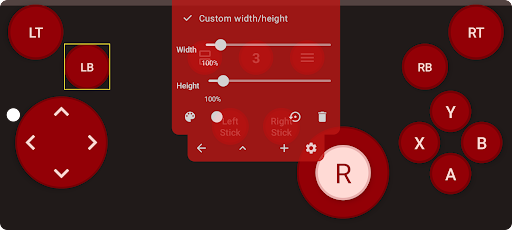
The included layout editor allows you to create and use your own game …
Read the full description
Play games on your PC using your phone as a game controller. Rotate your phone as the steering wheel in racing games. On-screen controls are available similar to a game controller. Supported devices • Windows 10/11 • Linux • Android phone or tablet • Google TV / Android TV • Generic Bluetooth controller (BETA) This app is compatible with all PC games which support game controllers. Use Wi-Fi, USB, or Bluetooth for the connection. No additional hardware is needed. Button presses on game controllers connected to your phone are forwarded. This allows you to use mobile game controllers with your PC. The included layout editor allows you to create and use your own game controller layouts. You can customize the button position, size, color, shape, and more. Layouts can be shared with other users using a link. A trial is available within the app. To continue using the app after the time limit, you can upgrade to the premium version or watch ads.
Installs, last 30 days Measured
Exact Google Play install counts, collected daily
Ratings
5,277 ratings, 113 reviews
- 5 ★57%
- 4 ★7.9%
- 3 ★2.8%
- 2 ★2.8%
- 1 ★29%
Recent reviews
Latest public reviews from the store
- 18 May 2026
The app is absolutely beautiful, I would recommend it to everyone who likes to play immersive racing games but doesn't want to pay a lot of money. there is even throttle support for buttons now. the only feature this app lacks is 360° steering, if this feature gets added in the future, i wouldn't buy a controller even if i had money to spare to it.
- 10 May 2026
Best Gamepad Ever. No hastle to download app to tv and stuff just scan for device and connect it only 2 clicks required. It has features to customize buttons sensitivity which is very useful also it does not have any intrusive ads not any banner ads nothing and it allows 30 minutes play time for 1 ad which is very reasonable. please Change the price for indian user as ₹180 for an app is too much but $2 for USA people is very less so please optimize the price for country where currency is weak
- 9 May 2026
this is the best Xbox 360 controller on android really enjoyed it to play Resident evil 5 gold editon ❤️❤️ and Origin wolverine uncaged edition 🖤🖤🖤 that's hot 🔥🔥❤️❤️❤️❤️❤️both USB and WiFi connection everything works perfectly But there is always a but FPS shooting games won't rotate the camera like modern warfare 4 and bad company 2 Battlefield just the rotating of camera that's it 💯 💯💯💯 300 for the developers yeah 👍👍
- 8 May 2026
It used to not work but now it connects immediately
What reviewers bring up
Topics mentioned in the latest 50 reviews, by how many reviews mention them
Liked in good reviews (25 reviews)
- controller 4
- gamepad 3
- android 3
- roblox 3
- customize 2
- perfectly 2
- required 2
- controls 2
Raised in bad reviews (20 reviews)
- connect 3
- pay 3
- unlimited 2
- better 2
- gets 2
- ads 2
- buy 2
Top chart positions
Latest Google Play chart ranks by country, last 10 days
Not in any tracked top chart in the last 10 days.
Remote Gamepad history
Release, install milestones, listing and store changes
- Reached 1,000,000+ installs 28 Apr 2025
- Reached 500,000+ installs 14 Oct 2024
- Reached 100,000+ installs 20 Mar 2024
- Reached 50,000+ installs 5 Feb 2024
- Reached 10,000+ installs 2 Dec 2023
- Reached 5,000+ installs 4 Nov 2023
- Reached 1,000+ installs 14 Oct 2023
- Reached 500+ installs 30 Sep 2023
Update frequency
How often Remote Gamepad ships a new version, month by month
12 updates in the last 12 months. More often than most similar apps: they shipped a median of 1 updates in the same year.
Recent versions
Current version 1.22.2
- Version 1.22.22 Oct 2026
• Bug fixes
- Version 1.21.518 Aug 2026
• Fix for volume button presses sometimes not detected • Bug fixes
- Version 1.21.415 Aug 2026
• Bug fixes
- Version 1.21.01 Aug 2026
• Bug fixes
Listing keywords
Words and phrases Remote Gamepad repeats most in its store listing
Top phrases: game controller (3), game controllers (3).
Highlighted words also appear in the title. Counts cover the title, short description and description.
Business model and tech
From the store listing and declared permissions
- Business model
- Free to downloadIn-app purchasesShows ads
- Subscriptions and payments
- Google Play billing
- Sensitive access
- LocationCameraNearby devicesAdvertising ID
20 permissions
0 special access, 6 sensitive, 14 standard
- Take photos and videosSensitive
- Approximate locationSensitive
- Precise locationSensitive
- Advertise to nearby Bluetooth devicesBLUETOOTH_ADVERTISESensitive
- Connect to paired Bluetooth devicesBLUETOOTH_CONNECTSensitive
- Find nearby Bluetooth devicesBLUETOOTH_SCANSensitive
- Ad attribution (Privacy Sandbox)ACCESS_ADSERVICES_ATTRIBUTIONStandard
- Ad topics (Privacy Sandbox)ACCESS_ADSERVICES_TOPICSStandard
- Read how it was installed (install referrer)BIND_GET_INSTALL_REFERRER_SERVICEStandard
- Read the advertising IDAD_IDStandard
- Read the advertising ID (Privacy Sandbox)ACCESS_ADSERVICES_AD_IDStandard
- Control vibrationStandard
Compliance
What the listing and the app package show
- Store status
- Live
- Upkeep
- Updated 2 Oct 2026
- Registered in
- Netherlands
- Privacy policy
- Linked on the listing
- Advertising
- Shows ads
- In-app purchases
- Offered
- Age rating
- Everyone
- Sensitive permissions
- 6 sensitive of 20
- Location access
- Yes, while in use
- Camera and microphone
- Camera
Apps like Remote Gamepad
Pro Name Style: Elite Symbolssubhaki3.9M installs★ 4.4
tele - TV-Programm - On Demandtele676K installs★ 4.33
Anime & Manga Recommendationsสิรภพ กล้ารอด514K installs★ 4.0
Earn Grow : Money Earning AppAerionX Studio51.9K installs★ 4.0
girly wallpapersulabs1.9M installs★ 4.06
Furniture Addons Minecraft PEMaps with Addons and Mods for Minecraft PE2.5M installs★ 4.26
Star WordsTokata666K installs★ 3.76
Luck Dramas - Video & EarnTrebelle Tours271K installs★ 4.75
Talking Giraffe: Safari WorldFunny Talking1.3M installs★ 4.1
Remote Gamepad: questions and answers
How many downloads does Remote Gamepad have?
Remote Gamepad has 3,109,948 installs on Google Play, measured from the store's own count on 18 Nov 2026.
Who makes Remote Gamepad?
Remote Gamepad is published by SmartFusionLabs, a developer based in NL.
When was Remote Gamepad last updated?
The latest version (1.22.2) was released on 2 Oct 2026.
Is Remote Gamepad free?
Yes. Remote Gamepad is free to download and offers in-app purchases, and it shows ads.
Is Remote Gamepad still available?
Yes. Remote Gamepad is live on Google Play as of 18 Nov 2026.
Track Remote Gamepad and its competitors
Watch any app for new versions, rating drops, chart moves and removals. Free plan, no card.