Remote Phone Call
A Wi-Fi and Bluetooth remote PC dialer and SMS tool with Outlook integration
- Installs
- 19.35K
- Measured
- Rating
- 3.5
- Ratings
- 550
- 57 reviews
- Version
- 6.11
- Updated 1 Jul 2026
- Released
- 8 Jul 2011
- Tracked since 13 May 2026
- Size
- 6 MB
- Needs 4.0.3
Screenshots




About Remote Phone Call
The description on the store listing
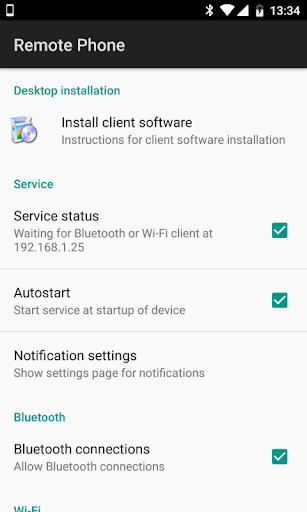
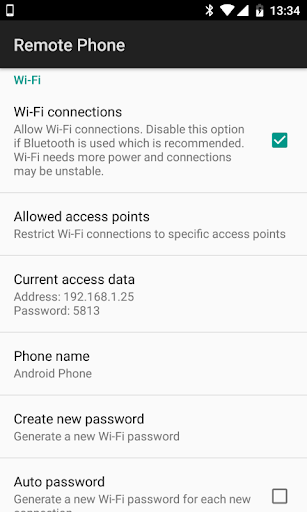
Use your Microsoft Windows PC as remote dialer for managing incoming and outgoing calls and for writing and receiving SMS messages. Look for missed incoming calls in your call log, read your SMS and use your phone contacts for dialing and creating SMS messages. All from your Windows desktop via Wi-Fi or Bluetooth....
Ideal in conjunction with a Bluetooth headset. You can leave your phone in the docking station while managing your calls.
The additional Microsoft Office integration allows simple dialing and SMS creation direct from Outlook, Word and Excel.
Also look for the 15 day trial version "Remote Phone Call Trial".
Simply the remote control for your mobile phone! …
Read the full description
Use your Microsoft Windows PC as remote dialer for managing incoming and outgoing calls and for writing and receiving SMS messages. Look for missed incoming calls in your call log, read your SMS and use your phone contacts for dialing and creating SMS messages. All from your Windows desktop via Wi-Fi or Bluetooth.... Ideal in conjunction with a Bluetooth headset. You can leave your phone in the docking station while managing your calls. The additional Microsoft Office integration allows simple dialing and SMS creation direct from Outlook, Word and Excel. Also look for the 15 day trial version "Remote Phone Call Trial". Simply the remote control for your mobile phone! CallCenter features (app running on your PC): - Shows phone contacts - Shows call log - Allows dialing contacts, call log entries and entered numbers - Writing and reading SMS messages - Contact search - Answer incoming calls - Popup for incoming calls and SMS messages - Manage audio settings - Hotkey for dialing numbers from the clipboard - Hotkey for accepting incoming calls - Handle "tel" and "callto" ULRs - Auto start at windows login CallCenter Microsoft Office integration: - Allows dialing selected numbers using the context menu of the text editor (Outlook, Excel and Word) - Allows calling email sender and recipients with help of contact information (Outlook) RemotePhone features (app running on your phone): - Auto start with Wi-Fi or Bluetooth - Acoustic signal on connect - Show connection status - Send or download client installation package to your Microsoft Windows PC System requirements: - Android 4.0 or higher - a Microsoft Windows PC (Vista or newer) - a Wi-Fi (WLAN) environment or a Bluetooth* enabled PC - optional: Microsoft Office 2007 or newer *Supported Bluetooth stacks: default Microsoft stack The PC application CallCenter offers a programming interface (API), which allows developers the use of the remote control features within arbitrary own applications. The SDK together with a sample can be found in the subdirectory "SDK" within the installation directory on your PC. If you have any questions, please contact us at [email protected]! We cannot respond to comments left on Google Play.
Installs since 29 Aug 2026 Measured
Exact Google Play install counts, collected daily
Ratings
550 ratings, 57 reviews
- 5 ★43%
- 4 ★9.0%
- 3 ★13%
- 2 ★13%
- 1 ★22%
Recent reviews
Latest public reviews from the store
- 3 Dec 2021
خیلی نقاشی های کیوتی داره🤗
- 25 Oct 2021
😍😍😍😍😍😍😗😗😘😙😑🚩🇫🇯
- 19 Aug 2021
good
- 5 Aug 2021
Hawa Ahmed Omar Osman
What reviewers bring up
Topics mentioned in the latest 50 reviews, by how many reviews mention them
Liked in good reviews (39 reviews)
- draw 7
- cute 5
- خیلی 4
- های 4
- این 4
- برنامه 3
- دانلود 3
- نقاشی 3
Raised in bad reviews (9 reviews)
No topic comes up twice.
Top chart positions
Latest Google Play chart ranks by country, last 10 days
Not in any tracked top chart in the last 10 days.
Remote Phone Call history
Release, install milestones, listing and store changes
- Reached 10,000+ installs 16 Sep 2017
- Reached 5,000+ installs 16 Jun 2015
- Reached 1,000+ installs 19 Mar 2013
- Reached 500+ installs 22 Nov 2012
- First released on the store 8 Jul 2011
Update frequency
How often Remote Phone Call ships a new version, month by month
1 updates in the last 12 months. About as often as similar apps, which shipped a median of 1 updates in the same year.
Recent versions
Current version 6.11
- Version 6.111 Jul 2026
NEW: Minor changes for Android 16
- Version 6.1013 Oct 2021
NEW: Minor changes for Android 12 and Windows 11
- Version 6.919 Feb 2021
- Version 6.815 Jun 2020
Listing keywords
Words and phrases Remote Phone Call repeats most in its store listing
Top phrases: incoming calls (4), sms messages (4), wi fi (4), microsoft windows pc (3), call log (3).
Highlighted words also appear in the title. Counts cover the title, short description and description.
Business model and tech
From the store listing, the SDKs in the app package and its declared permissions
- Business model
- Paid, $5.99
- Built with
- No cross-platform framework or game engine detected
- Ad networks (0)
- None detected
- Sensitive access
- ContactsPhone and callsText messagesNearby devicesDraws over other apps
0 ad, attribution and analytics SDKs detected. SDKs are read from the app package and permissions from the store listing, so code that loads later is not seen.
Technology
12 SDKs found in the app package
27 permissions
2 special access, 10 sensitive, 15 standard
- Draw over other appsSpecial access
- Read privileged phone stateREAD_PRIVILEGED_PHONE_STATESpecial access
- Read contactsSensitive
- Connect to paired Bluetooth devicesBLUETOOTH_CONNECTSensitive
- Answer phone callsANSWER_PHONE_CALLSSensitive
- Call phone numbersSensitive
- Read call historySensitive
- Read phone numbersREAD_PHONE_NUMBERSSensitive
- Read phone status and identitySensitive
- Read text messagesSensitive
- Receive text messagesSensitive
- Send text messagesSensitive
Compliance
What the listing and the app package show
- Store status
- Live
- Upkeep
- Updated 1 Jul 2026
- Registered in
- Austria
- Privacy policy
- Linked on the listing
- Advertising
- No ads declared
- In-app purchases
- None declared
- Age rating
- Everyone
- Sensitive permissions
- 10 sensitive, 2 special access of 27
- Location access
- No
- Camera and microphone
- Neither
Apps like Remote Phone Call
ChimeUp-Meet New FriendsChimeUp Team496K installs★ 2.73
VobiVox Telecommunications (Pty) Ltd144K installs★ 2.0
Walkie Talkie Offline TalkExcalbr259K installs★ 2.61
Teen Chat | Gen Z FriendshipTeen chat (PHP Chat Systems with Nginx Web Server)105K installs★ 3.28
LogicUI TV BrowserLogicUI597K installs★ 3.2
Ten Ten — Your Circle, On TapAll Reels Downloader, Video Saver And Downloader70.1K installs★ 4.17
CondoViveDISFORMA135K installs★ 3.52
Animated Memes WAStickerAlexPro Inc256K installs★ 3.0
Arabic stickers + Sticker makesanya win INC89.8K installs★ 5.0
Remote Phone Call: questions and answers
How many downloads does Remote Phone Call have?
Remote Phone Call has 19,347 installs on Google Play, measured from the store's own count on 17 Nov 2026.
Who makes Remote Phone Call?
Remote Phone Call is published by justRemotePhone, a developer based in AT.
When was Remote Phone Call last updated?
The latest version (6.11) was released on 1 Jul 2026.
Is Remote Phone Call free?
No. Remote Phone Call is a paid app priced at $5.99.
Is Remote Phone Call still available?
Yes. Remote Phone Call is live on Google Play as of 17 Nov 2026.
Track Remote Phone Call and its competitors
Watch any app for new versions, rating drops, chart moves and removals. Free plan, no card.