Remote Release
Remote release cable replacement app for Canon EOS
- Installs
- 302K
- Measured
- Rating
- 3.67
- Ratings
- 986
- 67 reviews
- Version
- 1.33
- Updated 8 Nov 2016
- Released
- 1 Dec 2011
- Tracked since 13 May 2026
- Size
- 0 MB
- Needs 2.2
Screenshots

About Remote Release
The description on the store listing
Remote Release allows you to "remote release" your Canon EOS DSLR from your Android device with only a USB cable.
Wi-Fi support is also present, if your camera supports Wi-Fi or you are using a go-between like the MR3040 - see further details on the DSLR Controller website ( http://dslrcontroller.com/ ) on how to setup the Wi-Fi connection.
*** PLEASE READ THE ENTIRE DESCRIPTION ***
*** IF YOUR DEVICE IS NOT COMPATIBLE THIS IS NOT MY OR THE SOFTWARES FAULT - YOUR PHONE IS MISSING NEEDED SOFTWARE OR HARDWARE ! ***
Remote releasing is using a remote control to activate the shutter of the camera. This is to prevent shaking the camera, and is often used with bulb shots and/or …
Read the full description
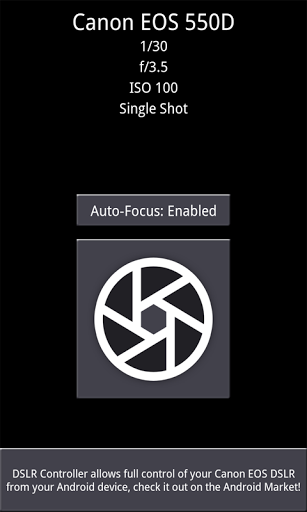
Remote Release allows you to "remote release" your Canon EOS DSLR from your Android device with only a USB cable. Wi-Fi support is also present, if your camera supports Wi-Fi or you are using a go-between like the MR3040 - see further details on the DSLR Controller website ( http://dslrcontroller.com/ ) on how to setup the Wi-Fi connection. *** PLEASE READ THE ENTIRE DESCRIPTION *** *** IF YOUR DEVICE IS NOT COMPATIBLE THIS IS NOT MY OR THE SOFTWARES FAULT - YOUR PHONE IS MISSING NEEDED SOFTWARE OR HARDWARE ! *** Remote releasing is using a remote control to activate the shutter of the camera. This is to prevent shaking the camera, and is often used with bulb shots and/or tripods. This app is the little (free) brother of DSLR Controller; see http://dslrcontroller.com/ and https://play.google.com/store/apps/details?id=eu.chainfire.dslrcontroller Remote Release also has a discussion thread on XDA-Developers.com: http://forum.xda-developers.com/showthread.php?t=1369684 ---- Features ---- - Activate the camera's shutter button from your phone over USB, just like using a remote release cable - Enable/Disable Auto-Focus * - Support for bulb shots (hold shutter button) * - Support for continuous shooting (hold shutter button) * * Depends on camera model. Requires a DryOS based camera. See DSLR Controller's device compatibility page ( http://dslrcontroller.com/devices.php ) ---- Requirements ---- - An Android device with an ARMv7-A or newer CPU architecture (virtually all 1ghz+ devices) - Supported Canon EOS DSLR When connecting over USB: - Not rooted: Android 3.1 or higher with USB host kernel+API support ** - Rooted: Android 2.3.1 or higher with USB host kernel support ** - The correct USB adapter, if applicable ** USB host kernel support can usually be determined by connecting a USB stick to your device, and seeing if the device recognizes it. ---- Devices ---- Please see DSLR Controller's supported devices page ( http://dslrcontroller.com/devices.php ) for device compatibility information. ----- Usage ----- -- Getting started -- - Install the application. - Connect your camera to the phone/tablet, and turn it on. Half-press the shutter button if it was already on. - If a popup comes up that offers to open Remote Release, press it, and move on to "Operation" below. - If a popup does not come up, manually start Remote Release. A Superuser popup should appear, click allow. If this took more than a few seconds, Remote Release will complain it cannot find a camera, regardless if you have one connected or not. Exit the app, half-press the shutter button on the camera, then restart the app. - If a popup appears that tells you your device is not compatible, this is the end of the line for you. -- Operation -- After you have connected your camera and started the app, the app will show you the following: - Camera model - Current shutter setting (depending on camera mode) - Current aperture setting (depending on camera mode) - Current ISO setting (depending on camera mode) - Current drive mode setting Below that you will see three buttons: - Auto-Focus button - Shutter button - Button to open DSLR Controller in the Market If your lens is set to Auto-Focus and you are using a DryOS based camera, you can use the Auto-Focus button to select if focusing is triggered by pressing the shutter button. By default it is, but it is not always desired. If your lens is set to Manual-Focus, this setting has no effect. Pressing the shutter button will take a picture on your camera. If the camera is set to bulb mode or to continuous shooting, press-and-hold the shutter button - the bulb/continuous capture will stop once you remove your finger from the screen.
Installs since 29 Aug 2026 Measured
Exact Google Play install counts, collected daily
Ratings
986 ratings, 67 reviews
- 5 ★59%
- 4 ★0.0%
- 3 ★18%
- 2 ★0.0%
- 1 ★23%
Recent reviews
Latest public reviews from the store
- 6 Sep 2025
Love the app! Been using it for years on my Canon 5D Mark III. It's given me so much more credibility. I love it! A few glitches don't bother me, I can always use it. And a small fee is totally worth it. Thank you!
- 20 Oct 2024
This is my "go to" app to control my Canon EOS1000D as it's very intuitive. Sadly, it won't work with my latest phone so I have to use an older phone with an earlier version of Android
- 31 Jan 2024
Very good app
- 5 Dec 2023
My On Location Best Friend!!
What reviewers bring up
Topics mentioned in the latest 50 reviews, by how many reviews mention them
Liked in good reviews (22 reviews)
- canon 7
- camera 5
- control 4
- without 3
- running 3
- usb 3
- magic lantern 2
- connection 2
Raised in bad reviews (27 reviews)
- newer 4
- compatible 3
- support 3
- samsung 3
- refund 3
- buy 3
- available 2
- developer 2
Top chart positions
Latest Google Play chart ranks by country, last 10 days
Not in any tracked top chart in the last 10 days.
Remote Release history
Release, install milestones, listing and store changes
- Reached 100,000+ installs 22 Nov 2013
- Reached 50,000+ installs 5 Jan 2013
- Reached 10,000+ installs 20 Mar 2012
- Reached 5,000+ installs 31 Jan 2012
- Reached 1,000+ installs 14 Dec 2011
- Reached 100+ installs 3 Dec 2011
- First released on the store 1 Dec 2011
Update frequency
How often Remote Release ships a new version, month by month
0 updates in the last 12 months. Less often than most similar apps: they shipped a median of 1 updates in the same year.
Recent versions
Current version 1.33
- Version 1.338 Nov 2016
Update DSLR library to latest version
- Version 1.3222 Oct 2016
- Version 1.318 Nov 2014
- Version 1.3028 Mar 2014
Listing keywords
Words and phrases Remote Release repeats most in its store listing
Top phrases: remote release (9), shutter button (9), auto focus (4), camera mode current (3), depending on camera (3).
Highlighted words also appear in the title. Counts cover the title, short description and description.
Business model and tech
From the store listing and declared permissions
- Business model
- Free to download
- Sensitive access
- No sensitive permission declared
9 permissions
0 special access, 0 sensitive, 9 standard
- Keep the phone awakeStandard
- Turn off the screen lockStandard
- Control NFCStandard
- Change network connectivityStandard
- Connect to and disconnect from Wi-FiStandard
- Full internet accessStandard
- See network connectionsStandard
- See Wi-Fi connectionsStandard
- Allow Wi-Fi Multicast receptionStandard
Compliance
What the listing and the app package show
- Store status
- Live
- Upkeep
- No update since 8 Nov 2016
- Registered in
- Netherlands
- Privacy policy
- Linked on the listing
- Advertising
- No ads declared
- In-app purchases
- None declared
- Age rating
- Everyone
- Sensitive permissions
- 0 sensitive of 9
- Location access
- No
- Camera and microphone
- Neither
Apps like Remote Release
Image Flip RotateActumn Factory Ltd.23K installs★ 4.59
AI Hairstyle : AI Hair ColorBrahms Soft Tech26.7K installs★ 3.63
Birthday collage makermodelapps94.3K installs★ 4.82
Baby Photo Editor - Baby FrameIndian Smart App63.2K installs★ 4.6
Body & Face EditorColor Delight Studio756K installs★ 3.86
LOWER - Lo-Fi CameraVweeter Limited270K installs★ 1.94
Mira - AI Photo GeneratorMTTech Ltd.26.7K installs★ 4.54
Photo Frame (Collage Maker)EONSOFT263K installs★ 3.0
News Paper Photo FramesApp Bites514K installs★ 4.22
Remote Release: questions and answers
How many downloads does Remote Release have?
Remote Release has 302,247 installs on Google Play, measured from the store's own count on 14 Nov 2026.
Who makes Remote Release?
Remote Release is published by Chainfire, a developer based in NL.
When was Remote Release last updated?
The latest version (1.33) was released on 8 Nov 2016.
Is Remote Release free?
Yes. Remote Release is free to download.
Is Remote Release still available?
Yes. Remote Release is live on Google Play as of 14 Nov 2026.
Track Remote Release and its competitors
Watch any app for new versions, rating drops, chart moves and removals. Free plan, no card.