
RemotePC Viewer
Install RemotePC on your Android device and remotely access your computer.
- Installs
- 310K
- Measured
- Rating
- 4.76
- Ratings
- 6.6K
- 395 reviews
- Version
- 5.9.8
- Updated 30 Oct 2026
- Released
- 23 Jun 2016
- Tracked since 13 May 2026
- Size
- 24 MB
- Needs 5.0
Screenshots




About RemotePC Viewer
The description on the store listing
Install the RemotePC app on your mobile devices and access your computer remotely from anywhere.
With a speed of 60 FPS and 4K quality, connect to your office or home computers remotely after hours, while traveling, etc., via the RemotePC application and access files and folders along with emails and software applications.
Features:
* Instant remote computer access provided there is an active internet connection and RemotePC application installed on it.
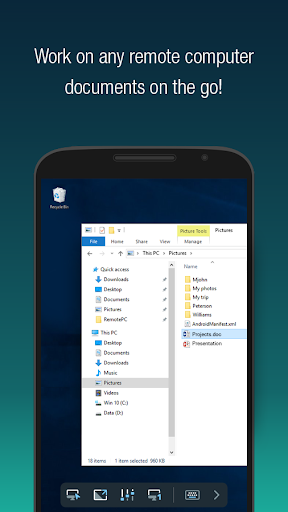
* Provides efficient team work with friends or colleagues by accessing their remote computers and to work on presentations, documents, view/edit media files, etc.
* Access PCs and MACs using your Android devices.
* Access Android …
Read the full description
Install the RemotePC app on your mobile devices and access your computer remotely from anywhere. With a speed of 60 FPS and 4K quality, connect to your office or home computers remotely after hours, while traveling, etc., via the RemotePC application and access files and folders along with emails and software applications. Features: * Instant remote computer access provided there is an active internet connection and RemotePC application installed on it. * Provides efficient team work with friends or colleagues by accessing their remote computers and to work on presentations, documents, view/edit media files, etc. * Access PCs and MACs using your Android devices. * Access Android devices and Chromebooks from computers or another Android device. * Enhanced performance and low latency. * Cross-platform compatibility (Windows, Mac, Linux, Android) 60 FPS speed allowing 4K quality. * Faster remote streaming for gamers. Functionalities: * Transfer files via your android devices and computers with/without remote session. * Session recording: Record remote sessions while accessing via Android devices. * Clipboard actions: Control clipboard actions (copy and paste) from your Android devices. * Enable inactivity timeout to retain remote session running in the background for the specified time. * Lock the remote system via your Android device. * Choose between better quality and speed of your remote device. * Change the screen resolution of your remote device from Android device. * Access and manage logged off and locked devices remotely. * Access a remote machine while using other applications on your Android device using picture-in-picture mode. * Enable background sound for remote devices during remote sessions. * Remote printing of documents and images using a local printer. * Chat with the recipients for effective communication. * Enable ‘Trusted Devices’ for enhanced security of your RemotePC account. * Enable ‘Blank Host Screen’ to work privately on your remote device by turning the screen blank. * View multiple monitors at the same time for Enterprise accounts. * Restart your remote system via the Android device in a safe mode. * Collaborate effectively by using Whiteboard to draw on the remote screen. What’s New? * Add comments for configured remote devices - other users can refer for instructions. * Add copied texts on OS-level screens using clipboard as keystrokes option * Access files/folders on remote computers using any Android device or Chromebook. * Perform search, upload, and download operations while accessing the files/folders on your remote computer. * Enhanced performance and low latency * Cross-platform compatibility (Windows, Mac, Linux, Android) * 60 FPS speed allowing 4K quality * Faster remote streaming for gamers * Record remote sessions while accessing via Android devices. * Control clipboard actions (copy and paste) from your Android devices. * Remove the saved ‘Personal Key’ and/or ‘System Authentication’ (SAUTH) of the devices configured in your RemotePC account using Clear Credentials
Installs, last 30 days Measured
Exact Google Play install counts, collected daily
Ratings
6,565 ratings, 395 reviews
- 5 ★83%
- 4 ★9.1%
- 3 ★1.8%
- 2 ★1.5%
- 1 ★4.8%
Recent reviews
Latest public reviews from the store
No reviews in our sample for this app yet.
Top chart positions
Latest Google Play chart ranks by country, last 10 days
Not in any tracked top chart in the last 10 days.
RemotePC Viewer history
Release, install milestones, listing and store changes
- First released on the store 23 Jun 2016
Update frequency
How often RemotePC Viewer ships a new version, month by month
16 updates in the last 12 months. More often than most similar apps: they shipped a median of 2 updates in the same year.
Recent versions
Current version 5.9.8
- Version 5.9.730 Oct 2026
Enhanced command line support for Windows and Linux remote machines
- Version 5.9.33 Aug 2026
Bug fixes.
- Version 5.9.216 Jun 2026
Enhancements and bug fixes
- Version 5.9.115 Jun 2026
Enhancements and bug fixes
Listing keywords
Words and phrases RemotePC Viewer repeats most in its store listing
Top phrases: android device (7), android devices (7), 4k quality (3), clipboard actions (3), remote device (3).
Highlighted words also appear in the title. Counts cover the title, short description and description.
Business model and tech
From the store listing, the SDKs in the app package and its declared permissions
- Business model
- Free to download
- Built with
- No cross-platform framework or game engine detected
- Ad networks (0)
- None detected
- Analytics and crash reports
- Firebase
- Sensitive access
- MicrophonePhone and callsPhotos, videos and filesNearby devicesAdvertising ID
1 ad, attribution and analytics SDKs detected. SDKs are read from the app package and permissions from the store listing, so code that loads later is not seen.
Technology
28 SDKs found in the app package
27 permissions
2 special access, 5 sensitive, 20 standard
- Manage all filesMANAGE_EXTERNAL_STORAGESpecial access
- Set exact alarmsSCHEDULE_EXACT_ALARMSpecial access
- Record audioSensitive
- Change or delete shared storageSensitive
- Read shared storageSensitive
- Show notificationsPOST_NOTIFICATIONSSensitive
- Read phone status and identitySensitive
- Ad attribution (Privacy Sandbox)ACCESS_ADSERVICES_ATTRIBUTIONStandard
- Read how it was installed (install referrer)BIND_GET_INSTALL_REFERRER_SERVICEStandard
- Read the advertising ID (Privacy Sandbox)ACCESS_ADSERVICES_AD_IDStandard
- Ask to skip battery optimisationREQUEST_IGNORE_BATTERY_OPTIMIZATIONSStandard
- Change audio settingsStandard
Compliance
What the listing and the app package show
- Store status
- Live
- Upkeep
- Updated 30 Oct 2026
- Registered in
- United States
- Privacy policy
- Linked on the listing
- Advertising
- No ads declared
- In-app purchases
- None declared
- Age rating
- Everyone
- Sensitive permissions
- 5 sensitive, 2 special access of 27
- Location access
- No
- Camera and microphone
- Microphone
Apps like RemotePC Viewer
Smart TranslatorSMARTWHO1.4M installs★ 4.51
AI Notes & Transcribe MemoNewway Apps1.2M installs★ 4.17
ScanAll - QR code & BarcodesGlilab524K installs★ 5.0
Sleep Time - Alarm CalculatorOleg Filimonov1.5M installs★ 4.6
RICOH Smart Device ConnectorRicoh Co., Ltd.3.3M installs★ 3.16
AdsCoin - Easy Mobile EarningsCDM Apps263K installs★ 3.37
TIM Segurança DigitalFS SECURITY SERVIÇOS DE TECNOLOGIA S A328K installs★ 4.69
All Document Reader - ViewerDragster Production2.1M installs★ 3.37
Habit Tracker - Habit RadarGoal Tracker203K installs★ 4.48
RemotePC Viewer: questions and answers
How many downloads does RemotePC Viewer have?
RemotePC Viewer has 309,909 installs on Google Play, measured from the store's own count on 19 Nov 2026.
Who makes RemotePC Viewer?
RemotePC Viewer is published by IDrive Inc, a developer based in US.
When was RemotePC Viewer last updated?
The latest version (5.9.8) was released on 30 Oct 2026.
Is RemotePC Viewer free?
Yes. RemotePC Viewer is free to download.
Is RemotePC Viewer still available?
Yes. RemotePC Viewer is live on Google Play as of 19 Nov 2026.
Track RemotePC Viewer and its competitors
Watch any app for new versions, rating drops, chart moves and removals. Free plan, no card.