
RemoteView for Android
RemoteView - A mobile service app to control remotely located PC.
- Installs
- 426K
- Measured
- Rating
- 4.03
- Ratings
- 1.1K
- 18 reviews
- Version
- 8.6.2.4
- Updated 29 Oct 2026
- Released
- 24 Oct 2010
- Tracked since 14 May 2026
- Size
- 17 MB
- Needs 4.1
Screenshots




About RemoteView for Android
The description on the store listing
If you have any questions or require additional information, please contact us through https://content.rview.com/en/support/contact-us/. We will contact you as soon as possible. Thank you.
RemoteView is a service from Rsupport that lets you remotely control computers located either at home, at the office, or anywhere else as long as there is live Internet connection. All you have to do is this: (1) Install an agent on a computer you want to access remotely; (2) Install a RemoteView App on your smartphone or a tablet. Voila! You’re ready to start! You can use all the resource-heavy applications that usually require a full-on computer, from the convenience of a smartphone or a tablet by …
Read the full description
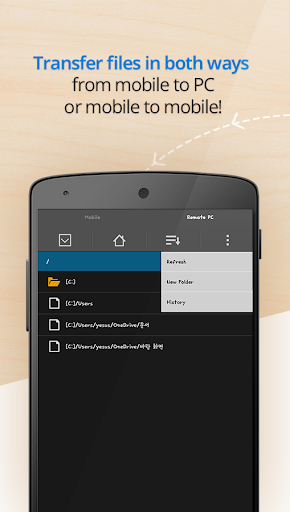
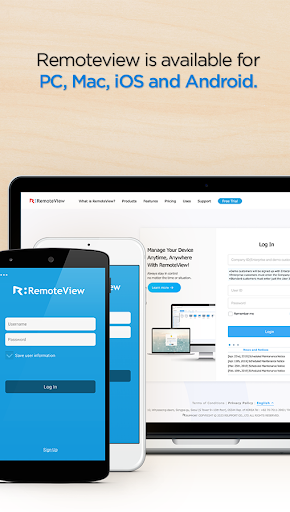
If you have any questions or require additional information, please contact us through https://content.rview.com/en/support/contact-us/. We will contact you as soon as possible. Thank you. RemoteView is a service from Rsupport that lets you remotely control computers located either at home, at the office, or anywhere else as long as there is live Internet connection. All you have to do is this: (1) Install an agent on a computer you want to access remotely; (2) Install a RemoteView App on your smartphone or a tablet. Voila! You’re ready to start! You can use all the resource-heavy applications that usually require a full-on computer, from the convenience of a smartphone or a tablet by using RemoteView. That’s it! [Special Features] - Provides fast and safe remote control. - File Transfer in both directions. - Works under multiple network environments: Dynamic IP; DHCP, Private IP, Private and corporate firewalls. - Improved security measures: Two-tier secured log-in process; ASE 256bit Encryption; SSL Security. - Ease of Use: Assume control over a remote mouse and keyboard from mobile devices; Multi Touch, Scroll and Zoom are all supported. - Language Input: Any language input method available on the remote computer will be supported. - Common UX: You can use RemoteView from an iOS device as well as the Android OS device seamlessly. - Virtual Environments Supported: Hyper-V; VMware; Virtual PC; Citrix Xen -- All supported. - Other Notable Features: Multi Monitor Support; Screen Lock Out; Remote Power On/Off Via RemoteWOL. [Rview Application Areas] - When you want to recreate an office IT work environment. - When you want to work at your office PC from home. - When you want to access your files located at home from your office - When you want to save files onto your PC from different places as you are on the move. - When you have to have immediate access into your servers located inside a secure and hard to access places like the IDC. - When you have a “One-to-Many” asset management needs. [How To] - Agent Installation Process 1. Go to rview.com from the computer you want to remote into. 2. Click on the Sign Up button and fill out the application form. 3. You have to complete your sign-up process by responding to a confirmation email sent to the email address you used in the sign-up process. 4. Log into your account at rview.com 5. While seated at the computer you wish to remote control, click on the Agent Installation button. 6. A download dialogue box should appear. Agree, download, launch the installation .exe and follow the instructions. The entire process should take less than 10 minutes to complete. - Remote Control a Computer from a smart device 1. Go to the Android Marketplace and download the RemoteView App.. 2. Launch the app and log into your account using your account ID and PW. 3. Click the remote computer you wish to control. 4. Initiate the remote control session using the ID and PW you assigned to the remote computer. 5. Wait for the connection to be established and start using RemoteView. * Android OS 8.0~14.0 Recommended RemoteView homepage: http://www.rview.com Contact US: https://content.rview.com/en/support/ Online inquiry: https://content.rview.com/en/support/contact-us/ RSUPPORT homepage: http://rsupport.com
Installs since 19 Jul 2026 Measured
Exact Google Play install counts, collected daily
Ratings
1,139 ratings, 18 reviews
- 5 ★69%
- 4 ★5.9%
- 3 ★5.9%
- 2 ★2.9%
- 1 ★16%
Recent reviews
Latest public reviews from the store
- 24 May 2024
very usefull
- 28 Dec 2023
Sangat membantu untuk mengurangi waktu antri pendaftaran.. Terimakasih kakanda Alan Agus Nawan yang telah meluangkan waktu untuk mendevelop aplikasi ini
Top chart positions
Latest Google Play chart ranks by country, last 10 days
Not in any tracked top chart in the last 10 days.
RemoteView for Android history
Release, install milestones, listing and store changes
- First released on the store 24 Oct 2010
Update frequency
How often RemoteView for Android ships a new version, month by month
7 updates in the last 12 months. More often than most similar apps: they shipped a median of 2 updates in the same year.
Recent versions
Current version 8.6.2.4
- Version 8.6.2.429 Oct 2026
Enhanced app security and update policies
- Version 8.5.3.1631 Aug 2026
-Other bugs and fixes
- Version 8.5.3.1113 Aug 2026
-Other bugs and fixes
- Version 8.5.1.75 Jun 2026
-Other bugs and fixes
Listing keywords
Words and phrases RemoteView for Android repeats most in its store listing
Top phrases: remote control (4), remote computer (3), computer you want (2), computer you wish (2), id and pw (2).
Highlighted words also appear in the title. Counts cover the title, short description and description.
Business model and tech
From the store listing and declared permissions
- Business model
- Free to download
- Sensitive access
- No sensitive permission declared
Compliance
What the listing and the app package show
- Store status
- Live
- Upkeep
- Updated 29 Oct 2026
- Privacy policy
- Linked on the listing
- Advertising
- No ads declared
- In-app purchases
- None declared
- Age rating
- Everyone
Apps like RemoteView for Android
Card Reader (Pin Code Scan)Aktham Ahmed236K installs★ 4.35
Level Tool: Bubble Leveler ProMONIQ TAP., CO LTD196K installs★ 3.8
Screen Lock(off screen)IDOAI299K installs★ 3.83
FloleVacFlole266K installs★ 4.0
Image to Textrunnableapps40.2K installs★ 4.31
Shopping CalculatorLemonClip130K installs★ 4.32
My NotesManee Osman Hussain500K installs★ 4.0
Scintilla In-StoreWalmart324K installs★ 3.07
Microlab пульты для акустикиWasiliySoft67.3K installs★ 3.91
RemoteView for Android: questions and answers
How many downloads does RemoteView for Android have?
RemoteView for Android has 426,144 installs on Google Play, measured from the store's own count on 15 Nov 2026.
Who makes RemoteView for Android?
RemoteView for Android is published by RSUPPORT Co., Ltd..
When was RemoteView for Android last updated?
The latest version (8.6.2.4) was released on 29 Oct 2026.
Is RemoteView for Android free?
Yes. RemoteView for Android is free to download.
Is RemoteView for Android still available?
Yes. RemoteView for Android is live on Google Play as of 15 Nov 2026.
Track RemoteView for Android and its competitors
Watch any app for new versions, rating drops, chart moves and removals. Free plan, no card.