
Resize Image
Resize Image - Crop & resize photos, preview & custom dimension settings
- Installs
- 263
- Measured
- Rating
- —
- Ratings
- —
- Version
- Varies with device
- Updated 24 Mar 2026
- Released
- 25 Jun 2025
- Tracked since 12 May 2026
- Size
- —
Screenshots




About Resize Image
The description on the store listing
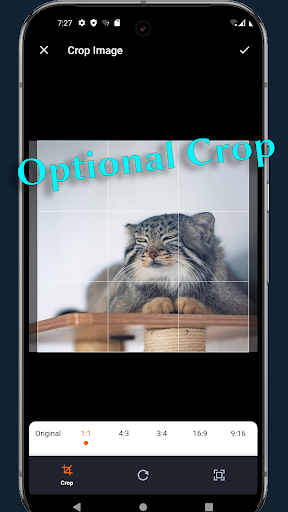
Resize Image is a straightforward Android utility for quickly cropping and resizing your JPEG or PNG photos. With a clean, modern interface and intuitive icons, you can turn any image into the perfect size in just a few taps—no extra features, no clutter.
Key Features
• Image Selection: browse and pick JPEG/PNG files from your device storage.
• Optional Crop: choose common aspect ratios (1:1, 4:3, 16:9) or freely adjust the crop box by dragging corners and edges.
• Flexible Resize: select from smart presets that match your image’s aspect ratio or enter custom width and height. By default, aspect ratio is maintained, but you can override it when needed.
• Instant Preview: compare …
Read the full description
Resize Image is a straightforward Android utility for quickly cropping and resizing your JPEG or PNG photos. With a clean, modern interface and intuitive icons, you can turn any image into the perfect size in just a few taps—no extra features, no clutter. Key Features • Image Selection: browse and pick JPEG/PNG files from your device storage. • Optional Crop: choose common aspect ratios (1:1, 4:3, 16:9) or freely adjust the crop box by dragging corners and edges. • Flexible Resize: select from smart presets that match your image’s aspect ratio or enter custom width and height. By default, aspect ratio is maintained, but you can override it when needed. • Instant Preview: compare original and processed images side by side before saving. • Easy Save Options: store your result in the default “Pictures/Resize Image” folder or pick a custom location with “Save As.” • Original Format Retained: saved files keep the same format (JPEG or PNG) as the source. • JPEG Quality Control: adjust output quality on a 0–100% slider in Settings. • Settings Page: view and change your default save folder and default JPEG quality. • Responsive UI: adapts to all screen sizes and orientations, with clear labels and loading indicators during processing. Use Resize Image to prepare photos for social media, email attachments, web uploads, or any scenario where precise image dimensions matter. Its minimal design focuses purely on crop and resize tasks, so you spend less time fumbling through menus and more time getting the perfect shot ready.
Installs since 15 Nov 2026 Measured
Exact Google Play install counts, collected daily
Daily history starts once this app is in our daily install sample.
Ratings
- 5 ★0.0%
- 4 ★0.0%
- 3 ★0.0%
- 2 ★0.0%
- 1 ★0.0%
Recent reviews
Latest public reviews from the store
- 1 May 2025
I tired several but this works smoothly. thank
Top chart positions
Latest Google Play chart ranks by country, last 10 days
Not in any tracked top chart in the last 10 days.
Resize Image history
Release, install milestones, listing and store changes
- Reached 100+ installs 24 Mar 2026
- Reached 50+ installs 23 Jan 2026
- First released on the store 25 Jun 2025
Listing keywords
Words and phrases Resize Image repeats most in its store listing
Top phrases: resize image (5), jpeg or png (2), aspect ratio (2), jpeg quality (2).
Highlighted words also appear in the title. Counts cover the title, short description and description.
Business model and tech
From the store listing and declared permissions
- Business model
- Free to download
- Sensitive access
- Photos, videos and files
4 permissions
0 special access, 2 sensitive, 2 standard
- Change or delete shared storageSensitive
- Read shared storageSensitive
- Internal app permissionDYNAMIC_RECEIVER_NOT_EXPORTED_PERMISSIONStandard
- Google Play license checkStandard
Compliance
What the listing and the app package show
- Store status
- Live
- Upkeep
- Updated 24 Mar 2026
- Registered in
- Hong Kong SAR China
- Privacy policy
- Linked on the listing
- Advertising
- No ads declared
- In-app purchases
- None declared
- Age rating
- Everyone
- Sensitive permissions
- 2 sensitive of 4
- Location access
- No
- Camera and microphone
- Neither
Apps like Resize Image
영산강 안심 알림eICT융합소프트 & 스마트오더18.3K installs★ 4.0
JBLETRADOC Mobile10.3K installs★ 4.5
Two Point HeightOmega Centauri Software15.3K installs★ 2.22
Sheridan RecyclesCity of Sheridan634 installs★ 4.67
NAFNorges Automobil-Forbund200K installs★ 3.9
Ipsos Adria CAPIIpsos Serbia7.4K installs★ 3.9
Clock: Alarm Clock & TimerIntratech so36.1K installs★ 3.79
Süzme Sayaç HesaplamaNotsup30.3K installs★ 3.6
Cattle & Goat Record KeepingVetzKin10.3K installs★ 2.5
Resize Image: questions and answers
How many downloads does Resize Image have?
Resize Image has 263 installs on Google Play, measured from the store's own count on 15 Nov 2026.
Who makes Resize Image?
Resize Image is published by Alpiaco, a developer based in HK.
When was Resize Image last updated?
The latest version (Varies with device) was released on 24 Mar 2026.
Is Resize Image free?
Yes. Resize Image is free to download.
Is Resize Image still available?
Yes. Resize Image is live on Google Play as of 15 Nov 2026.
Track Resize Image and its competitors
Watch any app for new versions, rating drops, chart moves and removals. Free plan, no card.