Ruler
Measure all dimensions - quickly and professionally!
- Installs
- 329K
- Measured
- Rating
- 3.79
- Ratings
- 564
- 8 reviews
- Version
- 1.4.02
- Updated 18 Jun 2026
- Released
- 16 Jun 2016
- Tracked since 12 May 2026
- Size
- 3 MB
- Needs 4.0
Screenshots





About Ruler
The description on the store listing
Ruler is an intelligent application by which you can precisely measure the dimensions of any object or item. Doesn't matter the object has a few millimeters (inches) or a few hundred meters (or feet) by using this ruler app you can easily and precisely check the length, width or height of any item or object. It's perfect tool in any DIY projects or renovations!
This pocket ruler app offers 3 modes of measurement:
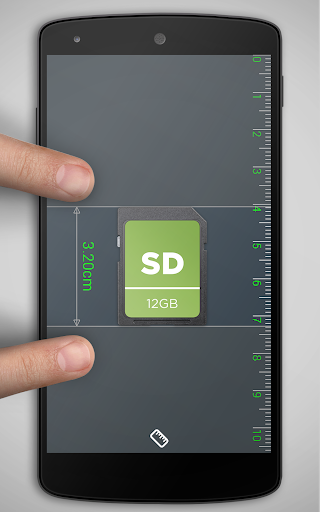
- Ruler on the screen (Screen Ruler) - measure objects placed on the screen of the phone or tablet
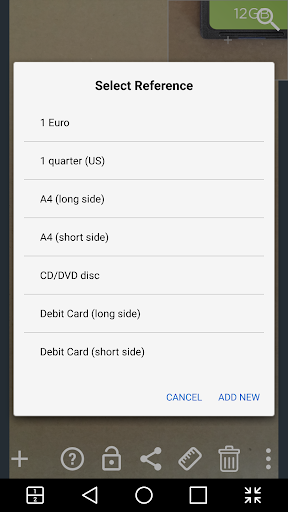
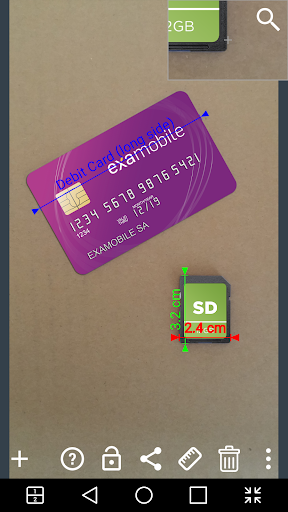
- Camera Mode (Photo Ruler) - take a picture of objects you want to measure and then using the reference object, you can measure the size of all the objects in the picture
- …
Read the full description
Ruler is an intelligent application by which you can precisely measure the dimensions of any object or item. Doesn't matter the object has a few millimeters (inches) or a few hundred meters (or feet) by using this ruler app you can easily and precisely check the length, width or height of any item or object. It's perfect tool in any DIY projects or renovations! This pocket ruler app offers 3 modes of measurement: - Ruler on the screen (Screen Ruler) - measure objects placed on the screen of the phone or tablet - Camera Mode (Photo Ruler) - take a picture of objects you want to measure and then using the reference object, you can measure the size of all the objects in the picture - Picture Mode Gallery - Select an image saved on the device (or memory card) and make measurements of objects placed on it, using method from ruler photo mode. Features of application Ruler (Settings): - Choice of units: Metric (millimeters, centimeters, meters) or imperial (inches, feet) - Determining the accuracy and precision of measurements - Additional calibration (useful on some devices) - Choice a ready reference object (credit card, coins, card A4, etc) or define own reference obiekt (do it yourself) - Magnifier - zoom the image to increase the precision of the measurements - Saving and sending the measurement results How to use: Ruler mode on the screen: - Place the object on the smartphone screen - Align the lines on the screen to the edge of object - Read the length or width of the measured object. Warning: in this mode, some devices require calibration, follow the instructions to make sure that you get the correct measurements. Camera Mode (Foto Ruler) + mode image from gallery - Take a photo (or select from the gallery) measured object and the reference object whose you know the dimensions (objects should be in the same plane) - Place the blue arrows (reference) on the reference object - Add measurement arrows (by press the "+") and set them on the measured object - Read the dimensions - Send or save the image with measurements DIY Ruler app can be successfully used in repair work, construction, design and other works of engineering or any measurement of distance, length or height of any objects. Successful measure!
Installs since 28 Aug 2026 Measured
Exact Google Play install counts, collected daily
Ratings
564 ratings, 8 reviews
- 5 ★54%
- 4 ★12%
- 3 ★12%
- 2 ★0.0%
- 1 ★21%
Recent reviews
Latest public reviews from the store
- 4 May 2026
Decent sensor app. Would love it mire if we could plot acceleration relative on zero axis, instead of at 9.8m/s2 offset. Update 2026: would love autoscaling.
- 18 Apr 2026
enjoy the app
- 4 Apr 2026
killer fun dude
- 3 Apr 2026
Wonderful!
What reviewers bring up
Topics mentioned in the latest 50 reviews, by how many reviews mention them
Liked in good reviews (38 reviews)
- sensors 5
- data 4
- see 3
- exactly 2
- needed 2
- wanted 2
- clear 2
Raised in bad reviews (11 reviews)
- ads 3
- click 2
Top chart positions
Latest Google Play chart ranks by country, last 10 days
Not in any tracked top chart in the last 10 days.
Ruler history
Release, install milestones, listing and store changes
- Reached 100,000+ installs 16 Jan 2019
- Reached 50,000+ installs 4 Jan 2017
- Reached 10,000+ installs 19 Jul 2016
- Reached 5,000+ installs 14 Jul 2016
- Reached 1,000+ installs 30 Jun 2016
- Reached 100+ installs 21 Jun 2016
- Reached 50+ installs 20 Jun 2016
- First released on the store 16 Jun 2016
Update frequency
How often Ruler ships a new version, month by month
1 updates in the last 12 months. More often than most similar apps: they shipped a median of 0 updates in the same year.
Recent versions
Current version 1.4.02
- Version 1.4.0218 Jun 2026
Minor bug fixed
- Version 1.3.0218 Apr 2024
Minor bug fixed
- Version 1.2.0120 Feb 2023
- Version 1.1.08 Oct 2018
Listing keywords
Words and phrases Ruler repeats most in its store listing
Top phrases: reference object (4), measured object (3), camera mode (2), object read (2), objects placed (2).
Highlighted words also appear in the title. Counts cover the title, short description and description.
Business model and tech
From the store listing and declared permissions
- Business model
- Free to downloadIn-app purchasesShows ads
- Sensitive access
- No sensitive permission declared
Compliance
What the listing and the app package show
- Store status
- Live
- Upkeep
- Updated 18 Jun 2026
- Registered in
- Poland
- Privacy policy
- Linked on the listing
- Advertising
- Shows ads
- In-app purchases
- Offered
- Age rating
- Everyone
Apps like Ruler
Color LED ControllerStonez56 (Kevin Chen)494K installs★ 2.46
Bigg VPNBigg Software Ltd72.2K installs★ 4.86
Junk Cleaner - Cleanup Phoneepazarturkiye.com161K installs★ 3.9
CloverPool - Multi-coins PoolCloverPool Team122K installs★ 3.94
Afghan Sim (خدمات سیم کارت ها)Yasin Mohammadi52.7K installs★ 3.91
Drink Water TrackerWe Soft Global221K installs★ 4.05
ХваляГосударственное предприятие "БелГИЭ"19.2K installs★ 2.29
QR code scanner & generatorDual Design Studio333K installs★ 3.53
فیلتر شکن قوی پرسرعت اریزوSol Sol App654472293K installs★ 4.39
Ruler: questions and answers
How many downloads does Ruler have?
Ruler has 329,376 installs on Google Play, measured from the store's own count on 14 Nov 2026.
Who makes Ruler?
Ruler is published by ExaMobile S.A., a developer based in PL.
When was Ruler last updated?
The latest version (1.4.02) was released on 18 Jun 2026.
Is Ruler free?
Yes. Ruler is free to download and offers in-app purchases, and it shows ads.
Is Ruler still available?
Yes. Ruler is live on Google Play as of 14 Nov 2026.
Track Ruler and its competitors
Watch any app for new versions, rating drops, chart moves and removals. Free plan, no card.