SA Group Text Lite
Send bulk sms on your phone using excel sheet as input.
- Installs
- 139K
- Measured
- Rating
- 3.07
- Ratings
- 885
- 60 reviews
- Version
- 3.7.9
- Updated 17 Oct 2026
- Released
- 11 Jan 2013
- Tracked since 13 May 2026
- Size
- 9 MB
- Needs 4.4
Also on App Store: SA Group Text Lite (11 ratings)
Screenshots


About SA Group Text Lite
The description on the store listing
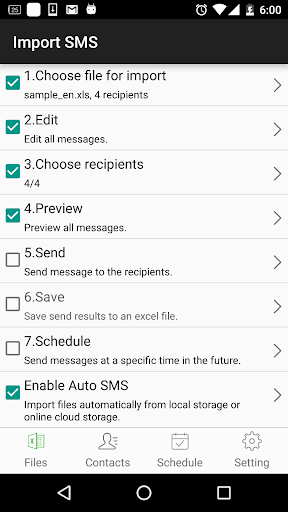
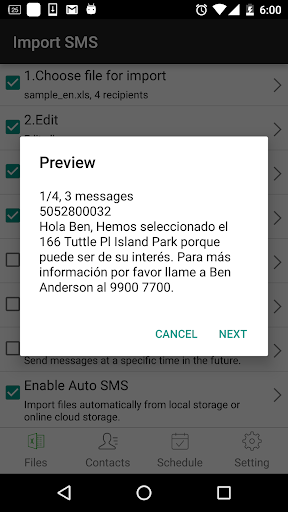
SA Group Text is the most efficient way to send group messages. You can add recipient names and phone numbers in an Excel file. You can enter static or personalized text messages right in the Excel spreadsheet. For example, if you enter “Hi {first name}, ...” in a message, the app will take the first name of the recipients and personalize the message, generating text such as “Hi David, …” , “Hi Michael, …”…
SA Group Text is also an easy way to send text messages to the contacts on your Phone. Just pick groups or individual contacts, type in a static or personalized message and send it.
Who uses SA Group Text ?
★ Small Businesses
★ Religious Groups
★ Retail
★ Nightlife - Bars & …
Read the full description
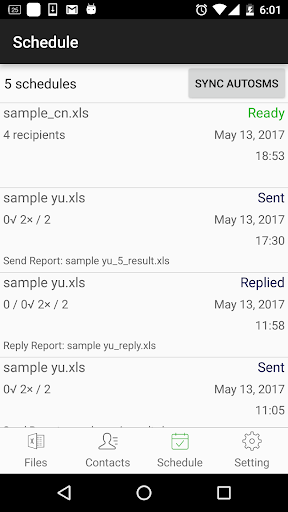
SA Group Text is the most efficient way to send group messages. You can add recipient names and phone numbers in an Excel file. You can enter static or personalized text messages right in the Excel spreadsheet. For example, if you enter “Hi {first name}, ...” in a message, the app will take the first name of the recipients and personalize the message, generating text such as “Hi David, …” , “Hi Michael, …”… SA Group Text is also an easy way to send text messages to the contacts on your Phone. Just pick groups or individual contacts, type in a static or personalized message and send it. Who uses SA Group Text ? ★ Small Businesses ★ Religious Groups ★ Retail ★ Nightlife - Bars & Nightclubs ★ Restaurants ★ Banks/Financial Institutions ★ Insurance Companies ★ Event Marketers (With hundreds (or even thousands) of people attending your events) ★ Traditional Media ★ Schools ★ Social Groups ★ Real Estate With SA Group Text you can : ★ Import group Text from an Excel file via USB/Email. ★ Create your own groups in an Excel spreadsheet and send messages to them. ★ Insert tags ({firstname},{lastname},{company} etc) in your text message in order to create personalized messages. When you use this function, each message has a personal touch. For example: Dear {firstname}, Welcome to our dinner party. ★ Use any Excel-compatible applications to create your group text messages. ★ Send SMS to as many recipients as you need within your Excel file ★ Create a formatted Excel file easily. The file can contain only two columns : Mobile and Message. You can find more example spreadsheets on the app’s website. ★ Create flexible group SMS in your spreadsheet. For example “{family} Family – Practice Tomorrow at 5pm for little {kidname}!” becomes “David Family – Practice Tomorrow at 5pm for little Johnny!”. The names change over and over again. ★ Schedule your messages you want to send at a specific time. ★ Set the time range of when you want your text message to send. ★ Support for Dual SIM devices (Android 5.1 or later). ★ Pause and resume schedules. You have to long press the schedule to access pause/resume option. ★ Import and send more 10,000 personalized messages in one time. ★ Send unsent messages. If the app is terminated while sending group sms, the app can continue the sending schedule after you launch the app. ★ Make send report and reply report. ★ If you provide the recipient's email address in the excel file , the same message will be sent to their email address. In order to send messages via email, you have to a. Enable send mail in the app’s setting page. b. set up an email account to send messages from it. c. add “Subject” and “EmailAddress” in the excel file. you can see the file sample-mail.xls in the app for detail. Due to SMS limitation, each app can only send 100 messages within an hour. You need to install SA Group text plug-in to extend the SMS limitation. After download plug-ins, please go to your phone’s settings, then go to app manager, grant Send SMS permission to these plug-ins. You also have to grant Run in background permission to the app and all plug-ins. Here's the way for some models to grant Run in background permission. Huawei go to Settings -> Battery -> Launch -> SA Group Text app turn on Auto-launch and Run in background Samsung go to Settings -> Apps -> Special access -> Optimise battery usage -> All apps -> turn off SA Group Text Vivo go to Settings -> More Settings -> Applications -> All -> SA Group Text -> Permission -> Single Permission Setting -> Autostart XiaoMi Permissions -> SA Group Text -> Start in background
Installs since 29 Aug 2026 Measured
Exact Google Play install counts, collected daily
Ratings
885 ratings, 60 reviews
- 5 ★30%
- 4 ★20%
- 3 ★14%
- 2 ★6.4%
- 1 ★30%
Recent reviews
Latest public reviews from the store
No reviews in our sample for this app yet.
Top chart positions
Latest Google Play chart ranks by country, last 10 days
Not in any tracked top chart in the last 10 days.
SA Group Text Lite history
Release, install milestones, listing and store changes
- Reached 100,000+ installs 15 Apr 2022
- Reached 50,000+ installs 17 Apr 2018
- First released on the store 11 Jan 2013
Update frequency
How often SA Group Text Lite ships a new version, month by month
5 updates in the last 12 months. More often than most similar apps: they shipped a median of 2 updates in the same year.
Recent versions
Current version 3.7.9
- Version 3.7.917 Oct 2026
1. Fixed known bugs.
- Version 3.7.812 Aug 2026
1. Fixed known bugs.
- Version 3.7.718 Jun 2026
1. Fixed known bugs.
- Version 3.7.616 Feb 2026
Fixed an issue where Dropbox could not connect or sync properly.
Listing keywords
Words and phrases SA Group Text Lite repeats most in its store listing
Top phrases: group text (12), sa group text (10), sa group (10), excel file (6), send messages (4).
Highlighted words also appear in the title. Counts cover the title, short description and description.
Business model and tech
From the store listing, the SDKs in the app package and its declared permissions
- Business model
- Free to downloadShows ads
- Built with
- No cross-platform framework or game engine detected
- Ad networks (1)
- AdMob
- Analytics and crash reports
- Firebase
- Sensitive access
- ContactsAccounts on the deviceAdvertising ID
2 ad, attribution and analytics SDKs detected. SDKs are read from the app package and permissions from the store listing, so code that loads later is not seen.
Technology
30 SDKs found in the app package
Ad networks
Advertising and install-attribution SDKs found in the app package
- AdMob
17 permissions
1 special access, 3 sensitive, 13 standard
- Set exact alarmsSCHEDULE_EXACT_ALARMSpecial access
- Read contactsSensitive
- See accounts on the deviceSensitive
- Show notificationsPOST_NOTIFICATIONSSensitive
- Ad attribution (Privacy Sandbox)ACCESS_ADSERVICES_ATTRIBUTIONStandard
- Ad topics (Privacy Sandbox)ACCESS_ADSERVICES_TOPICSStandard
- Read the advertising IDAD_IDStandard
- Read the advertising ID (Privacy Sandbox)ACCESS_ADSERVICES_AD_IDStandard
- Use accounts on the deviceStandard
- Keep the phone awakeStandard
- Run a foreground serviceFOREGROUND_SERVICEStandard
- Start when the phone turns onStandard
Compliance
What the listing and the app package show
- Store status
- Live
- Upkeep
- Updated 17 Oct 2026
- Registered in
- China
- Privacy policy
- Linked on the listing
- Advertising
- Shows ads
- In-app purchases
- None declared
- Age rating
- Everyone
- Sensitive permissions
- 3 sensitive, 1 special access of 17
- Location access
- No
- Camera and microphone
- Neither
Apps like SA Group Text Lite
LootParrot: Earn RewardsLootably607K installs★ 2.88
কারবার অ্যাপ - ডিজিটাল খাতাBizSphere308K installs★ 4.13
Cat® InspectCaterpillar Inc.155K installs★ 3.71
Fourthwall for CreatorsFW Creators33.7K installs★ 4.66
ScreenConnectConnectWise631K installs★ 2.04
OTRIM OFFICIALONPASSIVE TECHNOLOGIES L.L.C15.2K installs★ 5.0
IBM MaaS360 BrowserIBM MaaS360596K installs★ 2.86
Altametrics DARAltametrics80.2K installs★ 4.79
ESS MobileAttendance on Demand, Inc.378K installs★ 2.98
SA Group Text Lite: questions and answers
How many downloads does SA Group Text Lite have?
SA Group Text Lite has 139,462 installs on Google Play, measured from the store's own count on 14 Nov 2026.
Who makes SA Group Text Lite?
SA Group Text Lite is published by samapp, a developer based in CN.
When was SA Group Text Lite last updated?
The latest version (3.7.9) was released on 17 Oct 2026.
Is SA Group Text Lite free?
Yes. SA Group Text Lite is free to download, and it shows ads.
Is SA Group Text Lite still available?
Yes. SA Group Text Lite is live on Google Play as of 14 Nov 2026.
Track SA Group Text Lite and its competitors
Watch any app for new versions, rating drops, chart moves and removals. Free plan, no card.