
Samsung Smart Switch Mobile
If you can't download, you can open Smart Switch from device's Settings menu
- Installs
- 2.49B
- Measured
- Rating
- 3.93
- Ratings
- 542K
- 22.9K reviews
- Version
- 3.7.74.7
- Updated 22 Oct 2026
- Released
- 17 Apr 2013
- Tracked since 10 May 2026
- Size
- 30 MB
- Needs 4.0
Also on App Store: Samsung Smart Switch Mobile (239 ratings)
Screenshots


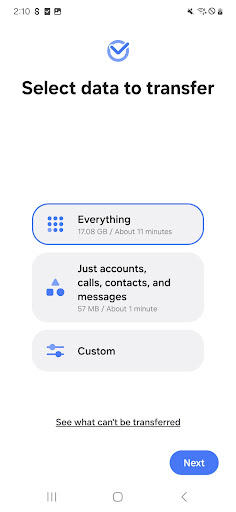
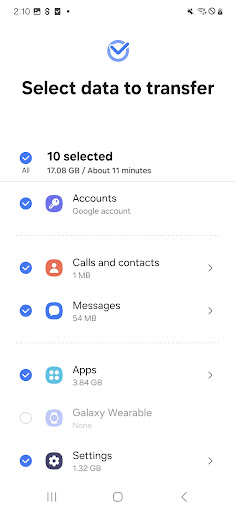

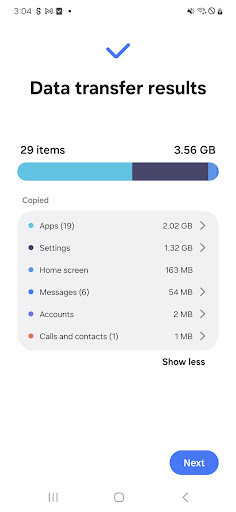
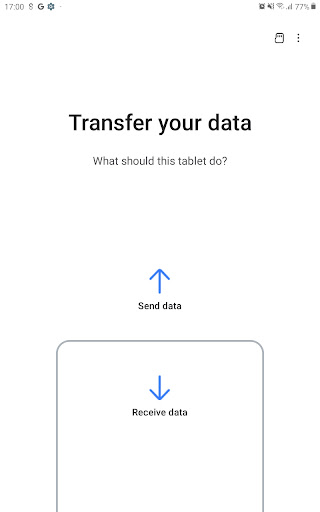
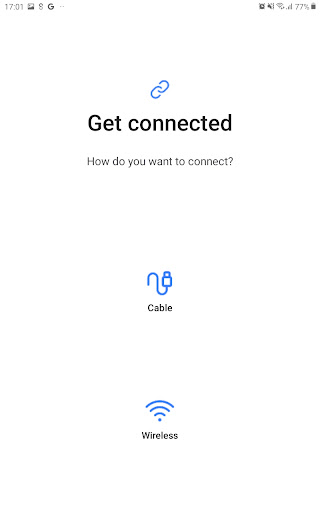
About Samsung Smart Switch Mobile
The description on the store listing
▣ Smart Switch gives you the freedom to move your contacts, music, photos, calendar, text messages, device settings and more to your new Galaxy device. Plus, Smart Switch™ helps you find your favorite apps or suggest similar ones on Google Play™.
▣ Who can transfer?
• Android™ owners
- Android 5.0 or higher
• iOS™ owners - use the option that’s best for you:
- Wired transfer from your iOS device to your Galaxy: iOS 5.0 or above, iOS device cable (lightning or 30 pin), and a USB connector
- Import from iCloud™: iOS 4.2.1 or higher and Apple ID
- PC/Mac transfer using iTunes™: Smart Switch PC/Mac software – Get started http://www.samsung.com/smartswitch
▣ What can be …
Read the full description
▣ Smart Switch gives you the freedom to move your contacts, music, photos, calendar, text messages, device settings and more to your new Galaxy device. Plus, Smart Switch™ helps you find your favorite apps or suggest similar ones on Google Play™. ▣ Who can transfer? • Android™ owners - Android 5.0 or higher • iOS™ owners - use the option that’s best for you: - Wired transfer from your iOS device to your Galaxy: iOS 5.0 or above, iOS device cable (lightning or 30 pin), and a USB connector - Import from iCloud™: iOS 4.2.1 or higher and Apple ID - PC/Mac transfer using iTunes™: Smart Switch PC/Mac software – Get started http://www.samsung.com/smartswitch ▣ What can be transferred? - Contacts, calendar(Device content only), messages, photos, music (DRM free content only, Not supported for iCloud), videos (DRM free content only), call logs, memos, alarms, Wi-Fi, wallpapers, documents, app data (Galaxy devices only), home layouts (Galaxy devices only) - You can send app data and home layouts by upgrading your Galaxy device to M OS (Galaxy S6 or higher). ▣ Which devices are supported? • Galaxy: Recent Galaxy mobile devices and tablets (From Galaxy S2) • Other Android devices: - HTC, LG, Sony, Huawei, Lenovo, Motorola, PANTECH, Panasonic, Kyocera, NEC, SHARP, Fujitsu, Xiaomi, Vivo, OPPO, Coolpad, RIM, YotaPhone, ZTE, Gionee, LAVA, MyPhone, Cherry Mobile, Google * For reasons such as compatibility between devices, it may not be possible to install and use Smart Switch on certain devices. 1. To transfer data, both devices must have a minimum of 500 MB free space in their internal memory. 2. If you have a non-Samsung device that constantly disconnects from the wireless network, go to Advanced Wi-Fi on your device, turn off the “Wi-Fi initialize” and “Disconnect low Wi-Fi signal” options, and try again. (The options described above may not be available, depending on your device manufacturer and OS version.) The following permissions are required for the app service. For optional permissions, the default functionality of the service is turned on, but not allowed. [ Required permissions ] . Phone: Used to confirm your phone number (Android 12 or lower) . Call logs: Used to transfer call log data (Android 9 or higher) . Contacts: Used to transfer contacts data . Calendar: Used to transfer calendar data . Camera: Used to scan QR codes to connect to Galaxy phones and tablets . SMS: Used to transfer SMS data . Storage: Used to save the files necessary for data transfer (Android 11 or lower) . Files and media: Used to save the files necessary for data transfer(Android 12) . Photos and Videos: Used to save the files necessary for data transfer (Android 13 or higher) . Nearby devices: Used to search for nearby devices using Wi-Fi or Bluetooth (Android 12 or higher) . Location: Used to connect to devices using Wi-Fi Direct, which makes your location available to nearby devices (Android 12 or lower) . Notifications: Used to provide information about the progress of data transfers (Android 13 or higher) If your system software version is lower than Android 6.0, please update the software to configure App permissions. Previously allowed permissions can be reset on Apps menu in device settings after software update.
Installs, last 30 days Measured
Exact Google Play install counts, collected daily
Ratings
542,471 ratings, 22,918 reviews
- 5 ★61%
- 4 ★7.9%
- 3 ★6.4%
- 2 ★3.8%
- 1 ★21%
Recent reviews
Latest public reviews from the store
- 17 May 2026
great
- 25 Apr 2026
It's number 1 in my top 5 list for android browsers. It has the best adblock settings & by far the best download manager. No large downloads have failed once on it unlike others I've used including Edge & Chrome, that have failed downloads at least a few times. But loading web pages is a bit slow compared to other browsers in my top 5.
- 25 Apr 2026
so fast
- 22 Apr 2026
ok..does what it should
What reviewers bring up
Topics mentioned in the latest 50 reviews, by how many reviews mention them
Liked in good reviews (24 reviews)
- standards 2
- number 2
- modern 2
- bar 2
Raised in bad reviews (23 reviews)
- browser 6
- add 6
- option 5
- menu 5
- samsung 4
- customize 3
- internet 3
- removed 3
Top chart positions
Latest Google Play chart ranks by country, last 10 days
- Countries ranked
- 37
- Best rank
- #8
- Top 10 placements
- 3
- of 46 chart placements
- Average rank
- #91.4
Best countries on Google Play
- 🇲🇽 Mexico · Top free, Tools#8
- 🇬🇧 United Kingdom · Top free, Tools#9
- 🇩🇪 Germany · Top free, Tools#10
- 🇨🇦 Canada · Top free, Tools#11
- 🇫🇷 France · Top free, Tools#14
- 🇦🇺 Australia · Top free, Tools#17
| Country | Chart | Category | Rank | Best (10 days) | Date |
|---|---|---|---|---|---|
| 🇲🇽 Mexico | Top free | Tools | #8 | #4 | 19 Nov 2026 |
| 🇬🇧 United Kingdom | Top free | Tools | #9 | #5 | 19 Nov 2026 |
| 🇩🇪 Germany | Top free | Tools | #10 | #7 | 19 Nov 2026 |
| 🇨🇦 Canada | Top free | Tools | #11 | #11 | 19 Nov 2026 |
| 🇫🇷 France | Top free | Tools | #14 | #9 | 19 Nov 2026 |
| 🇦🇺 Australia | Top free | Tools | #17 | #11 | 19 Nov 2026 |
| 🇺🇸 United States | Top free | Tools | #18 | #17 | 19 Nov 2026 |
| 🇧🇷 Brazil | Top free | Tools | #27 | #19 | 19 Nov 2026 |
| 🇫🇮 Finland | Top free | All apps | #30 | #17 | 19 Nov 2026 |
| 🇯🇵 Japan | Top free | Tools | #30 | #21 | 19 Nov 2026 |
Samsung Smart Switch Mobile history
Release, install milestones, listing and store changes
- Reached 1,000,000,000+ installs 26 Sep 2024
- Reached 500,000,000+ installs 13 Dec 2023
- First released on the store 17 Apr 2013
Update frequency
How often Samsung Smart Switch Mobile ships a new version, month by month
4 updates in the last 12 months. Less often than most similar apps: they shipped a median of 8 updates in the same year.
Recent versions
Current version 3.7.74.7
- Version 3.7.74.722 Oct 2026
- Fixed bugs and improved stability
- Version 3.7.72.616 Jul 2026
- Fixed bugs and improved stability
- Version 3.7.71.162 Jun 2026
- Fixed bugs and improved stability
- Version 3.7.69.1512 Feb 2026
- Fixed bugs and improved stability
Listing keywords
Words and phrases Samsung Smart Switch Mobile repeats most in its store listing
Top phrases: smart switch (6), wi fi (6), android or higher (5), transfer android (4), android or lower (3).
Highlighted words also appear in the title. Counts cover the title, short description and description.
Business model and tech
From the store listing and declared permissions
- Business model
- Free to download
- Sensitive access
- LocationCameraContactsPhone and callsText messagesCalendarPhotos, videos and filesAccounts on the deviceNearby devices
195 permissions
7 special access, 19 sensitive, 169 standard
- Change system settingsWRITE_SETTINGSSpecial access
- Install other appsREQUEST_INSTALL_PACKAGESSpecial access
- Manage all filesMANAGE_EXTERNAL_STORAGESpecial access
- Read privileged phone stateREAD_PRIVILEGED_PHONE_STATESpecial access
- Read sensitive log dataSpecial access
- See every installed appQUERY_ALL_PACKAGESSpecial access
- See which apps are usedPACKAGE_USAGE_STATSSpecial access
- Read calendar eventsSensitive
- Take photos and videosSensitive
- Change contactsSensitive
- Read contactsSensitive
- See accounts on the deviceSensitive
Compliance
What the listing and the app package show
- Store status
- Live
- Upkeep
- Updated 22 Oct 2026
- Registered in
- South Korea
- Privacy policy
- Linked on the listing
- Advertising
- No ads declared
- In-app purchases
- None declared
- Age rating
- Everyone
- Sensitive permissions
- 19 sensitive, 7 special access of 195
- Location access
- Yes, while in use
- Camera and microphone
- Camera
Apps like Samsung Smart Switch Mobile
MATE VPN - Security Proxy VPNMATRIX MOBILE PTE. LTD.144M installs★ 4.2
Battery Life & Health ToolBattery Stats Saver12.8M installs★ 4.41
Bitdefender Mobile SecurityBitdefender23M installs★ 4.7
Internet Speed Test SPEEDCHECKOokla17.1M installs★ 4.45
Barcode Scanner & QR ReaderMATRIX MOBILE PTE. LTD.20.8M installs★ 4.11
LOCKit: App Lock, Photos VaultSuperTools Corporation41.4M installs★ 4.55
Hotspot Shield Basic - Free VPAnchorfree LLC37.9M installs★ 4.54
Photo Translator - TranslateEVOLLY.APP47.4M installs★ 3.9
Phone Cleaner – Junk FilesJonDev. Studio15.8M installs★ 4.4
Samsung Smart Switch Mobile: questions and answers
How many downloads does Samsung Smart Switch Mobile have?
Samsung Smart Switch Mobile has 2,486,919,533 installs on Google Play, measured from the store's own count on 19 Nov 2026.
Who makes Samsung Smart Switch Mobile?
Samsung Smart Switch Mobile is published by Samsung Electronics Co., Ltd., a developer based in KR.
When was Samsung Smart Switch Mobile last updated?
The latest version (3.7.74.7) was released on 22 Oct 2026.
Is Samsung Smart Switch Mobile free?
Yes. Samsung Smart Switch Mobile is free to download.
Is Samsung Smart Switch Mobile still available?
Yes. Samsung Smart Switch Mobile is live on Google Play as of 19 Nov 2026.
Track Samsung Smart Switch Mobile and its competitors
Watch any app for new versions, rating drops, chart moves and removals. Free plan, no card.