
Scanify- PDF Camera Scanner
Scan from Scanify Cam Scanner, Create, Convert and Edit High Quality PDF files
- Installs
- 163K
- Measured
- Rating
- 4.68
- Ratings
- 1.7K
- 6 reviews
- Version
- 3.4.0
- Updated 17 Aug 2024
- Released
- 28 Oct 2021
- Tracked since 13 May 2026
- Size
- —
Screenshots





About Scanify- PDF Camera Scanner
The description on the store listing
One of the most trusted document scanning app on the Play Store with an average rating of 4.5 stars.
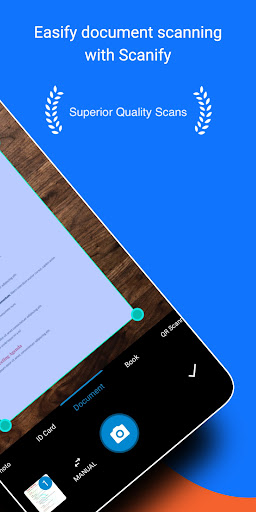
Scan your documents digitally and convert them into crystal clear high quality PDF files with a lot of editing options.
Apart from just scanning, this app provides you with a ton of features from which you can easily edit and manage your PDF files-
1) Compression, auto-cropping, Color Filters, Original Signature, Erase, Watermark, Batch editing, OCR, Notes, and more.
2) Scan Documents, ID cards, Books, QR codes and convert images to text(OCR) through the camera screen.
3) PDF Tools have options like Merge PDF, Split PDF, PDF to image, Image to PDF, Text to PDF, Long image, PDF …
Read the full description
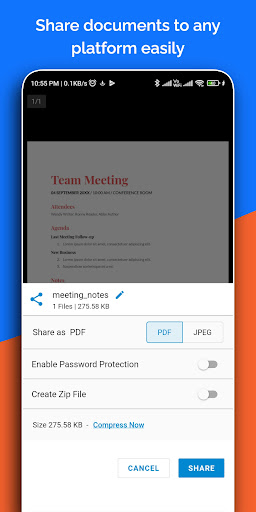
One of the most trusted document scanning app on the Play Store with an average rating of 4.5 stars. Scan your documents digitally and convert them into crystal clear high quality PDF files with a lot of editing options. Apart from just scanning, this app provides you with a ton of features from which you can easily edit and manage your PDF files- 1) Compression, auto-cropping, Color Filters, Original Signature, Erase, Watermark, Batch editing, OCR, Notes, and more. 2) Scan Documents, ID cards, Books, QR codes and convert images to text(OCR) through the camera screen. 3) PDF Tools have options like Merge PDF, Split PDF, PDF to image, Image to PDF, Text to PDF, Long image, PDF to text, PDF to ZIP, add a link, and Add/Remove Password (coming soon). What's more? <b>Document Scanner App</b> – An Indian scanner app that provides you with more advanced scan options as compared to any other apps on the store. <b>Advanced Artificial Intelligence(AI)</b> - The smart AI lets you scan without a tap on the screen. It automatically detects the edges of the document and captures it automatically. <b>Scan Document</b> - Now scan your documents with a far superior quality without taking the help of a Xerox machine. All you need is a smartphone and you are ready to go. Key Features: * Various Scan Modes – ID Card, Document, Book, Photo, QR Scanner, and OCR Text. * Perfect shot – Grid mode to get the perfect click of the document. * Select Scan quality from High to Custom Scan Quality. <b>Color Filters</b> - This app comes with various color filters which will help you to choose the perfect color combination for your documents. You can also adjust the intensity of the color filters. Filters like the Vibrant(Magic color), Soft tone, Sharp black, OCVColor, etc provide you with a variety of options to choose from. Key Features: * Options to further adjust the intensity of the color filters. * Vibrant and Soft tone can be used as a magic color filter. <b>Original Signature on Documents</b> - Now you can directly put your original signature on your digital Document. You can Scan your signature through the App’s camera and can put it directly on a document. You can also import your existing signature through the gallery and can put it on a document. Also, you can even draw your signature on the screen and add it to the document. Key Features: * Get your Signatures scanned through the Camera. * Option to import signature from Gallery. * Options to edit the signature like Darken, Color, Opacity, Blend, Flip, Resize, etc. * Option to directly share and save the original signature. <b>Compression</b> - Compression technology in this app is one of the best technology in this segment. This is one of the features that our users like the most. This app significantly reduces the size of a document without much reducing the image quality. Key Features: * Reduce file size with a very minimal effect on scan quality. * Various file compression options from Low to High. <b>Copy Text from Image(OCR)</b> - Now with the help of the OCR feature of the app, you can easily copy all the text from your photos. This app also comes with OCR on the Camera Screen. <b>Cam Scanner</b> - Easily scan your documents and paper through your camera and convert them into high-quality PDF or JPEG files. Take a picture of the whiteboard or blackboard and produce it the same with the help of Scanify Scanner at any place even if you're offline. <b>Easy Scanner</b> - Scan and Instantly print out documents in any size like A1, A2, A3, A4, Postcard, Letter, Note, etc. <b>QR and Barcode Scanner</b> - Scanify Scanner also has a QR and BarCode Scanner feature. <b>Paper Scanner</b> - Scan your exam papers and submit them directly to your school and colleges into PDF as well as JPG format. <b>Portable Scanner</b> - The Doc scanner once installed can turn every smartphone into a portable scanner.
Installs, last 30 days Measured
Exact Google Play install counts, collected daily
Ratings
1,733 ratings, 6 reviews
- 5 ★88%
- 4 ★4.1%
- 3 ★0.0%
- 2 ★4.1%
- 1 ★4.1%
Recent reviews
Latest public reviews from the store
No reviews in our sample for this app yet.
Top chart positions
Latest Google Play chart ranks by country, last 10 days
Not in any tracked top chart in the last 10 days.
Scanify- PDF Camera Scanner history
Release, install milestones, listing and store changes
- Reached 100,000+ installs 17 Aug 2024
- Reached 50,000+ installs 10 Apr 2022
- Reached 10,000+ installs 19 Dec 2021
- First released on the store 28 Oct 2021
Update frequency
How often Scanify- PDF Camera Scanner ships a new version, month by month
0 updates in the last 12 months. Less often than most similar apps: they shipped a median of 1 updates in the same year.
Recent versions
Current version 3.4.0
- Version 3.4.028 Jul 2023
Bug Fix and Improvements. Latest Android Support upgraded. Scan quality improved. Performance Improved.
- Version 3.3.312 Dec 2022
- Version 3.2.314 Nov 2022
- Version 2.1.710 Feb 2022
Listing keywords
Words and phrases Scanify- PDF Camera Scanner repeats most in its store listing
Top phrases: color filters (5), key features (4), original signature (4), high quality pdf (3), scan your documents (3).
Highlighted words also appear in the title. Counts cover the title, short description and description.
Business model and tech
From the store listing, the SDKs in the app package and its declared permissions
- Business model
- Free to downloadIn-app purchasesShows ads
- Built with
- Flutter
- Ad networks (1)
- AdMob
- Subscriptions and payments
- Google Play billing
- Analytics and crash reports
- Firebase
- Sensitive access
- CameraPhotos, videos and filesAdvertising ID
2 ad, attribution and analytics SDKs detected. SDKs are read from the app package and permissions from the store listing, so code that loads later is not seen.
Technology
26 SDKs found in the app package
Ad networks
Advertising and install-attribution SDKs found in the app package
- AdMob
16 permissions
0 special access, 5 sensitive, 11 standard
- Take photos and videosSensitive
- Change or delete shared storageSensitive
- Read photosREAD_MEDIA_IMAGESSensitive
- Read shared storageSensitive
- Show notificationsPOST_NOTIFICATIONSSensitive
- Read how it was installed (install referrer)BIND_GET_INSTALL_REFERRER_SERVICEStandard
- Read the advertising IDAD_IDStandard
- Add home screen shortcutsStandard
- Run a foreground serviceFOREGROUND_SERVICEStandard
- Use fingerprint or face unlockUSE_BIOMETRICStandard
- Use the fingerprint readerUSE_FINGERPRINTStandard
- Full internet accessStandard
Compliance
What the listing and the app package show
- Store status
- Live
- Upkeep
- No update since 17 Aug 2024
- Registered in
- India
- Privacy policy
- Linked on the listing
- Advertising
- Shows ads
- In-app purchases
- Offered
- Age rating
- Everyone
- Sensitive permissions
- 5 sensitive of 16
- Location access
- No
- Camera and microphone
- Camera
Apps like Scanify- PDF Camera Scanner
Secure Notes Lock - Notepad -NewSoftwares LLC135K installs★ 4.07
EFL Joy of SellingEureka Forbes56.2K installs★ 3.6
Super Productivity: To-Do ListThe Front End121K installs★ 4.75
MVola ComoresYAS Madagascar123K installs★ 4.5
Beit QRcode(Accurate Read)Ma Dav2.8M installs★ 3.88
Korean KeyboardAbbott Cullen309K installs★ 3.54
My GoodBarberGoodBarber SAS349K installs★ 3.37
10BA Pro Financial CalculatorSegitiga.Pro264K installs★ 4.69
SMS by Voice - Voice to TextGalaxy Apps Center503K installs★ 4.14
Scanify- PDF Camera Scanner: questions and answers
How many downloads does Scanify- PDF Camera Scanner have?
Scanify- PDF Camera Scanner has 163,456 installs on Google Play, measured from the store's own count on 19 Nov 2026.
Who makes Scanify- PDF Camera Scanner?
Scanify- PDF Camera Scanner is published by Lufick Apps, a developer based in IN.
When was Scanify- PDF Camera Scanner last updated?
The latest version (3.4.0) was released on 17 Aug 2024.
Is Scanify- PDF Camera Scanner free?
Yes. Scanify- PDF Camera Scanner is free to download and offers in-app purchases, and it shows ads.
Is Scanify- PDF Camera Scanner still available?
Yes. Scanify- PDF Camera Scanner is live on Google Play as of 19 Nov 2026.
Track Scanify- PDF Camera Scanner and its competitors
Watch any app for new versions, rating drops, chart moves and removals. Free plan, no card.