
Scanner PDF, document scanner,
PDF scanner, document scanner, scan to PDF, scan and convert, camera to PDF
- Installs
- 35K
- Measured
- Rating
- 4.87
- Ratings
- 286
- 10 reviews
- Version
- 1.5.8
- Updated 25 Aug 2023
- Released
- 19 Sep 2021
- Tracked since 14 May 2026
- Size
- —
Also on App Store: Scanner • PDF Document Scanner (3 ratings)
Screenshots


About Scanner PDF, document scanner,
The description on the store listing
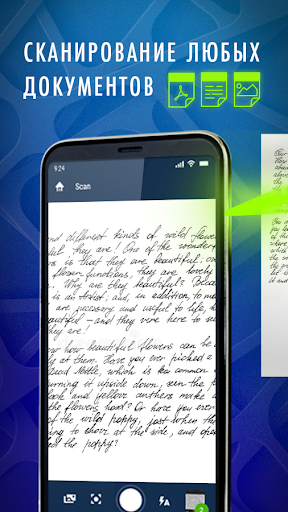
<b>Scanner PDF, document scanner, scan to PDF</b> app is a simple and multifunctional tool in your mobile phone!
It will help you quickly and easily <b>scan any documents, digitalize, edit</b> them and smart <b>text recognition</b> will let you <b>save documents in any convenient format</b> and <b>share</b> them within just a few clicks.
Install the app and you will leave stationary scanners behind for good simply because you won’t need them anymore!
PDF scanner, document scanner, scan to PDF app <b>won’t use much storage</b> of your device but it includes <b>lots of useful features</b>, such as:
● <u><b>Documents scanner</b></u>
<b>Use your phone camera to scan any type of …
Read the full description
<b>Scanner PDF, document scanner, scan to PDF</b> app is a simple and multifunctional tool in your mobile phone! It will help you quickly and easily <b>scan any documents, digitalize, edit</b> them and smart <b>text recognition</b> will let you <b>save documents in any convenient format</b> and <b>share</b> them within just a few clicks. Install the app and you will leave stationary scanners behind for good simply because you won’t need them anymore! PDF scanner, document scanner, scan to PDF app <b>won’t use much storage</b> of your device but it includes <b>lots of useful features</b>, such as: ● <u><b>Documents scanner</b></u> <b>Use your phone camera to scan any type of documents</b>: agreements, contracts, bills, receipts, letters, faxes, books, notes, business cards, photos, questionnaires and so much more. With this mobile scanner you will scan anything accurately and quickly anytime and anywhere - no one will ever guess that you scanned it with just a mobile device! ● <u><b>Text recognition and various formats</b></u> <b>Accurate text recognition (OCR)</b> will help you convert pictures, images and photos to text. Text content recognized by the app can be <b>converted and saved in any format that</b> is convenient for you for further use and editing: JPEG, PDF, TXT, DOC, XLS, PPTX. ● <u><b>Lots of languages supported</b></u> PDF scanner, document scanner, scan to PDF text recognition feature supports <b>38 languages</b> and will easily convert images to text! But there is more! For added convenience the app has one more great feature: text <b>translation to 108 foreign languages!</b> ● <u><b> Hi-Tech</b></u> We use modern technologies to make sure that the app automatically detects borders, sharpens scanned content and <b>recognizes text precisely</b>. ● <u><b>Documents editing</b></u> Edit scanned documents <b>effortlessly: adjust colors, change brightness and contrast</b> and edit other image settings to enhance it and make the scanned file even sharper, clearer and better! Or you can change colors of the selected part of text, signature or date to <b>highlight the most important</b> parts only! ● <u><b>Insert to documents</b></u> You no longer need any extra text editors! You can <b>add handwritten signature, typed text, handwritten text, images or dates</b> (9 different formats of dates are supported) - directly in PDF scanner, document scanner, scan to PDF app! ● <u><b>Share with friends</b></u> <b>Share</b> PDF files, translated text or saved in any other favourable format files with family, friends and colleagues - in messengers (Whatsapp, Telegram, iMessage and others), as attachments to e-mails, etc. ● <u><b>Many pages - one scan</b></u> With this pocket scanner you can <b>scan many pages into one document</b> in just a few taps. You will never get confused and lost in dozens of similar files again! PDF scanner, document scanner, scan to PDF is a <b>scanner, converter and editor</b> in just one app! Install the app and <b>feel the difference</b>: document and file management has never been so convenient, easy and fast!
Installs since 29 Aug 2026 Measured
Exact Google Play install counts, collected daily
Ratings
286 ratings, 10 reviews
- 5 ★95%
- 4 ★2.5%
- 3 ★0.0%
- 2 ★0.0%
- 1 ★2.5%
Recent reviews
Latest public reviews from the store
- 14 Jun 2022
Easy and free. Ads aren't too bad but the filter helps the papers look amazing
- 7 Jun 2022
Easy to use!
- 10 May 2022
Easy to use.
- 9 May 2022
works fine
Top chart positions
Latest Google Play chart ranks by country, last 10 days
Not in any tracked top chart in the last 10 days.
Scanner PDF, document scanner, history
Release, install milestones, listing and store changes
- Reached 10,000+ installs 20 Dec 2021
- Reached 5,000+ installs 22 Nov 2021
- Reached 1,000+ installs 9 Oct 2021
- First released on the store 19 Sep 2021
Update frequency
How often Scanner PDF, document scanner, ships a new version, month by month
0 updates in the last 12 months. Less often than most similar apps: they shipped a median of 2 updates in the same year.
Recent versions
Current version 1.5.8
- Version 1.5.825 Aug 2023
Fixes
- Version 1.5.723 Jan 2023
- Version 1.5.67 Dec 2022
- Version 1.5.521 Feb 2022
Listing keywords
Words and phrases Scanner PDF, document scanner, repeats most in its store listing
Top phrases: document scanner (7), document scanner scan (6), scan to pdf (6), scanner scan (6), pdf scanner document (5).
Highlighted words also appear in the title. Counts cover the title, short description and description.
Business model and tech
From the store listing and declared permissions
- Business model
- Free to downloadIn-app purchasesShows ads
- Sensitive access
- No sensitive permission declared
Compliance
What the listing and the app package show
- Store status
- Live
- Upkeep
- No update since 25 Aug 2023
- Privacy policy
- Linked on the listing
- Advertising
- Shows ads
- In-app purchases
- Offered
- Age rating
- Everyone
Apps like Scanner PDF, document scanner,
Fit Tolerance ISOYaşar Yücel Yeşilbağ151K installs★ 4.83
ADL DMX CalculatorKirill Trofimov62K installs★ 5.0
Screenshot Expert: Markup ToolTasakiApps12.2K installs★ 4.25
TV Remote - Control Roku & AllLyra mob110K installs★ 4.03
Battery barABC.21.1K installs★ 3.18
Bubble LevelEONSOFT55K installs★ 4.8
Bubble LevelCrydata13.2K installs★ 4.85
M Calendar(calendar, schedule)Sunguy257K installs★ 3.56
Easy Homescreen LauncherSimple Palace studio69.2K installs★ 3.94
Scanner PDF, document scanner,: questions and answers
How many downloads does Scanner PDF, document scanner, have?
Scanner PDF, document scanner, has 35,001 installs on Google Play, measured from the store's own count on 14 Nov 2026.
Who makes Scanner PDF, document scanner,?
Scanner PDF, document scanner, is published by Evacorp.
When was Scanner PDF, document scanner, last updated?
The latest version (1.5.8) was released on 25 Aug 2023.
Is Scanner PDF, document scanner, free?
Yes. Scanner PDF, document scanner, is free to download and offers in-app purchases, and it shows ads.
Is Scanner PDF, document scanner, still available?
Yes. Scanner PDF, document scanner, is live on Google Play as of 14 Nov 2026.
Track Scanner PDF, document scanner, and its competitors
Watch any app for new versions, rating drops, chart moves and removals. Free plan, no card.