
Screen Capture and Recorder -
Screenshot, Screen recorder, Photo and Video editor.
- Installs
- 10.41M
- Measured
- Rating
- 3.43
- Ratings
- 81.6K
- 4K reviews
- Version
- 7.2.9
- Updated 6 Aug 2021
- Released
- 21 May 2013
- Tracked since 13 May 2026
- Size
- 7 MB
- Needs 5.0
Screenshots
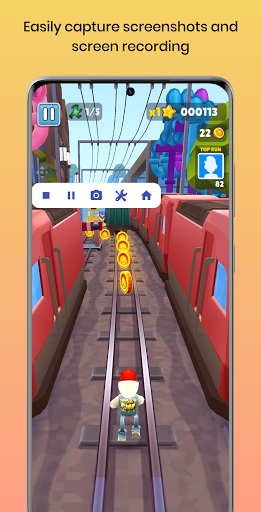


About Screen Capture and Recorder -
The description on the store listing
SCAR is a beautiful and easy to use screen recorder and screenshot capturing app. It provides massive video and photo editing features for your screen recordings, screenshots, and external media. Get it now and see for yourself.
<b>Features</b>
<b>Sticky Notification</b>
Use the sticky notification to easily start and/or stop capture service without even opening the app.
<b>4K Screen Recording</b>
Capture screen recordings in 4K quality.
<b>Screen Recording Tools</b>
• Use the back or front-facing camera as an overlay in screen recording for creating effective tutorials.
• While screen recording, draw on your phone screen using a paintbrush to annotate important things.
• …
Read the full description
SCAR is a beautiful and easy to use screen recorder and screenshot capturing app. It provides massive video and photo editing features for your screen recordings, screenshots, and external media. Get it now and see for yourself. <b>Features</b> <b>Sticky Notification</b> Use the sticky notification to easily start and/or stop capture service without even opening the app. <b>4K Screen Recording</b> Capture screen recordings in 4K quality. <b>Screen Recording Tools</b> • Use the back or front-facing camera as an overlay in screen recording for creating effective tutorials. • While screen recording, draw on your phone screen using a paintbrush to annotate important things. • Personalize your screen recordings by easily adding a text or image watermark to it. The watermarks are fully customizable w.r.t. the size and transparency. <b>Floating Button</b> An easy to use floating-button that lets you easily capture screen recordings and screenshots. It is fully customizable w.r.t. the size, transparency, and action on click. <b>Image Joiner/Sticher/Merger</b> Stich/Join/Merge images horizontally/vertically to create a panorama. <b>Video Compressor</b> Compress big videos to a smaller file size. <b>Video Trimmer</b> Remove unwanted parts from your videos by trimming them. <b>Video Audio Extractor</b> Extract just audio from a video track. <b>Mute Video</b> Remove soundtrack from a video. <b>Video Frame Extractor</b> Extract still images from a video. <b>Image Cropper</b> Crop important parts of your photo. <b>Draw & Erase</b> Draw on a photo using a paintbrush with customizable size and color. You can also erase if you drew something by mistake. <b>Add Text</b> Add text to your photos with customizable size and color. <b>Stickers</b> Add stickers to your photos. <b>Photo Filters</b> Add filters to your photos. <b>Add Photo</b> Add external photos on top of the photo in the editor. <b>Themes</b> The app is available in light and dark themes.
Installs, last 30 days Measured
Exact Google Play install counts, collected daily
Ratings
81,561 ratings, 3,974 reviews
- 5 ★44%
- 4 ★14%
- 3 ★10.0%
- 2 ★5.0%
- 1 ★27%
Recent reviews
Latest public reviews from the store
No reviews in our sample for this app yet.
Top chart positions
Latest Google Play chart ranks by country, last 10 days
Not in any tracked top chart in the last 10 days.
Screen Capture and Recorder - history
Release, install milestones, listing and store changes
- Reached 10,000,000+ installs 20 Oct 2020
- First released on the store 21 May 2013
Update frequency
How often Screen Capture and Recorder - ships a new version, month by month
0 updates in the last 12 months. Less often than most similar apps: they shipped a median of 1 updates in the same year.
Recent versions
Current version 7.2.9
- Version 7.2.96 Aug 2021
Crash and bug fixes. A recording timer is now displayed in the floating button. You can favorite the recorded or captured media. Added a couple of shortcuts to open external media (image or video). You can prefer not to show a heads-up notification for screenshots. Go to screenshot settings and change it the way you like. Now you can choose to automatically start the capture service when the device restarts. Better audio support.
- Version 7.2.81 Aug 2021
- Version 7.2.521 Jul 2021
- Version 7.2.31 Jul 2021
Listing keywords
Words and phrases Screen Capture and Recorder - repeats most in its store listing
Top phrases: screen recording (4), screen recordings (4), capture screen recordings (2), customizable the size (2), size and color (2).
Highlighted words also appear in the title. Counts cover the title, short description and description.
Business model and tech
From the store listing, the SDKs in the app package and its declared permissions
- Business model
- Free to downloadIn-app purchasesShows ads
- Built with
- No cross-platform framework or game engine detected
- Ad networks (2)
- AdMobFacebook Audience Network
- Subscriptions and payments
- Google Play billing
- Analytics and crash reports
- Firebase
- Sensitive access
- CameraMicrophonePhotos, videos and filesDraws over other apps
3 ad, attribution and analytics SDKs detected. SDKs are read from the app package and permissions from the store listing, so code that loads later is not seen.
Technology
20 SDKs found in the app package
Ad networks
Advertising and install-attribution SDKs found in the app package
- AdMob
- Facebook Audience Network
14 permissions
1 special access, 4 sensitive, 9 standard
- Draw over other appsSpecial access
- Record audioSensitive
- Take photos and videosSensitive
- Change or delete shared storageSensitive
- Read shared storageSensitive
- Read how it was installed (install referrer)BIND_GET_INSTALL_REFERRER_SERVICEStandard
- Control vibrationStandard
- Keep the phone awakeStandard
- Run a foreground serviceFOREGROUND_SERVICEStandard
- Start when the phone turns onStandard
- Full internet accessStandard
- See network connectionsStandard
Compliance
What the listing and the app package show
- Store status
- Live
- Upkeep
- No update since 6 Aug 2021
- Registered in
- India
- Privacy policy
- Linked on the listing
- Advertising
- Shows ads
- In-app purchases
- Offered
- Age rating
- Everyone
- Sensitive permissions
- 4 sensitive, 1 special access of 14
- Location access
- No
- Camera and microphone
- Both
Apps like Screen Capture and Recorder -
HTTP Custom - AIO Tunnel VPNePro Dev. Team27.3M installs★ 4.11
vConnectVodafone Idea Ltd.6.8M installs★ 4.0
Clickmate - Auto Clicker MacroBattery Stats Saver17.7M installs★ 4.22
VirusBuster MobileTrend Micro Inc. / トレンドマイクロ株式会社13.1M installs★ 4.0
Send files to TVYablio43.7M installs★ 4.2
My FilesColorOS1.4B installs★ 3.75
Tube Video Downloader & Videovideo download.11.2M installs★ 3.49
Skins for Minecraft PERemoro Studios22.3M installs★ 4.26
Satoshi App: Get AirdropsAimee Han9.3M installs★ 3.3
Screen Capture and Recorder -: questions and answers
How many downloads does Screen Capture and Recorder - have?
Screen Capture and Recorder - has 10,414,164 installs on Google Play, measured from the store's own count on 20 Nov 2026.
Who makes Screen Capture and Recorder -?
Screen Capture and Recorder - is published by App Doodle, a developer based in IN.
When was Screen Capture and Recorder - last updated?
The latest version (7.2.9) was released on 6 Aug 2021.
Is Screen Capture and Recorder - free?
Yes. Screen Capture and Recorder - is free to download and offers in-app purchases, and it shows ads.
Is Screen Capture and Recorder - still available?
Yes. Screen Capture and Recorder - is live on Google Play as of 20 Nov 2026.
Track Screen Capture and Recorder - and its competitors
Watch any app for new versions, rating drops, chart moves and removals. Free plan, no card.