Screen Locker: Time Passcode
Screen locker uses phone current time to unlock which is your one time password
- Installs
- 410K
- Measured
- Rating
- 4.01
- Ratings
- 11.4K
- 11 reviews
- Version
- Varies with device
- Updated 30 Jun 2026
- Released
- 12 Feb 2021
- Tracked since 13 May 2026
- Size
- 6 MB
- Needs 4.1
Screenshots





About Screen Locker: Time Passcode
The description on the store listing
Do you feel unsafe about keeping a constant PIN code all the time?
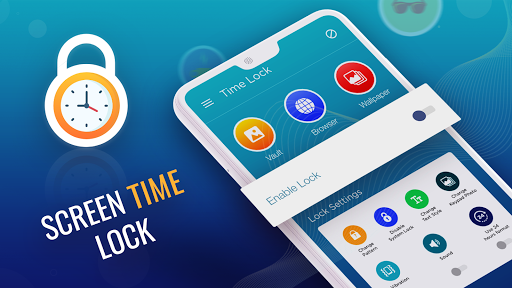
Our <font color=""><b>Screen lock: Time Lock</b></font> offers a dynamic time Password that changes every minute. This means you can lock your phone at the current time whenever try to unlock it.
Are you bothered by people peeking at your PIN code while unlocking your phone?
This <font color=""><b>Time Lock: Screen lock</b></font>is a reliable lock screen app for the security of your smartphone. Because time changes every minute, means the password changes too, which is hard to guess or see by side. It also offers screen lock wallpaper which is HD.
How about a PIN code that changes with every passing minute? Yes!! You …
Read the full description
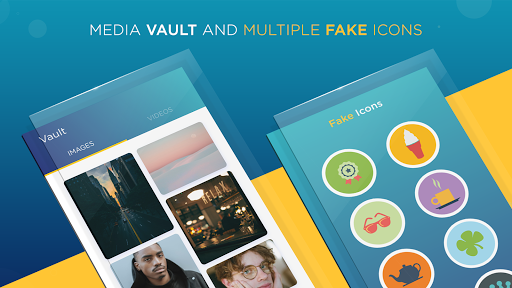
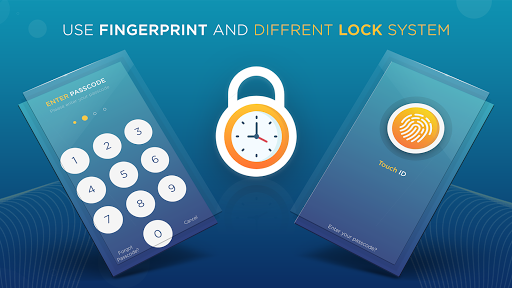
Do you feel unsafe about keeping a constant PIN code all the time? Our <font color=""><b>Screen lock: Time Lock</b></font> offers a dynamic time Password that changes every minute. This means you can lock your phone at the current time whenever try to unlock it. Are you bothered by people peeking at your PIN code while unlocking your phone? This <font color=""><b>Time Lock: Screen lock</b></font>is a reliable lock screen app for the security of your smartphone. Because time changes every minute, means the password changes too, which is hard to guess or see by side. It also offers screen lock wallpaper which is HD. How about a PIN code that changes with every passing minute? Yes!! You read it right. Thanks to the TIME LOCKER, which enables you to set the current phone time as your password screen lock. You get a new one-time password every time the clock clicks, keeping your private data secure from shoulder surfers. It is 100% time passed. Now download the password screen lock app, enhance the safety of your mobile, and protect it from unauthorized users. Don’t wait to protect your smartphone by activating the password for the lock screen by using the time passcode. <p><font color=""><b>🔥 features 🔥</b></font> </p><p><b>✔️ Compatible with a wide range of android phones </b> </p><p><b>✔️ Apple-themed sliding lock screen option</b> </p><p><b>✔️ Stunning parallax effect lock</b> </p><p><b>✔️ Impregnable lock security</b> </p><p><b>✔️ Completely customizable lock screen</b> </p><p><b>✔️ Editable sliding text.</b> (You can display any desired text on your lock screen). </p><p><b>✔️ Lock personal photos and videos </b> (a one-time password is required to access photos and videos on your cell phone) </p><p><font color=""><b>More Features of Time Locker</b></font> </p><p><b>⏰ Personalized wallpaper on lock screen.</b> ( Download and apply ULTRA HD wallpapers from the web or choose from the phone gallery).</p> <p><b>💡 Enable/Disable unlock sound mode.</b> </p><p><b>💡 Enable/Disable unlock vibration mode.</b> </p><p><b>💡 Compatible with 24hr and 12hr modes of the current time.</b> </p><p><b>💡 Smart and user-friendly password screen lock application.</b> </p><p><b>💡 Impregnable security lock system.</b> </p><p><b>💡 Battery efficient and consumes less memory space.</b> </p><p><b>💡 Dynamic PIN code option.</b> (Set the password in one of the following modes according to your convenience) </p><p><b>💡 Current time is your password for the lock screen.</b> </p><p><b>💡 PIN Password</b> (Any user-defined password) </p><p><b>💡 Current Time Password</b> (If the time on lock screen = 09:35 then, your PIN = 0935). </p><p><b>💡 Time Passed and unlock your phone.</b> </p><p>This <font color=""><b>Time Lock: Screen lockTime code</b></font> app will generate one-time passcode with every minute. This dynamic time is your mobile password for the lock screen and the latest features help you to improve security. With HD screen lock wallpaper enjoy the difference.</p>
Installs, last 30 days Measured
Exact Google Play install counts, collected daily
Ratings
11,438 ratings, 11 reviews
- 5 ★63%
- 4 ★6.8%
- 3 ★6.8%
- 2 ★2.7%
- 1 ★21%
Recent reviews
Latest public reviews from the store
No reviews in our sample for this app yet.
Top chart positions
Latest Google Play chart ranks by country, last 10 days
Not in any tracked top chart in the last 10 days.
Screen Locker: Time Passcode history
Release, install milestones, listing and store changes
- Moved from Tools to Personalization 6 Nov 2025
- Reached 100,000+ installs 10 May 2023
- Reached 50,000+ installs 13 Mar 2023
- Reached 10,000+ installs 1 Jul 2021
- Reached 5,000+ installs 22 Apr 2021
- Reached 1,000+ installs 25 Mar 2021
- Reached 500+ installs 9 Mar 2021
- Reached 100+ installs 23 Feb 2021
Update frequency
How often Screen Locker: Time Passcode ships a new version, month by month
1 updates in the last 12 months. More often than most similar apps: they shipped a median of 0 updates in the same year.
Recent versions
Current version Varies with device
- Version 3.130 Jun 2026
• Added the new Voice Lock feature for enhanced screen security. • Improved lock screen performance and overall user experience. • Fixed minor issues and enhanced app stability.
- Version 3.021 Aug 2025
- Version 2.910 Aug 2024
- Version 2.46 Nov 2023
Listing keywords
Words and phrases Screen Locker: Time Passcode repeats most in its store listing
Top phrases: lock screen (11), screen lock (8), font color (5), pin code (4), password screen lock (3).
Highlighted words also appear in the title. Counts cover the title, short description and description.
Business model and tech
From the store listing and declared permissions
- Business model
- Free to downloadShows ads
- Sensitive access
- Photos, videos and filesDraws over other appsAdvertising ID
22 permissions
1 special access, 3 sensitive, 18 standard
- Draw over other appsSpecial access
- Read photosREAD_MEDIA_IMAGESSensitive
- Read shared storageSensitive
- Show notificationsPOST_NOTIFICATIONSSensitive
- Ad attribution (Privacy Sandbox)ACCESS_ADSERVICES_ATTRIBUTIONStandard
- Ad topics (Privacy Sandbox)ACCESS_ADSERVICES_TOPICSStandard
- Read how it was installed (install referrer)BIND_GET_INSTALL_REFERRER_SERVICEStandard
- Read the advertising IDAD_IDStandard
- Read the advertising ID (Privacy Sandbox)ACCESS_ADSERVICES_AD_IDStandard
- Control vibrationStandard
- Foreground service (special use)FOREGROUND_SERVICE_SPECIAL_USEStandard
- Keep the phone awakeStandard
Compliance
What the listing and the app package show
- Store status
- Live
- Upkeep
- Updated 30 Jun 2026
- Registered in
- Pakistan
- Privacy policy
- Linked on the listing
- Advertising
- Shows ads
- In-app purchases
- None declared
- Age rating
- Everyone
- Sensitive permissions
- 3 sensitive, 1 special access of 22
- Location access
- No
- Camera and microphone
- Neither
Apps like Screen Locker: Time Passcode
Anime Wallpapers 4K | HDApps Mro2.8M installs★ 4.59
Wallpaper MakerReal Zhang825K installs★ 4.23
Galaxy Flower Unicorn KeyboardFancy keyboard for theme apps2.6M installs★ 4.9
O-Xyde Watch Facethema813K installs★ 4.4
Amazing Water Live WallpaperSam Live Wallpaper2.3M installs★ 4.06
USB-C to HDMI Phone to TVBattery Stats Saver1.8M installs★ 3.52
Fireflies Live WallpaperDoubleDragon1.5M installs★ 4.71
Bangla Keyboard (Bharat)Bharat Keyboards5M installs★ 4.24
Blue Neon Fonts Tech Beam KeybFancy keyboard for theme apps1.9M installs★ 4.62
Screen Locker: Time Passcode: questions and answers
How many downloads does Screen Locker: Time Passcode have?
Screen Locker: Time Passcode has 409,752 installs on Google Play, measured from the store's own count on 20 Nov 2026.
Who makes Screen Locker: Time Passcode?
Screen Locker: Time Passcode is published by D-apps Studio, a developer based in PK.
When was Screen Locker: Time Passcode last updated?
The latest version (Varies with device) was released on 30 Jun 2026.
Is Screen Locker: Time Passcode free?
Yes. Screen Locker: Time Passcode is free to download, and it shows ads.
Is Screen Locker: Time Passcode still available?
Yes. Screen Locker: Time Passcode is live on Google Play as of 20 Nov 2026.
Track Screen Locker: Time Passcode and its competitors
Watch any app for new versions, rating drops, chart moves and removals. Free plan, no card.