Screen Master Pro
No-root screenshot & annotation tool to capture and markup your screen.
- Installs
- 22.17K
- Measured
- Rating
- 4.1
- Ratings
- 2.3K
- 339 reviews
- Version
- 1.8.0.36-pro
- Updated 17 Aug 2026
- Released
- 23 Sep 2017
- Tracked since 14 May 2026
- Size
- —
- Needs 5.0
Screenshots


About Screen Master Pro
The description on the store listing
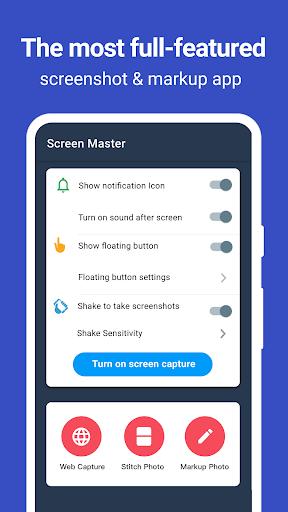
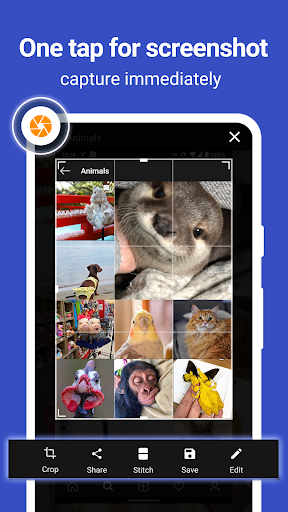
Screen Master is an easy-to-use, no rooting required screenshot & photo markup tool. With Screen Master, you can capture screen by touching the floating button or shaking device, lets you take screenshots on your tablet, phone or other Android device the easy way!
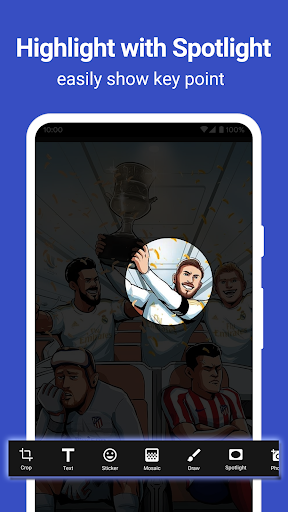
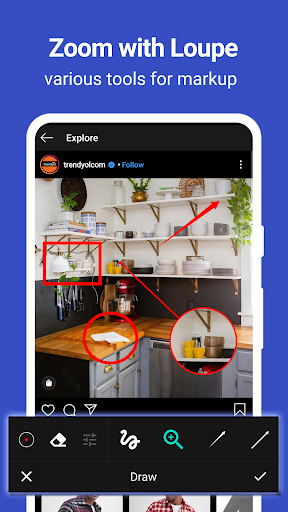
Screen Master also provides a variety of annotation features such as crop, add text, pixelated image, draw arrow, rect, circle and more. Lets you easily edit and markup your screenshots and quickly share it with your friends!
<b>► Advantages: </b>
1. No rooting required, No restrictions on use
2. HIGH-QUALITY screenshot, saved without any loss, support PNG format
3. A variety of image annotation features
4. Web page …
Read the full description
Screen Master is an easy-to-use, no rooting required screenshot & photo markup tool. With Screen Master, you can capture screen by touching the floating button or shaking device, lets you take screenshots on your tablet, phone or other Android device the easy way! Screen Master also provides a variety of annotation features such as crop, add text, pixelated image, draw arrow, rect, circle and more. Lets you easily edit and markup your screenshots and quickly share it with your friends! <b>► Advantages: </b> 1. No rooting required, No restrictions on use 2. HIGH-QUALITY screenshot, saved without any loss, support PNG format 3. A variety of image annotation features 4. Web page whole capture, quickly save webpage as image 5. Support save screenshots to external SD card 6. Support Android 7.0 Shortcuts and QuickTile features <b>7. Support long screenshot and stitching photos</b> ► Key Features: <b>★ Take Screenshots: </b> Screen Master provides a variety of features to take a screenshot - Floating button: An simple button that is displayed on top of everything, just one-click to take a screenshot - Shaking device: Shaking your device to take a screenshot - Web capture: The simplest way to take a full page screenshot of your web page, just share the url to Screen Master - Long screenshot: Support long screen capture function to easily capture the entire screen <b>★ Photo Markup: </b> - Crop and rotate image: can be cut into rectangular, round, star, triangle and other shapes - Spotlight key info: highlight something with Spotlight - Blur image: pixelate the image to cover areas you do not want to show - Magnify image: zoom in your selected section with loupe - Add emoji sticker: Make your pictures look lively and interesting - Add text on photo: can be customized text color, background, shadow, stroke, style, size and more - Annotate picture, all tools you need: Arrow, Rect, Circle, Pen - Large picture can be directly annotated and do not have to be cropped first - Not only screenshots but all pictures are supported, you could import photo from gallery, HD save and share with your friends <b>★ Photo Stitching:</b> Automatically recognize and stitch multiple photos into a long screenshot, that can be stitched horizontally and vertically <b>Accessibility Service: </b> This app uses the accessibility service provided by Android to help you take long screenshots, we will not use the accessibility service to collect and share any data, or take actions that users do not do ► Notice: Screen Master can't capture secure pages, such as Youtube protected content, pages in a banking app, or a password input page If you have any comments or suggestions on Screen Master, please contact us at [email protected]. We appreciate your feedback!
Installs, last 30 days Measured
Exact Google Play install counts, collected daily
Ratings
2,262 ratings, 339 reviews
- 5 ★70%
- 4 ★4.9%
- 3 ★6.9%
- 2 ★5.9%
- 1 ★12%
Recent reviews
Latest public reviews from the store
- 17 Mar 2024
Nice👍🏽
- 1 Jun 2022
Perfect for the digital age
- 9 Nov 2020
Would it be possible to add Raamattu Kansalle translation for Finnish?
- 31 Jul 2020
Awesome, very edifying
Top chart positions
Latest Google Play chart ranks by country, last 10 days
Not in any tracked top chart in the last 10 days.
Screen Master Pro history
Release, install milestones, listing and store changes
- Reached 10,000+ installs 17 Jun 2020
- First released on the store 23 Sep 2017
Update frequency
How often Screen Master Pro ships a new version, month by month
1 updates in the last 12 months. Less often than most similar apps: they shipped a median of 4 updates in the same year.
Recent versions
Current version 1.8.0.36-pro
- Version 1.8.0.36-pro17 Aug 2026
Stability improvements and bug fixes.
- Version 1.8.0.32-pro5 Oct 2025
Bug fixes and stability improvements
- Version 1.8.0.325 Oct 2025
- Version 1.8.0.3126 Jul 2025
Listing keywords
Words and phrases Screen Master Pro repeats most in its store listing
Top phrases: screen master (8), accessibility service (3), long screenshot (3), take screenshot (3), arrow rect circle (2).
Highlighted words also appear in the title. Counts cover the title, short description and description.
Business model and tech
From the store listing and declared permissions
- Business model
- Paid, $4.99
- Sensitive access
- No sensitive permission declared
Compliance
What the listing and the app package show
- Store status
- Live
- Upkeep
- Updated 17 Aug 2026
- Registered in
- China
- Privacy policy
- Linked on the listing
- Advertising
- No ads declared
- In-app purchases
- None declared
- Age rating
- Everyone
Apps like Screen Master Pro
HiOrg-ServerHiOrg Server GmbH205K installs★ 3.7
Georgian keyboardSimple Keyboard, theme & emoji662K installs★ 4.05
Zoho CalendarZoho Corporation279K installs★ 3.33
Super-Bright LED FlashlightUnicorn Photo Editor Games Apps683K installs★ 4.26
Quick Translate All LanguagesMonkey AI Studio241K installs★ 4.73
Disk & Storage Analyzer [PRO]Mobile Infographics Tools41.5K installs★ 4.16
GoSignInfoCert SpA701K installs★ 2.0
Year View CalendarDevWolf258K installs★ 4.65
Type ግዕዝ All Language KeyboardData Science Ethiopia395K installs★ 4.56
Screen Master Pro: questions and answers
How many downloads does Screen Master Pro have?
Screen Master Pro has 22,170 installs on Google Play, measured from the store's own count on 19 Nov 2026.
Who makes Screen Master Pro?
Screen Master Pro is published by Blossgraph, a developer based in CN.
When was Screen Master Pro last updated?
The latest version (1.8.0.36-pro) was released on 17 Aug 2026.
Is Screen Master Pro free?
No. Screen Master Pro is a paid app priced at $4.99.
Is Screen Master Pro still available?
Yes. Screen Master Pro is live on Google Play as of 19 Nov 2026.
Track Screen Master Pro and its competitors
Watch any app for new versions, rating drops, chart moves and removals. Free plan, no card.