
Screen Mirroring
Screen mirroring to a browser - easy to use screen mirroring app
- Installs
- 808K
- Measured
- Rating
- 4.11
- Ratings
- 2.5K
- 67 reviews
- Version
- 1.8.9
- Updated 1 Oct 2023
- Released
- 8 Feb 2015
- Tracked since 13 May 2026
- Size
- 3 MB
- Needs 5.0
Screenshots


About Screen Mirroring
The description on the store listing
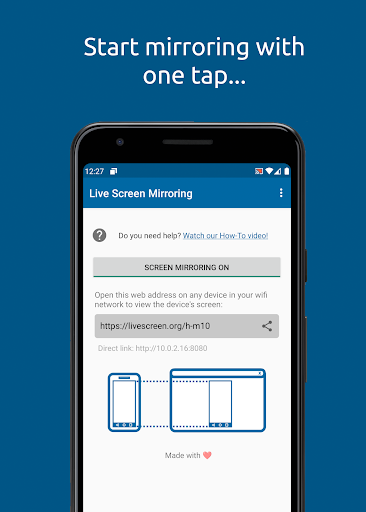
Live Screen is one of the best yet most simple and easy to use screen mirroring app.
With Live Screen, you can mirror your device's screen over WiFi and access it from a browser from any other device in your WiFi network.
Screen mirroring is easy: just open Live Screen on your android device and start the screen mirroring process and open the url displayed in the app in your browser. As simple as that. No additional software on your remote device is needed.
Live Screen is perfect if you need a second screen: if you would like to show your phone's screen at a presentation in front of an audience, or if you would like to present your photos to your family.
Simply launch the app …
Read the full description
Live Screen is one of the best yet most simple and easy to use screen mirroring app. With Live Screen, you can mirror your device's screen over WiFi and access it from a browser from any other device in your WiFi network. Screen mirroring is easy: just open Live Screen on your android device and start the screen mirroring process and open the url displayed in the app in your browser. As simple as that. No additional software on your remote device is needed. Live Screen is perfect if you need a second screen: if you would like to show your phone's screen at a presentation in front of an audience, or if you would like to present your photos to your family. Simply launch the app and open the displayed URL (something similar to http://192.168.0.2:8080) in your favourite web browser in order to start the screen mirroring. That's all. Attention - Please read before use: In order to work properly, this app requires that your Android device and your target device (computer, notebook or tablet) are in the same WiFi network (or connected via the smartphones hotspot). Please be aware that with Live Screen only the screen is mirrored, but not your device's audio signals. Works great with Google Chrome, Apple Safari, Firefox and Samsung Smart TVs. Please be aware that the screen mirroring delay highly depends on your Androids Device computation power as well as the speed of the WiFi connection. For the best screen mirroring results, make sure your WiFi connection is good and your phone has a strong processor. Screen Mirroring is not supported by all Android device's and Android Versions. If you face any problems with your device or have any questions or feedback, feel free to send us an email! Screen Mirroring requires at least Android 5.0. You can use the app for free with ads, upgrade to the pro version if you prefer an ad-free version. Live Screen contains ads which will be shown at the beginning and end of each screen mirror session. To disable ads and unlock pro features, consider updating to the pro version. Just click on "Upgrade to Pro".
Installs, last 30 days Measured
Exact Google Play install counts, collected daily
Ratings
2,496 ratings, 67 reviews
- 5 ★66%
- 4 ★9.7%
- 3 ★9.0%
- 2 ★2.6%
- 1 ★13%
Recent reviews
Latest public reviews from the store
- 28 Jul 2025
This app deserves better ratings. I have pretty much tried all of the streaming and screen mirroring apps and this is faster than all except maybe SRT and NDI protocol using apps, but this is much easier to use than those anyways. You can also use it in OBS multiple ways, which means you can use your android device as a wireless camera with every filter or face changing capability of any app that works on your device! Kinda like the old Snapchat cam on PC.
- 4 Mar 2025
Great App, on phone, not to manny ads, screen mirroring to online web on computer is fast & full screen
- 6 Feb 2025
it was amazing
- 15 Jan 2025
okay
What reviewers bring up
Topics mentioned in the latest 50 reviews, by how many reviews mention them
Liked in good reviews (36 reviews)
- device 4
- mirroring 3
- android 3
- screen 3
- fast 3
- far 3
- computer 2
- solution 2
Raised in bad reviews (9 reviews)
No topic comes up twice.
Top chart positions
Latest Google Play chart ranks by country, last 10 days
Not in any tracked top chart in the last 10 days.
Screen Mirroring history
Release, install milestones, listing and store changes
- Reached 500,000+ installs 2 Mar 2022
- Moved from Productivity to Tools 4 Aug 2021
- Reached 100,000+ installs 1 Apr 2017
- Reached 50,000+ installs 22 Jul 2016
- Reached 10,000+ installs 1 Feb 2016
- Reached 5,000+ installs 5 Jan 2016
- Reached 1,000+ installs 26 Nov 2015
- Reached 500+ installs 21 Oct 2015
Recent versions
Current version 1.8.9
- Version 1.8.91 Oct 2023
- Fixes issues with interrupted mirroring sessions - New feature: URL shortener to access device - Design improvements for screen mirroring - Bugfixes - Android 12 and Android 13 Screen mirroring support
- Version 1.8.84 Nov 2021
- Version 1.8.63 Nov 2021
- Version 1.7.724 Oct 2021
Listing keywords
Words and phrases Screen Mirroring repeats most in its store listing
Top phrases: screen mirroring (11), live screen (6), please be aware (2), start the screen (2), android device (2).
Highlighted words also appear in the title. Counts cover the title, short description and description.
Business model and tech
From the store listing, the SDKs in the app package and its declared permissions
- Business model
- Free to downloadIn-app purchasesShows ads
- Built with
- No cross-platform framework or game engine detected
- Ad networks (1)
- AdMob
- Subscriptions and payments
- Google Play billing
- Analytics and crash reports
- Firebase
- Sensitive access
- Advertising ID
2 ad, attribution and analytics SDKs detected. SDKs are read from the app package and permissions from the store listing, so code that loads later is not seen.
Technology
27 SDKs found in the app package
Ad networks
Advertising and install-attribution SDKs found in the app package
- AdMob
12 permissions
0 special access, 0 sensitive, 12 standard
- Ad attribution (Privacy Sandbox)ACCESS_ADSERVICES_ATTRIBUTIONStandard
- Ad topics (Privacy Sandbox)ACCESS_ADSERVICES_TOPICSStandard
- Read how it was installed (install referrer)BIND_GET_INSTALL_REFERRER_SERVICEStandard
- Read the advertising IDAD_IDStandard
- Read the advertising ID (Privacy Sandbox)ACCESS_ADSERVICES_AD_IDStandard
- Keep the phone awakeStandard
- Run a foreground serviceFOREGROUND_SERVICEStandard
- Full internet accessStandard
- See network connectionsStandard
- See Wi-Fi connectionsStandard
- Internal app permissionDYNAMIC_RECEIVER_NOT_EXPORTED_PERMISSIONStandard
- In-app purchases with Google PlayStandard
Compliance
What the listing and the app package show
- Store status
- Live
- Upkeep
- No update since 1 Oct 2023
- Registered in
- Austria
- Privacy policy
- Linked on the listing
- Advertising
- Shows ads
- In-app purchases
- Offered
- Age rating
- Teen
- Sensitive permissions
- 0 sensitive of 12
- Location access
- No
- Camera and microphone
- Neither
Apps like Screen Mirroring
Craft Lucky Block Mods MCPEWira N Dev280K installs★ 4.54
Recover Everything: Photo&DataGIYASTAR2.9M installs★ 3.67
GameDriver - Mali (S20/N20)Samsung Electronics Co., Ltd.23.2M installs★ 3.85
SaveTok - Video DownloaderCynt Maxwell Apps243K installs★ 4.39
Mulugu Astro - Panchangam 2024Kameshwari e Services Pvt Ltd582K installs★ 3.36
TaskarioRichaMiguel307K installs★ 4.66
Authenticator App - 2FA AuthTaka Applications1.8M installs★ 4.34
MTG Tracker & Life CounterPlatty Soft Ltd38.7K installs★ 2.46
Shake to Enable TorchLuxebyte Labs531K installs★ 4.62
Screen Mirroring: questions and answers
How many downloads does Screen Mirroring have?
Screen Mirroring has 807,902 installs on Google Play, measured from the store's own count on 19 Nov 2026.
Who makes Screen Mirroring?
Screen Mirroring is published by HMI Apps, a developer based in AT.
When was Screen Mirroring last updated?
The latest version (1.8.9) was released on 1 Oct 2023.
Is Screen Mirroring free?
Yes. Screen Mirroring is free to download and offers in-app purchases, and it shows ads.
Is Screen Mirroring still available?
Yes. Screen Mirroring is live on Google Play as of 19 Nov 2026.
Track Screen Mirroring and its competitors
Watch any app for new versions, rating drops, chart moves and removals. Free plan, no card.