
Screen Recorder:Capture Screen
Save & share your screen recordings effortlessly with advanced screen recorder
- Installs
- 7.51K
- Measured
- Rating
- —
- Ratings
- —
- Version
- 2.1
- Updated 26 Oct 2025
- Released
- 19 Jan 2023
- Tracked since 12 May 2026
- Size
- —
Screenshots



About Screen Recorder:Capture Screen
The description on the store listing
Introducing the most advanced and feature-rich screen recorder app on the market! With our app, you can easily record your screen with just a tap of a button. The app is user-friendly and simple to use, making it perfect for anyone looking to record their screen on the go.
Our app offers a wide range of features that will enhance your screen recording experience and make it more enjoyable. Some of the key features of our app include:
High-definition video recording: Our app allows you to record videos in 1080p, 720p and 4k resolution. You can choose the resolution that best suits your needs and the device you are using.
Simple and easy-to-use interface: Our app has a clean and modern …
Read the full description
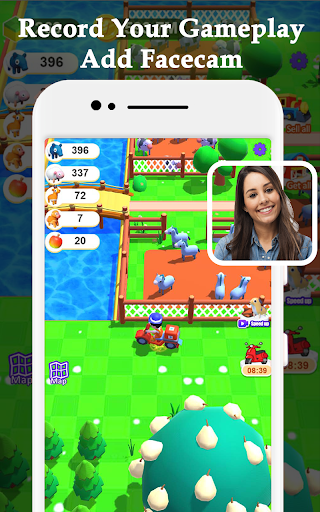
Introducing the most advanced and feature-rich screen recorder app on the market! With our app, you can easily record your screen with just a tap of a button. The app is user-friendly and simple to use, making it perfect for anyone looking to record their screen on the go. Our app offers a wide range of features that will enhance your screen recording experience and make it more enjoyable. Some of the key features of our app include: High-definition video recording: Our app allows you to record videos in 1080p, 720p and 4k resolution. You can choose the resolution that best suits your needs and the device you are using. Simple and easy-to-use interface: Our app has a clean and modern interface that is easy to navigate. You can start recording your screen with just one tap, and all the controls you need are easily accessible. No time limits on recordings: Unlike other screen recording apps, our app doesn't have any time limits on recordings. You can record videos as long as you want, giving you the freedom to capture all the special moments. Option to pause and resume recording: Our app allows you to pause and resume recording at any time, giving you the flexibility to record multiple segments in one go. Automatic saving of videos to your camera roll: Our app automatically saves all your recorded videos to your camera roll, so you never have to worry about losing your recordings. Ability to share videos directly from the app: Our app allows you to share your recorded videos directly from the app to your social media, cloud storage, and other platforms. Support for Audio recording: Our app allows you to record audio while recording the screen, you can record the sound from the microphone or system sound. Support for Facecam recording: Our app allows you to record a video of your face using the front camera while recording the screen, this feature is useful for tutorial and vlogging. Support for drawing and annotation: Our app allows you to draw and add annotations while recording, this feature is useful for tutorial and video explanation. Support for Countdown timer: Our app allows you to set a countdown timer before starting the recording, this feature is useful for preparing before recording. Support for shake to stop: Our app allows you to stop recording by shaking the device, this feature is useful for stopping the recording quickly. Support for floating button: Our app allows you to record by using a floating button, this feature is useful for recording while using other apps. Support for screen off recording: Our app allows you to record even if the screen is off, this feature is useful for recording long videos. Our app is perfect for anyone looking to record their screen for personal or professional use. Whether you're recording a tutorial, a vlog, a gameplay, or just a special moment, our app has got you covered. We have designed this app with the user in mind, so it is suitable for people of all ages and skill levels. We understand the importance of privacy, that's why we have implemented strict security measures to protect your data. Our app does not collect any personal information or share it with third parties. In conclusion, Our Screen Recorder app is the most advanced and feature-rich screen recorder app on the market. It offers a wide range of features that will enhance your screen recording experience and make it more enjoyable. So, download now and start recording your screen today!
Installs since 28 Aug 2026 Measured
Exact Google Play install counts, collected daily
Ratings
- 5 ★0.0%
- 4 ★0.0%
- 3 ★0.0%
- 2 ★0.0%
- 1 ★0.0%
Recent reviews
Latest public reviews from the store
No reviews in our sample for this app yet.
Top chart positions
Latest Google Play chart ranks by country, last 10 days
Not in any tracked top chart in the last 10 days.
Screen Recorder:Capture Screen history
Release, install milestones, listing and store changes
- Reached 5,000+ installs 4 Jul 2025
- Reached 1,000+ installs 19 Jul 2023
- Reached 500+ installs 18 Feb 2023
- Reached 100+ installs 5 Feb 2023
- First released on the store 19 Jan 2023
Recent versions
Current version 2.1
- Version 2.026 Oct 2025
Minor fixes and improvements
- Version 1.72 Feb 2024
- Version 1.627 Jan 2024
- Version 1.327 Aug 2023
Listing keywords
Words and phrases Screen Recorder:Capture Screen repeats most in its store listing
Top phrases: feature is useful (6), screen recorder (5), screen recording (3), advanced and feature (2), enhance your screen (2).
Highlighted words also appear in the title. Counts cover the title, short description and description.
Business model and tech
From the store listing, the SDKs in the app package and its declared permissions
- Business model
- Free to downloadIn-app purchasesShows ads
- Built with
- No cross-platform framework or game engine detected
- Ad networks (2)
- AdMobFacebook Audience Network
- Subscriptions and payments
- Google Play billing
- Analytics and crash reports
- Firebase
- Sensitive access
- CameraMicrophonePhone and callsPhotos, videos and filesDraws over other appsAdvertising ID
3 ad, attribution and analytics SDKs detected. SDKs are read from the app package and permissions from the store listing, so code that loads later is not seen.
Technology
17 SDKs found in the app package
Ad networks
Advertising and install-attribution SDKs found in the app package
- AdMob
- Facebook Audience Network
28 permissions
1 special access, 7 sensitive, 20 standard
- Draw over other appsSpecial access
- Record audioSensitive
- Take photos and videosSensitive
- Change or delete shared storageSensitive
- Read shared storageSensitive
- Read videosREAD_MEDIA_VIDEOSensitive
- Show notificationsPOST_NOTIFICATIONSSensitive
- Read phone status and identitySensitive
- Ad attribution (Privacy Sandbox)ACCESS_ADSERVICES_ATTRIBUTIONStandard
- Ad topics (Privacy Sandbox)ACCESS_ADSERVICES_TOPICSStandard
- Read how it was installed (install referrer)BIND_GET_INSTALL_REFERRER_SERVICEStandard
- Read the advertising IDAD_IDStandard
Compliance
What the listing and the app package show
- Store status
- Live
- Upkeep
- Updated 26 Oct 2025
- Privacy policy
- Linked on the listing
- Advertising
- Shows ads
- In-app purchases
- Offered
- Age rating
- Everyone
- Sensitive permissions
- 7 sensitive, 1 special access of 28
- Location access
- No
- Camera and microphone
- Both
Apps like Screen Recorder:Capture Screen
영산강 안심 알림eICT융합소프트 & 스마트오더18.3K installs★ 4.0
JBLETRADOC Mobile10.3K installs★ 4.5
Two Point HeightOmega Centauri Software15.3K installs★ 2.22
Sheridan RecyclesCity of Sheridan634 installs★ 4.67
NAFNorges Automobil-Forbund200K installs★ 3.9
Ipsos Adria CAPIIpsos Serbia7.4K installs★ 3.9
Clock: Alarm Clock & TimerIntratech so36.1K installs★ 3.79
Süzme Sayaç HesaplamaNotsup30.3K installs★ 3.6
Cattle & Goat Record KeepingVetzKin10.3K installs★ 2.5
Screen Recorder:Capture Screen: questions and answers
How many downloads does Screen Recorder:Capture Screen have?
Screen Recorder:Capture Screen has 7,514 installs on Google Play, measured from the store's own count on 20 Nov 2026.
Who makes Screen Recorder:Capture Screen?
Screen Recorder:Capture Screen is published by Bayern-Apps.
When was Screen Recorder:Capture Screen last updated?
The latest version (2.1) was released on 26 Oct 2025.
Is Screen Recorder:Capture Screen free?
Yes. Screen Recorder:Capture Screen is free to download and offers in-app purchases, and it shows ads.
Is Screen Recorder:Capture Screen still available?
Yes. Screen Recorder:Capture Screen is live on Google Play as of 20 Nov 2026.
Track Screen Recorder:Capture Screen and its competitors
Watch any app for new versions, rating drops, chart moves and removals. Free plan, no card.