
Screen Recorder • Video Editor
FREE Screen Recorder w/ Face Cam & Audio + Easy Video Editor w/ Music AD-FREE :)
- Installs
- 1.66M
- Measured
- Rating
- 4.42
- Ratings
- 8.8K
- 683 reviews
- Version
- 3.0.30
- Updated 9 Oct 2026
- Released
- 13 Jan 2020
- Tracked since 13 May 2026
- Size
- 83 MB
- Needs 7.0
Screenshots




About Screen Recorder • Video Editor
The description on the store listing
ScreenPal, formerly Screencast-O-Matic, the original and #1 ranked desktop screen recorder, facecam recorder and video editor, is now available on your Android devices. Our free, easy-to-use mobile app allows you to quickly capture your screen and create high-quality videos. Our powerful, intuitive video editor gives you all the tools you need to personalize your videos. Our AD-FREE app allows you to record video with audio & facecam with NO watermark and NO time limit!
Record app demos, tutorials, reviews, training, games and more with or without facecam. After recording, crop, trim, or adjust the speed of your video. Enhance your videos with filters and music. Add shape and sticker …
Read the full description
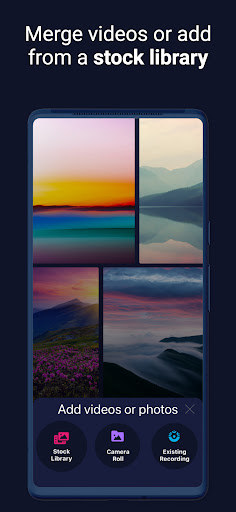
ScreenPal, formerly Screencast-O-Matic, the original and #1 ranked desktop screen recorder, facecam recorder and video editor, is now available on your Android devices. Our free, easy-to-use mobile app allows you to quickly capture your screen and create high-quality videos. Our powerful, intuitive video editor gives you all the tools you need to personalize your videos. Our AD-FREE app allows you to record video with audio & facecam with NO watermark and NO time limit! Record app demos, tutorials, reviews, training, games and more with or without facecam. After recording, crop, trim, or adjust the speed of your video. Enhance your videos with filters and music. Add shape and sticker overlays. Use the blur tool to hide sensitive information. Import existing clips to edit, combine and more. Insert video reactions with audio narrations via facecam to further enrich your recording. Easily share or connect with our intuitive desktop video editor to work across devices. Start making amazing videos today! Recommended by PC Magazine: “ScreenPal (Screencast-O-Matic) is an excellent, free screen-capture utility that boasts a subscription option that offers even more powerful features.” SCREEN RECORD: • Record your screen, facecam, or both • Record as many videos as you want for FREE with NO ads! • Unlimited screen recording time • Voice commentary and dubs via microphone • Hide controls while recording • Record everything - video tutorials, demos, games and more! ADD FACECAM REACTIONS: • Record facecam onto existing video for picture in picture (PIP) • Add facecam reactions to your recordings! • Select sections of your video to add facecam • Drag to reposition and resize facecam • Add reaction cam to your favorite videos! EDIT & ENHANCE VIDEO CLIPS: • Easily add music from iTunes, your device or our stock library! • Use video filters • Add and style rich text • Blur sensitive information • Add shapes and sticker overlays, including emojis, gestures, and frames • Trim and cut video clips • Cut sections from video clips • Crop video clips with presets for social video sharing • Adjust the playback speed for fast or slow motion • Rotate videos • Add voice narration • Undo and Redo any edit to your video clip with just one click! EXPLORE OUR STOCK LIBRARY: • Explore music and images in our stock library! AUTOMATICALLY TRANSFER TO THE DESKTOP VIDEO EDITOR: • Connect with the desktop video editor to work across devices! • Import videos to your ScreenPal album to edit. Automatically transfer to the desktop video editor with a desktop Premier Plan • Take advantage of the ScreenPal desktop subscriptions available on Mac & Windows in our Android app (use ONE subscription for ALL devices)! MANAGE & SHARE: • Import video clips from your photo library! • Merge recordings • Insert videos from your camera roll, existing recordings, or add stock to create intros and outros • Keep and manage your recordings in your ScreenPal album • Share to ScreenPal's website or other popular sites and apps • Share it directly with your friends via text, messenger and more! Using Chromebook? Check out our optimized app on your Chromebook Google Play Store @ "Screen Recorder & Video Editor for Chromebook" Terms of Service: https://ScreenPal.com/tos
Installs, last 30 days Measured
Exact Google Play install counts, collected daily
Ratings
8,828 ratings, 683 reviews
- 5 ★69%
- 4 ★16%
- 3 ★2.6%
- 2 ★2.6%
- 1 ★9.4%
Recent reviews
Latest public reviews from the store
- 22 Sep 2025
YE EK BEKAR APP HAI
- 15 May 2025
Great in
Top chart positions
Latest Google Play chart ranks by country, last 10 days
Not in any tracked top chart in the last 10 days.
Screen Recorder • Video Editor history
Release, install milestones, listing and store changes
- Reached 1,000,000+ installs 8 Nov 2022
- Reached 500,000+ installs 3 Jul 2021
- Reached 100,000+ installs 15 May 2020
- Reached 50,000+ installs 11 Apr 2020
- First released on the store 13 Jan 2020
Update frequency
How often Screen Recorder • Video Editor ships a new version, month by month
2 updates in the last 12 months. Less often than most similar apps: they shipped a median of 5 updates in the same year.
Recent versions
Current version 3.0.30
- Version 3.0.309 Oct 2026
Accessibility improvements
- Version 3.0.2715 Jan 2026
Changed Premier to Max Plan Upgraded libraries for 16kb support
- Version 3.0.2529 Jun 2025
- Version 3.0.2421 May 2025
Listing keywords
Words and phrases Screen Recorder • Video Editor repeats most in its store listing
Top phrases: video editor (9), video clips (5), desktop video editor (4), desktop video (4), screen recorder (4).
Highlighted words also appear in the title. Counts cover the title, short description and description.
Business model and tech
From the store listing, the SDKs in the app package and its declared permissions
- Business model
- Free to downloadIn-app purchases
- Built with
- No cross-platform framework or game engine detected
- Ad networks (0)
- None detected
- Subscriptions and payments
- Google Play billing
- Analytics and crash reports
- AmplitudeFirebase
- Sensitive access
- CameraMicrophonePhotos, videos and filesAccounts on the deviceDraws over other appsAdvertising ID
2 ad, attribution and analytics SDKs detected. SDKs are read from the app package and permissions from the store listing, so code that loads later is not seen.
Technology
52 SDKs found in the app package
28 permissions
1 special access, 9 sensitive, 18 standard
- Draw over other appsSpecial access
- Record audioSensitive
- Take photos and videosSensitive
- See accounts on the deviceSensitive
- Change or delete shared storageSensitive
- Read music and audioREAD_MEDIA_AUDIOSensitive
- Read photosREAD_MEDIA_IMAGESSensitive
- Read shared storageSensitive
- Read videosREAD_MEDIA_VIDEOSensitive
- Show notificationsPOST_NOTIFICATIONSSensitive
- Ad attribution (Privacy Sandbox)ACCESS_ADSERVICES_ATTRIBUTIONStandard
- Read the advertising ID (Privacy Sandbox)ACCESS_ADSERVICES_AD_IDStandard
Compliance
What the listing and the app package show
- Store status
- Live
- Upkeep
- Updated 9 Oct 2026
- Registered in
- United States
- Privacy policy
- Linked on the listing
- Advertising
- No ads declared
- In-app purchases
- Offered
- Age rating
- Everyone
- Sensitive permissions
- 9 sensitive, 1 special access of 28
- Location access
- No
- Camera and microphone
- Both
Apps like Screen Recorder • Video Editor
Hide photo, videovideo editor maker htt1M installs★ 4.52
Video to Mp3 - Audio ConverterEasyelife3M installs★ 4.22
Video RingtoneMitra Ringtones2.3M installs★ 4.25
Photo Slideshow: Video MakerNKH Team4.2M installs★ 3.85
Video Player: 4K Live PlaybackFirehawk940K installs★ 4.57
All Status Video DownloaderPhoto and Video apps525K installs★ 4.2
Slideshow Maker Photo VideoGovo Tech9.6M installs★ 4.36
Video Player - OPlayerOLIMSOFT484K installs★ 3.64
Stop Motion Cartoon MakerDemapps LLC1.2M installs★ 4.41
Screen Recorder • Video Editor: questions and answers
How many downloads does Screen Recorder • Video Editor have?
Screen Recorder • Video Editor has 1,663,592 installs on Google Play, measured from the store's own count on 19 Nov 2026.
Who makes Screen Recorder • Video Editor?
Screen Recorder • Video Editor is published by ScreenPal, a developer based in US.
When was Screen Recorder • Video Editor last updated?
The latest version (3.0.30) was released on 9 Oct 2026.
Is Screen Recorder • Video Editor free?
Yes. Screen Recorder • Video Editor is free to download and offers in-app purchases.
Is Screen Recorder • Video Editor still available?
Yes. Screen Recorder • Video Editor is live on Google Play as of 19 Nov 2026.
Track Screen Recorder • Video Editor and its competitors
Watch any app for new versions, rating drops, chart moves and removals. Free plan, no card.