
Screen Recorder with audio
No watermark, no limits, just high-quality screen recording
- Installs
- 4.13K
- Measured
- Rating
- —
- Ratings
- —
- Version
- Varies with device
- Released
- 31 Oct 2021
- Tracked since 13 May 2026
- Size
- —
Screenshots

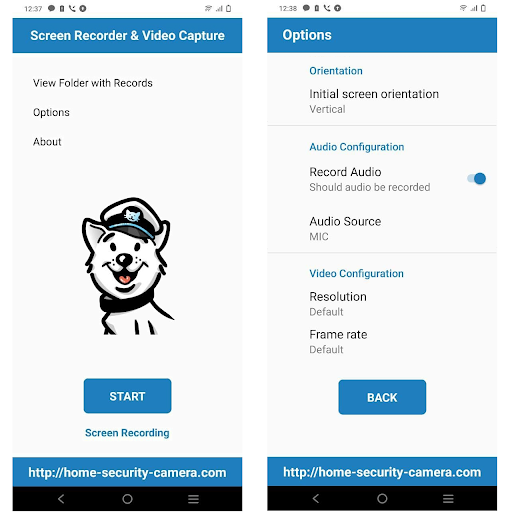
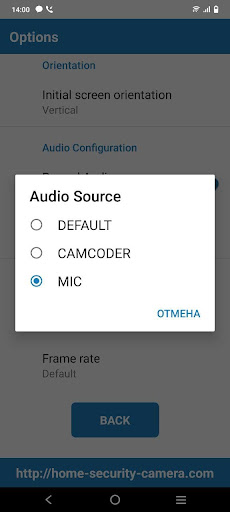
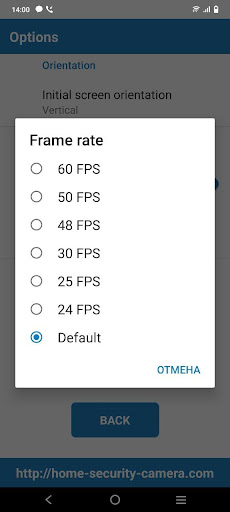


About Screen Recorder with audio
The description on the store listing
Screen Recorder mobile app for Android is an excellent tool that helps you capture your phone's screen in high-definition (HD) quality. It's designed to enable users to record videos of various activities taking place on their mobile devices, including gameplay, video tutorials, IP camera streams, audio/video calls, and videos that cannot be downloaded.
The app comes with several unique features that make it stand out from other screen recording apps available in the market. Let's dive deeper into its features and capabilities.
<b>Video Capture without Watermark</b>
Screen Recorder enables users to capture their phone's screen without leaving any watermark on the recorded video. This …
Read the full description
Screen Recorder mobile app for Android is an excellent tool that helps you capture your phone's screen in high-definition (HD) quality. It's designed to enable users to record videos of various activities taking place on their mobile devices, including gameplay, video tutorials, IP camera streams, audio/video calls, and videos that cannot be downloaded. The app comes with several unique features that make it stand out from other screen recording apps available in the market. Let's dive deeper into its features and capabilities. <b>Video Capture without Watermark</b> Screen Recorder enables users to capture their phone's screen without leaving any watermark on the recorded video. This means that you can record your phone's screen without any branding or logos from the app. <b>Vertical and Horizontal Screen Orientation</b> The app supports both vertical and horizontal screen orientation, which allows users to record videos in either portrait or landscape mode, depending on their preference. <b>Video Recorder with Sound</b> The internal audio recording function of the Screen Recorder allows users to capture sound while recording the screen. The recorded sound is clean and free of background noise, which makes it ideal for recording tutorials, video calls, and gameplay. <b>Recording IP Cameras, Cloud Cameras, RTSP, and RTMP Streams</b> With Screen Recorder, users can record videos from IP cameras, cloud cameras, RTSP, and RTMP streams. This feature makes it possible to record live events, online classes, and other activities taking place on other devices or platforms. <b>Export Full HD Video with Custom Settings</b> Screen Recorder allows users to export full HD videos with custom settings. Users can adjust the recording resolution (from 240p to 1080p), quality, and frames per second (FPS) to suit their specific needs. <b>H264 Compression</b> The app compresses recorded videos using H264 compression, which helps to minimize the video's file size while maintaining its quality. The recorded video is saved as an MP4 file format, which is widely supported by most devices and platforms. <b>Record Gameplay on Your Phone</b> Screen Recorder is an ideal tool for gamers who want to record their gameplay on their phones. The app supports recording gameplay with sound, making it possible to capture the full gaming experience. <b>No Recording Time Limits & No Root Needed</b> Screen Recorder allows users to record videos with no time limits, meaning they can record for as long as they want. Also, the app does not require any root access, making it easy to use for anyone. <b>Countdown Timer</b> The app comes with a countdown timer that allows users to prepare for recording. To use this feature, users need to grant the app permission to draw over other apps from the background. <b>Permissions Required</b> To experience all the features of Screen Recorder, users need to grant the app permissions to access their phone's storage and microphone. The storage permission is required to save recorded videos, while the microphone permission is needed to capture sound while recording. Screen Recorder is an app for anyone who wants to record their phone's screen in high-quality. Its unique features, including video capture without a watermark, horizontal and vertical screen orientation, internal audio recording, and the ability to record IP cameras and cloud streams, make it stand out from other screen recording apps. The app is also easy to use, requires no root access, and comes with no time limits for recording. If you want to get support and share your ideas or have any feedback at: https://home-security-camera.com
Installs since 15 Nov 2026 Measured
Exact Google Play install counts, collected daily
Daily history starts once this app is in our daily install sample.
Ratings
- 5 ★0.0%
- 4 ★0.0%
- 3 ★0.0%
- 2 ★0.0%
- 1 ★0.0%
Recent reviews
Latest public reviews from the store
- 11 Nov 2025
simply lovely, it's fun and surprisingly I haven't noticed any battery drain or anything crazy. it's fun and cute. my kids love moss and I have grown fond of him. 🏹
Top chart positions
Latest Google Play chart ranks by country, last 10 days
Not in any tracked top chart in the last 10 days.
Screen Recorder with audio history
Release, install milestones, listing and store changes
- First released on the store 31 Oct 2021
Listing keywords
Words and phrases Screen Recorder with audio repeats most in its store listing
Top phrases: screen recorder (10), allows users (5), phone's screen (4), record videos (4), recorder allows users (3).
Highlighted words also appear in the title. Counts cover the title, short description and description.
Business model and tech
From the store listing and declared permissions
- Business model
- Free to download
- Sensitive access
- MicrophonePhotos, videos and filesDraws over other apps
6 permissions
1 special access, 3 sensitive, 2 standard
- Draw over other appsSpecial access
- Record audioSensitive
- Change or delete shared storageSensitive
- Read shared storageSensitive
- Run a foreground serviceFOREGROUND_SERVICEStandard
- Write internal storageWRITE_INTERNAL_STORAGEStandard
Compliance
What the listing and the app package show
- Store status
- Live
- Privacy policy
- Linked on the listing
- Advertising
- No ads declared
- In-app purchases
- None declared
- Age rating
- Everyone
- Sensitive permissions
- 3 sensitive, 1 special access of 6
- Location access
- No
- Camera and microphone
- Microphone
Apps like Screen Recorder with audio
Photo Video MakerVideo Player & Photo Video Maker App12.7K installs★ 3.14
M3U Player: Edit, Test & CheckÖzgür Gürbüz13.1K installs★ 1.8
VIDEMON - ВидеонаблюдениеООО "Цифровая связь"23.3K installs★ 3.1
Lyrical Photo StatusPhoto Lyrical Status Zone41.4K installs★ 3.6
Streamblix: M3U EPG PlayerPsychelit1.1K installs★ 4.8
Channels for HDHomeRunFancy Bits, LLC5K installs★ 3.83
La CamcorderDmitriy Lapayev10.6K installs★ 4.2
Bisv.TVDmitriy Kozmenko44.1K installs★ 3.6
Love Photo Effect Video MakerEcoder Studio16.1K installs★ 4.5
Screen Recorder with audio: questions and answers
How many downloads does Screen Recorder with audio have?
Screen Recorder with audio has 4,135 installs on Google Play, measured from the store's own count on 15 Nov 2026.
Who makes Screen Recorder with audio?
Screen Recorder with audio is published by Home Security Camera.
Is Screen Recorder with audio free?
Yes. Screen Recorder with audio is free to download.
Is Screen Recorder with audio still available?
Yes. Screen Recorder with audio is live on Google Play as of 15 Nov 2026.
Track Screen Recorder with audio and its competitors
Watch any app for new versions, rating drops, chart moves and removals. Free plan, no card.