Screen Splitter : Use 2 apps
Convert your phone screen into a multitasking gadget with screen splitter app.
- Installs
- 79.77K
- Measured
- Rating
- 3.63
- Ratings
- 398
- 23 reviews
- Version
- 1.8
- Updated 11 Aug 2026
- Released
- 7 Jun 2021
- Tracked since 13 May 2026
- Size
- —
Screenshots


About Screen Splitter : Use 2 apps
The description on the store listing
Want to use 2 apps on one screen? Want to split and enable your phone screen for multitasking?
Yes, then this <b>Screen Splitter : Use 2 apps Quickly</b> app is only for you.
If you want to work with Multi Window screen at the same time then you can easily do it using Split Screen Manager app. This app creates split screen shortcut on your phone screen, so you can use dual window for multitasking.
What all included in Split Screen Manager?
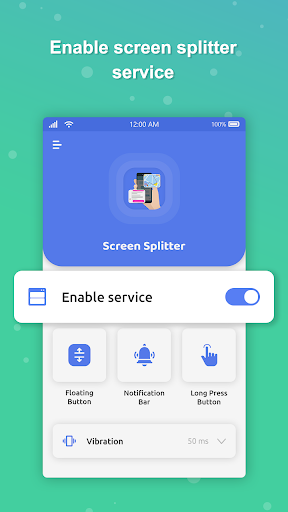
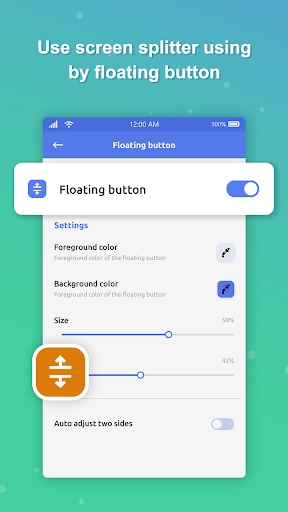
Firstly, Enable screen splitter service to enable to use app feature. You will get a floating Split Screen Shortcut on your screen. Tap on shortcut to use app in dual screen. You can change color of floating button, size and opacity. Enable and …
Read the full description
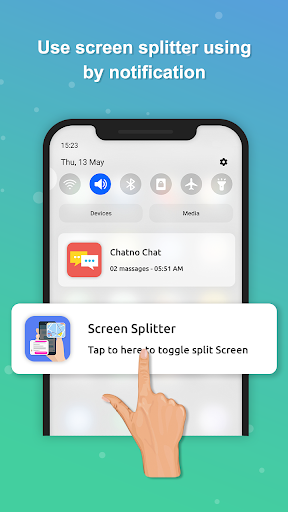
Want to use 2 apps on one screen? Want to split and enable your phone screen for multitasking? Yes, then this <b>Screen Splitter : Use 2 apps Quickly</b> app is only for you. If you want to work with Multi Window screen at the same time then you can easily do it using Split Screen Manager app. This app creates split screen shortcut on your phone screen, so you can use dual window for multitasking. What all included in Split Screen Manager? Firstly, Enable screen splitter service to enable to use app feature. You will get a floating Split Screen Shortcut on your screen. Tap on shortcut to use app in dual screen. You can change color of floating button, size and opacity. Enable and disable notification of Screen Splitter app. Easily enable 2 apps on one screen by long press on accessibility, back and home button. Change vibration setting or can off on long press on split screen shortcut. Features of Split Screen Manager: 📱 Add floating button on the home screen 📱 Resize floating button and change opacity 📱 Customize the foreground color and background color of the floating button 📱 Phone vibrates on activate or deactivate the split-screen 📱 Split the screen in dual screen 📱 Simple and easy app 📱 No internet required for app 📱 Free App .....Download this app and use dual window for multitasking.....
Installs since 29 Aug 2026 Measured
Exact Google Play install counts, collected daily
Ratings
398 ratings, 23 reviews
- 5 ★51%
- 4 ★15%
- 3 ★2.1%
- 2 ★4.1%
- 1 ★28%
Recent reviews
Latest public reviews from the store
- 25 Apr 2026
not warking
- 9 Mar 2026
simple but work smootly
- 17 Nov 2025
good
- 15 Nov 2025
well
What reviewers bring up
Topics mentioned in the latest 50 reviews, by how many reviews mention them
Liked in good reviews (19 reviews)
No topic comes up twice.
Raised in bad reviews (29 reviews)
- full 2
- adds 2
Top chart positions
Latest Google Play chart ranks by country, last 10 days
Not in any tracked top chart in the last 10 days.
Screen Splitter : Use 2 apps history
Release, install milestones, listing and store changes
- Reached 50,000+ installs 20 Jun 2024
- Reached 10,000+ installs 20 Feb 2022
- Reached 5,000+ installs 31 Oct 2021
- Reached 1,000+ installs 25 Jul 2021
- Reached 500+ installs 11 Jul 2021
- Reached 100+ installs 1 Jul 2021
- Reached 50+ installs 26 Jun 2021
- First released on the store 7 Jun 2021
Update frequency
How often Screen Splitter : Use 2 apps ships a new version, month by month
2 updates in the last 12 months. More often than most similar apps: they shipped a median of 0 updates in the same year.
Recent versions
Current version 1.8
- Version 1.811 Aug 2026
Test 1
- Version 1.711 Apr 2026
- Version 1.62 Aug 2025
- Version 1.418 Oct 2024
Listing keywords
Words and phrases Screen Splitter : Use 2 apps repeats most in its store listing
Top phrases: split screen (7), screen splitter (5), floating button (4), split screen manager (3), split screen shortcut (3).
Highlighted words also appear in the title. Counts cover the title, short description and description.
Business model and tech
From the store listing, the SDKs in the app package and its declared permissions
- Business model
- Free to downloadShows ads
- Built with
- No cross-platform framework or game engine detected
- Ad networks (1)
- AdMob
- Analytics and crash reports
- Firebase
- Sensitive access
- Advertising ID
2 ad, attribution and analytics SDKs detected. SDKs are read from the app package and permissions from the store listing, so code that loads later is not seen.
Technology
29 SDKs found in the app package
Ad networks
Advertising and install-attribution SDKs found in the app package
- AdMob
11 permissions
0 special access, 1 sensitive, 10 standard
- Show notificationsPOST_NOTIFICATIONSSensitive
- Ad attribution (Privacy Sandbox)ACCESS_ADSERVICES_ATTRIBUTIONStandard
- Ad topics (Privacy Sandbox)ACCESS_ADSERVICES_TOPICSStandard
- Read the advertising IDAD_IDStandard
- Read the advertising ID (Privacy Sandbox)ACCESS_ADSERVICES_AD_IDStandard
- Control vibrationStandard
- Keep the phone awakeStandard
- Run a foreground serviceFOREGROUND_SERVICEStandard
- Full internet accessStandard
- See network connectionsStandard
- Internal app permissionDYNAMIC_RECEIVER_NOT_EXPORTED_PERMISSIONStandard
Compliance
What the listing and the app package show
- Store status
- Live
- Upkeep
- Updated 11 Aug 2026
- Registered in
- United Kingdom
- Privacy policy
- Linked on the listing
- Advertising
- Shows ads
- In-app purchases
- None declared
- Age rating
- Everyone
- Sensitive permissions
- 1 sensitive of 11
- Location access
- No
- Camera and microphone
- Neither
Apps like Screen Splitter : Use 2 apps
Apk GeneratorAks Apps92.9K installs★ 3.54
Total Control 2.0Extraflame S.p.A.30K installs★ 2.67
EASI DriverHungrypanda Au Pty Ltd43.8K installs★ 3.67
Waste calendarZampogna Gianluca33.5K installs★ 3.0
Offline Password ManagerYogesh Dama21.4K installs★ 3.77
OBD Pluswanbaolu46.9K installs★ 2.67
Dreamy Light Jar ThemesTheme Design Apps for Android31.1K installs★ 4.75
- Apk Plus Sharing app - Application ManagerApp Sharing Management Lab226K installs★ 4.56
LaserPecker Design SpaceShenzhen Hingin Technology Co., Ltd.80.4K installs★ 2.05
Screen Splitter : Use 2 apps: questions and answers
How many downloads does Screen Splitter : Use 2 apps have?
Screen Splitter : Use 2 apps has 79,774 installs on Google Play, measured from the store's own count on 14 Nov 2026.
Who makes Screen Splitter : Use 2 apps?
Screen Splitter : Use 2 apps is published by Balint Infotech, a developer based in GB.
When was Screen Splitter : Use 2 apps last updated?
The latest version (1.8) was released on 11 Aug 2026.
Is Screen Splitter : Use 2 apps free?
Yes. Screen Splitter : Use 2 apps is free to download, and it shows ads.
Is Screen Splitter : Use 2 apps still available?
Yes. Screen Splitter : Use 2 apps is live on Google Play as of 14 Nov 2026.
Track Screen Splitter : Use 2 apps and its competitors
Watch any app for new versions, rating drops, chart moves and removals. Free plan, no card.