Screen Timer
Track your phone usage like never before with Screen Timer
- Installs
- 219
- Measured
- Rating
- —
- Ratings
- —
- Version
- Varies with device
- Updated 12 Jul 2025
- Released
- 25 Jul 2023
- Tracked since 12 May 2026
- Size
- —
Screenshots

About Screen Timer
The description on the store listing
Are you curious about how much time you spend on your phone each day? Want to take charge of your digital habits and achieve a healthier balance between screen time and the real world? Look no further than Screen Timer, the revolutionary app designed to help you monitor and manage your phone usage effortlessly.
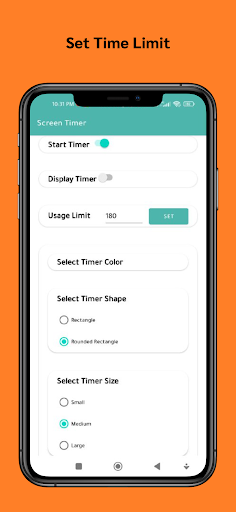
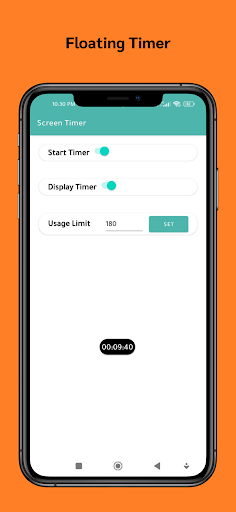
Monitor the time you spend on your phone by automatically starting the timer when you turn on the screen and stopping it when the screen goes off. Gain insights into your digital habits and take control of your screen time today.
Key Features:
1. Automatic Timer: Screen Timer takes the hassle out of tracking your phone usage. The app automatically starts the timer the moment …
Read the full description
Are you curious about how much time you spend on your phone each day? Want to take charge of your digital habits and achieve a healthier balance between screen time and the real world? Look no further than Screen Timer, the revolutionary app designed to help you monitor and manage your phone usage effortlessly. Monitor the time you spend on your phone by automatically starting the timer when you turn on the screen and stopping it when the screen goes off. Gain insights into your digital habits and take control of your screen time today. Key Features: 1. Automatic Timer: Screen Timer takes the hassle out of tracking your phone usage. The app automatically starts the timer the moment you turn on your screen and stops it when you switch off the phone. No manual input required! 2. Daily Insights: Stay informed about your daily screen time habits with detailed insights and statistics. Visualize your phone usage patterns to identify areas where you can cut back and regain valuable time. 3. Set Goals: Take control of your screen time by setting daily usage goals. Screen Timer will alert you when you approach your preset limit, helping you stay disciplined and focused. 4. App Usage Breakdown: Get a clear breakdown of the time spent on different apps. Discover which apps consume the most of your time and make informed decisions to optimize your productivity. 5. User-Friendly Interface: Screen Timer features a sleek and intuitive interface that makes tracking and understanding your phone usage a breeze. No complicated menus or confusing settings—just simple, actionable data. 6. Privacy and Security: We value your privacy. Screen Timer runs entirely on your device and doesn't collect any personal data. Your information stays secure and confidential. 7. Widget Support: Access your screen time data directly from your home screen with widget support. Stay motivated and aware of your usage throughout the day. 8. Weekly and Monthly Reports: Receive weekly and monthly summaries of your phone usage, allowing you to track progress over time and make consistent improvements. Make a positive change in your digital lifestyle today! Download Screen Timer and unlock a world of insights into your phone usage habits. Empower yourself to make mindful choices and regain control of your time. It's time to embrace a healthier and happier relationship with your phone!
Installs Measured
Exact Google Play install counts, collected daily
Daily history starts once this app is in our daily install sample.
Ratings
- 5 ★0.0%
- 4 ★0.0%
- 3 ★0.0%
- 2 ★0.0%
- 1 ★0.0%
Recent reviews
Latest public reviews from the store
- 15 Oct 2025
waheguru ji 🙏
- 2 Aug 2024
nice
- 23 Apr 2024
Nice
- 18 Apr 2024
Good
What reviewers bring up
Topics mentioned in the latest 5 reviews, by how many reviews mention them
Liked in good reviews (5 reviews)
- waheguru 2
Raised in bad reviews (0 reviews)
No topic comes up twice.
Top chart positions
Latest Google Play chart ranks by country, last 10 days
Not in any tracked top chart in the last 10 days.
Screen Timer history
Release, install milestones, listing and store changes
- Reached 100+ installs 12 Jul 2025
- Reached 50+ installs 22 Feb 2025
- Reached 10+ installs 19 Mar 2024
- Reached 5+ installs 9 Jan 2024
- First released on the store 25 Jul 2023
Update frequency
How often Screen Timer ships a new version, month by month
0 updates in the last 12 months. Less often than most similar apps: they shipped a median of 1 updates in the same year.
Listing keywords
Words and phrases Screen Timer repeats most in its store listing
Top phrases: screen timer (8), phone usage (7), weekly and monthly (2), digital habits (2), take control (2).
Highlighted words also appear in the title. Counts cover the title, short description and description.
Business model and tech
From the store listing and declared permissions
- Business model
- Free to downloadShows ads
- Sensitive access
- Draws over other apps
6 permissions
2 special access, 1 sensitive, 3 standard
- Draw over other appsSpecial access
- See which apps are usedPACKAGE_USAGE_STATSSpecial access
- Show notificationsPOST_NOTIFICATIONSSensitive
- Run a foreground serviceFOREGROUND_SERVICEStandard
- Start when the phone turns onStandard
- Internal app permissionDYNAMIC_RECEIVER_NOT_EXPORTED_PERMISSIONStandard
Compliance
What the listing and the app package show
- Store status
- Live
- Upkeep
- Updated 12 Jul 2025
- Registered in
- India
- Privacy policy
- Linked on the listing
- Advertising
- Shows ads
- In-app purchases
- None declared
- Age rating
- Everyone
- Sensitive permissions
- 1 sensitive, 2 special access of 6
- Location access
- No
- Camera and microphone
- Neither
Apps like Screen Timer
- Guns for MinecraftDenNarut8.3K installs★ 4.6
Leitor QREduardo Szesz14.7K installs★ 4.5
Bigou Pedidos - ParceiroLab Cinco11.4K installs★ 4.1
Testa porta (port tester)Maxwell Freire12.4K installs★ 4.5
PrintLabShenzhen Eve-Innovations Technology Co., Ltd.15.7K installs★ 3.73
Device ID Changer Pro [ADIC]AksymTech2.6K installs★ 3.8
My AppraisalsRocket Close, LLC5.8K installs★ 4.24
Search Bite - All Quick SearchDipesh Pednekar10.3K installs★ 4.35
Linkzary - Link OrganizerAppCodeCraft3.7K installs★ 4.8
Screen Timer: questions and answers
How many downloads does Screen Timer have?
Screen Timer has 219 installs on Google Play, measured from the store's own count on 12 May 2026.
Who makes Screen Timer?
Screen Timer is published by Bit Art, a developer based in IN.
When was Screen Timer last updated?
The latest version (Varies with device) was released on 12 Jul 2025.
Is Screen Timer free?
Yes. Screen Timer is free to download, and it shows ads.
Is Screen Timer still available?
Yes. Screen Timer is live on Google Play as of 12 May 2026.
Track Screen Timer and its competitors
Watch any app for new versions, rating drops, chart moves and removals. Free plan, no card.