
Screenshot Editor Capture Tool
Edit screenshots instantly with powerful tools to beautify in seconds.
- Installs
- 19.91K
- Measured
- Rating
- 3.69
- Ratings
- 253
- 8 reviews
- Version
- 1.4.11
- Updated 25 Oct 2026
- Released
- 21 Sep 2022
- Tracked since 13 May 2026
- Size
- —
Also on App Store: Screenshot Editor Capture Tool (88 ratings)
Screenshots




About Screenshot Editor Capture Tool
The description on the store listing
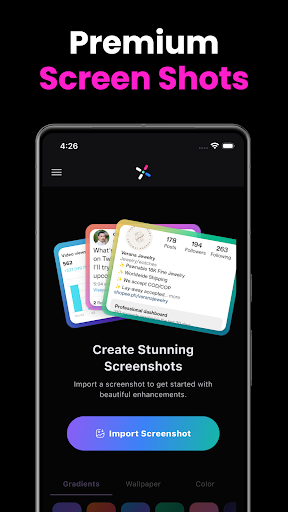
Transform your raw images into stunning, professional-grade visuals with NexSnap, the ultimate screenshot maker. Whether you need a simple phone screenshot or a high-end mockup for your portfolio, NexSnap is the all-in-one screenshotter and screenshot editor app that makes your work stand out instantly.
Stop sharing dull, unpolished images. With our screenshot maker pro, you can turn any screen capture into a share-ready masterpiece in seconds.
🎨 ALL-IN-ONE SCREENSHOT EDITOR
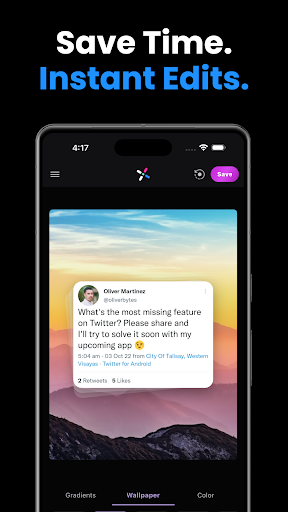
Stunning Backgrounds: Choose from vibrant gradients, 4K wallpapers, or solid colors to frame your screenshot.
1-Click Style Presets: Instantly apply screenshot pro styles like "Stacked," "Clean," or wrap your …
Read the full description
Transform your raw images into stunning, professional-grade visuals with NexSnap, the ultimate screenshot maker. Whether you need a simple phone screenshot or a high-end mockup for your portfolio, NexSnap is the all-in-one screenshotter and screenshot editor app that makes your work stand out instantly. Stop sharing dull, unpolished images. With our screenshot maker pro, you can turn any screen capture into a share-ready masterpiece in seconds. 🎨 ALL-IN-ONE SCREENSHOT EDITOR Stunning Backgrounds: Choose from vibrant gradients, 4K wallpapers, or solid colors to frame your screenshot. 1-Click Style Presets: Instantly apply screenshot pro styles like "Stacked," "Clean," or wrap your image in a sleek browser window. Advanced Customization: Use our screenshot editor tool to adjust padding, round corners, and add 3D shadows for depth. Professional Snipping Tool: Use our built-in snip tool to add text, arrows, highlight boxes, and step markers for clear communication. Perfect Proportions: Quickly capture screen and crop to predefined aspect ratios for Instagram, X (Twitter), LinkedIn, and more. 🚀 WHY CHOOSE NEXSNAP? Save Time: Forget complex software; get snagit-level results with a simple screen shot app. Elevate Your Brand: Create consistent, beautiful visuals that look like they were made by a designer. Versatile Tools: Whether you need a page capture tool for web or a snipping tool for apps, we have you covered. 🔐 PRIVATE & SECURE CAPTURE NexSnap is designed for security. Our private screenshot app features allow you to edit and hide sensitive data before sharing. Whether you are taking a secret screenshot for personal notes or managing private screenshots for work, your privacy is our priority. 🌟 KEY FEATURES AT A GLANCE: S Capture & Snip: The perfect snip it for android experience for quick annotations. Auto Screenshot Enhancements: AI-powered tools that automatically polish your screenshoots. High-Res Export: No more blurry screenshoo or low-quality screenshote; export in crisp HD. Alternative to the Best: The best mobile alternative to Skitch, Snagit, and Iphone screen capture styles. 🚀 WHO IS IT FOR? Developers: Showcase your UI/UX with professional screencap mockups. Content Creators: Make your screen shot stop the scroll on social media. Professionals: Upgrade your presentations with a clean snip it aesthetic. Download NexSnap today—the most powerful screenshot app and snipping tool on the Play Store! Learn more: https://nexsnap.app
Installs since 29 Aug 2026 Measured
Exact Google Play install counts, collected daily
Ratings
253 ratings, 8 reviews
- 5 ★63%
- 4 ★3.8%
- 3 ★3.8%
- 2 ★0.0%
- 1 ★29%
Recent reviews
Latest public reviews from the store
No reviews in our sample for this app yet.
Top chart positions
Latest Google Play chart ranks by country, last 10 days
Not in any tracked top chart in the last 10 days.
Screenshot Editor Capture Tool history
Release, install milestones, listing and store changes
- Moved from Business to Art & Design 28 Mar 2026
- Reached 10,000+ installs 12 Dec 2023
- Reached 5,000+ installs 11 Jul 2023
- Reached 1,000+ installs 1 Jan 2023
- Reached 500+ installs 4 Dec 2022
- Reached 100+ installs 23 Oct 2022
- Reached 50+ installs 9 Oct 2022
- Moved from Photography to Business 9 Oct 2022
Update frequency
How often Screenshot Editor Capture Tool ships a new version, month by month
6 updates in the last 12 months. More often than most similar apps: they shipped a median of 0 updates in the same year.
Recent versions
Current version 1.4.11
- Version 1.4.1125 Oct 2026
Meta ads attribution and analytics improvements.
- Version 1.4.103 Aug 2026
Bug fixes and performance improvements
- Version 1.4.95 May 2026
Bug fixes and performance improvements
- Version 1.4.83 Apr 2026
Listing keywords
Words and phrases Screenshot Editor Capture Tool repeats most in its store listing
Top phrases: screenshot editor (4), snipping tool (3), whether you need (2), capture tool (2), screen capture (2).
Highlighted words also appear in the title. Counts cover the title, short description and description.
Business model and tech
From the store listing, the SDKs in the app package and its declared permissions
- Business model
- Free to downloadIn-app purchasesSubscriptions
- Built with
- Flutter
- Ad networks (0)
- None detected
- Subscriptions and payments
- RevenueCatGoogle Play billing
- Analytics and crash reports
- FirebaseSentry
- Sensitive access
- Photos, videos and filesAdvertising ID
1 ad, attribution and analytics SDKs detected. SDKs are read from the app package and permissions from the store listing, so code that loads later is not seen.
Technology
16 SDKs found in the app package
18 permissions
0 special access, 4 sensitive, 14 standard
- Read music and audioREAD_MEDIA_AUDIOSensitive
- Read photosREAD_MEDIA_IMAGESSensitive
- Read shared storageSensitive
- Show notificationsPOST_NOTIFICATIONSSensitive
- Ad attribution (Privacy Sandbox)ACCESS_ADSERVICES_ATTRIBUTIONStandard
- Read how it was installed (install referrer)BIND_GET_INSTALL_REFERRER_SERVICEStandard
- Read the advertising IDAD_IDStandard
- Read the advertising ID (Privacy Sandbox)ACCESS_ADSERVICES_AD_IDStandard
- Control vibrationStandard
- Keep the phone awakeStandard
- Start when the phone turns onStandard
- Full internet accessStandard
Compliance
What the listing and the app package show
- Store status
- Live
- Upkeep
- Updated 25 Oct 2026
- Privacy policy
- Linked on the listing
- Advertising
- No ads declared
- In-app purchases
- Offered
- Age rating
- Everyone
- Sensitive permissions
- 4 sensitive of 18
- Location access
- No
- Camera and microphone
- Neither
Apps like Screenshot Editor Capture Tool
Wallpaper Emoji Paradise Theme+HOME by Ateam Entertainment50.3K installs★ 5.0
Mockwear: 3D Clothing MockupsOstreno3.2K installs★ 4.6
Lunara: AR Drawing & SketchNexara Studio173K installs★ 3.75
Nle Choppa Wallpaper HDNADIRAA16.7K installs★ 4.67
VidGenix: AI Video GeneratorBigSix team25.6K installs★ 4.64
Sketch Trace – Draw HelperBlazing App Studio63.9K installs★ 4.15
Tattoo Design - Tattoo MakerNeli Creative714K installs★ 3.44
Graffiti Name Art - Logo MakerSupiror Solutions69.3K installs★ 3.9
VCard : AI Business Card MakerGraphic Design Maker Tools27.5K installs★ 4.4
Screenshot Editor Capture Tool: questions and answers
How many downloads does Screenshot Editor Capture Tool have?
Screenshot Editor Capture Tool has 19,908 installs on Google Play, measured from the store's own count on 12 Nov 2026.
Who makes Screenshot Editor Capture Tool?
Screenshot Editor Capture Tool is published by Stackwares.
When was Screenshot Editor Capture Tool last updated?
The latest version (1.4.11) was released on 25 Oct 2026.
Is Screenshot Editor Capture Tool free?
Yes. Screenshot Editor Capture Tool is free to download and offers in-app purchases.
Is Screenshot Editor Capture Tool still available?
Yes. Screenshot Editor Capture Tool is live on Google Play as of 12 Nov 2026.
Track Screenshot Editor Capture Tool and its competitors
Watch any app for new versions, rating drops, chart moves and removals. Free plan, no card.