Screenshot Editor - Markup
Screenshot editor - blur text, redact, markup, add text, crop, backdrop effects.
- Installs
- 55.90K
- Measured
- Rating
- 3.7
- Ratings
- 160
- 7 reviews
- Version
- 12.0.3
- Updated 25 Oct 2026
- Released
- 17 Jun 2025
- Tracked since 13 May 2026
- Size
- —
Screenshots


About Screenshot Editor - Markup
The description on the store listing
Complete <b>Screenshot Editor</b> & Privacy Tool in One App!
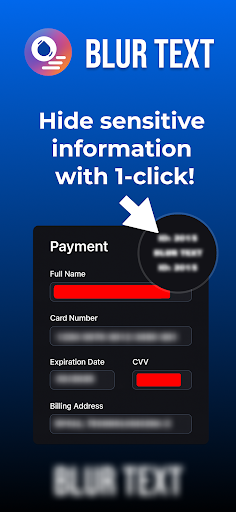
<b>Blur Text App - Screenshot Editor</b> - Transform your screenshots and images with the all-in-one editor that combines privacy features, annotation tools, and stunning backdrop effects. Perfect for tutorials, hiding sensitive info, and enhancing images.
✨ <b>Core Features:</b>
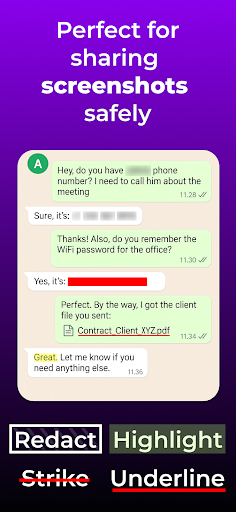
<b>Smart Text Privacy</b> - AI detects text, tap to blur, redact, highlight, underline, or strike through
<b>Creative Backdrop Effects</b> - Transform images with stunning background styling and visual effects
<b>Image Cropping</b> - Crop images to perfect dimensions
<b>Text Addition</b> - Add custom text with full styling options …
Read the full description
Complete <b>Screenshot Editor</b> & Privacy Tool in One App! <b>Blur Text App - Screenshot Editor</b> - Transform your screenshots and images with the all-in-one editor that combines privacy features, annotation tools, and stunning backdrop effects. Perfect for tutorials, hiding sensitive info, and enhancing images. ✨ <b>Core Features:</b> <b>Smart Text Privacy</b> - AI detects text, tap to blur, redact, highlight, underline, or strike through <b>Creative Backdrop Effects</b> - Transform images with stunning background styling and visual effects <b>Image Cropping</b> - Crop images to perfect dimensions <b>Text Addition</b> - Add custom text with full styling options <b>Markup Tools</b> - Draw arrows, circles, rectangles, and ovals <b>Text Templates</b> - Save and reuse text styles <b>Custom Colors</b> - Choose from presets or create your own palette <b>Custom Area Selection</b> - Draw rectangles to blur, pixelate, or cover specific parts <b>Offline Processing</b> - All editing happens on your device for maximum privacy 🎯 <b>Perfect For:</b> ✓ Professional tutorials with annotations and backdrops ✓ Hiding sensitive info in screenshots ✓ Adding explanatory text and arrows ✓ Marking up documents with visual flair ✓ Enhancing social media posts with backdrop effects ✓ Creating educational content with engaging backgrounds ✓ Protecting privacy in shared images 🚀 <b>How It Works:</b> 1. Select any image or screenshot 2. Apply backdrop effects for visual appeal 3. Use privacy tools to hide sensitive information 4. Add text, arrows, shapes, and annotations 5. Draw custom areas to blur, pixelate, or cover 6. Save and share your enhanced images! ⭐ <b>Premium Features:</b> <b>Ad-Free Experience</b> - Clean, distraction-free workspace <b>Advanced Backdrop Effects</b> - Professional background styling <b>Advanced Markup Tools</b> - Professional arrows, circles, rectangles, ovals <b>Expanded Font Library</b> - Access to premium typography <b>Custom Text Templates</b> - Save and reuse text styles <b>Advanced Text Styling</b> - Outline effects and background options <b>Custom Area Drawing</b> - Select any part to blur, pixelate, or cover <b>Undo & Redo</b> - Fix mistakes and experiment fearlessly 🔐 <b>Privacy First:</b> Your images never leave your device. All processing happens locally. 💡 <b>Free vs Premium:</b> <b>Free:</b> Core editing including text, crop, markup, backdrop effects, privacy tools (with ads) <b>Premium:</b> Ad-free + advanced backdrop effects + advanced markup + premium fonts + custom templates + advanced styling + custom area drawing + undo/redo (one-time payment!) 📚 <b>Use Cases:</b> <b>Educators:</b> Create instructional materials with annotations and backdrops <b>Professionals:</b> Document workflows, hide sensitive data, add visual appeal <b>Content Creators:</b> Enhance images for social media with backdrop effects <b>Students:</b> Mark up study materials with style <b>Business Users:</b> Create professional presentations with backdrop styling Download <b>Screenshot Editor - Blur Text</b> now! Whether you need privacy protection, professional annotations, or stunning backdrop effects, Blur Text has everything. Upgrade to Premium for the ultimate experience.
Installs since 27 Aug 2026 Measured
Exact Google Play install counts, collected daily
Ratings
160 ratings, 7 reviews
- 5 ★55%
- 4 ★11%
- 3 ★0.0%
- 2 ★0.0%
- 1 ★34%
Recent reviews
Latest public reviews from the store
- 4 May 2026
100 percent perfect
- 19 Apr 2026
nice
- 29 Mar 2026
it is so nice
- 20 Feb 2026
very good app for blur video but paid version not working sometimes i think there is some bugs or tecnical issues in paid version of this app
What reviewers bring up
Topics mentioned in the latest 25 reviews, by how many reviews mention them
Liked in good reviews (17 reviews)
- blurring 2
- face 2
Raised in bad reviews (6 reviews)
- video 2
- says 2
Top chart positions
Latest Google Play chart ranks by country, last 10 days
Not in any tracked top chart in the last 10 days.
Screenshot Editor - Markup history
Release, install milestones, listing and store changes
- Reached 10,000+ installs 30 Sep 2025
- Moved from Photography to Tools 30 Sep 2025
- Reached 5,000+ installs 19 Aug 2025
- Reached 1,000+ installs 5 Aug 2025
- Reached 100+ installs 8 Jul 2025
- Reached 50+ installs 25 Jun 2025
- First released on the store 17 Jun 2025
Update frequency
How often Screenshot Editor - Markup ships a new version, month by month
3 updates in the last 12 months. More often than most similar apps: they shipped a median of 0 updates in the same year.
Recent versions
Current version 12.0.3
- Version 12.0.325 Oct 2026
🚀 Screenshot Editor update! • Smart Detect: find emails, phone numbers, card numbers, addresses and more, and hide them in one tap • Easier rotation: objects snap to straight angles, plus quick buttons to rotate 90°, straighten, mirror or reset • Resizing smoothly follows your finger, even on rotated objects • Backdrop: Windows, KDE and GNOME window styles, and a dice button for a random background • Tap an applied effect again to remove it • More reliable touch controls in every tool
- Version 11.0.727 Jul 2026
Screenshot Editor - Blur, redact & highlight text with 1-tap! Markup tools, add text on photo, annotation, backdrop (background effects, styles, gradients) 🔘 11.0 Spotlight tool added 🆃 10.0 New: Keywords Tool 🔥 9.0 Symbols Tool (vectors added) 📸 8.0 Brush tool and adding photo tool (you can add photo as a new layer) 1️⃣ 7.0 Numbers tool Also: new styles for arrows 🔎 6.0 Zoom features. You can point the target on the image and show the line to the point you want to zoom-in.
- Version 11.0.421 Feb 2026
Screenshot Editor - Blur, redact & highlight text with 1-tap! Markup tools, add text on photo, annotation, backdrop (background effects, styles, gradients) 🔘 11.0 Spotlight tool added 🆃 10.0 New: Keywords Tool 🔥 9.0 Symbols Tool (vectors added) 📸 8.0 Brush tool and adding photo tool (you can add photo as a new layer) 1️⃣ 7.0 Numbers tool Also: new styles for arrows 🔎 6.0 Zoom features. You can point the target on the image and show the line to the point you want to zoom-in.
Listing keywords
Words and phrases Screenshot Editor - Markup repeats most in its store listing
Top phrases: backdrop effects (10), screenshot editor (5), blur text (4), pixelate or cover (3), blur pixelate (3).
Highlighted words also appear in the title. Counts cover the title, short description and description.
Business model and tech
From the store listing and declared permissions
- Business model
- Free to downloadIn-app purchasesShows ads
- Sensitive access
- No sensitive permission declared
Compliance
What the listing and the app package show
- Store status
- Live
- Upkeep
- Updated 25 Oct 2026
- Registered in
- Poland
- Privacy policy
- Linked on the listing
- Advertising
- Shows ads
- In-app purchases
- Offered
- Age rating
- Everyone
Apps like Screenshot Editor - Markup
My India VPNAppPulse Tech42.2K installs★ 4.42
Light Bulb Security CameraRockyTeach63.1K installs★ 2.88
TCL Smart TV Screen mirroringTech-Tools95.2K installs★ 3.85
Easy Schedule Notebookoxdb.net51.5K installs★ 5.0
Land Parcels Areas CalculatorGeoZidan46K installs★ 1.73
Gallery Vault - Hide PhotoMerryblue51K installs★ 4.2
Heat Index Calculator - How toVnMobileSolutions Inc.3.7K installs★ 4.24
2D OwnerTechnologyGateway46K installs★ 4.8
3D Print Cost CalculatorReme Le Hane38.5K installs★ 3.95
Screenshot Editor - Markup: questions and answers
How many downloads does Screenshot Editor - Markup have?
Screenshot Editor - Markup has 55,902 installs on Google Play, measured from the store's own count on 19 Nov 2026.
Who makes Screenshot Editor - Markup?
Screenshot Editor - Markup is published by Adrian Kajda, a developer based in PL.
When was Screenshot Editor - Markup last updated?
The latest version (12.0.3) was released on 25 Oct 2026.
Is Screenshot Editor - Markup free?
Yes. Screenshot Editor - Markup is free to download and offers in-app purchases, and it shows ads.
Is Screenshot Editor - Markup still available?
Yes. Screenshot Editor - Markup is live on Google Play as of 19 Nov 2026.
Track Screenshot Editor - Markup and its competitors
Watch any app for new versions, rating drops, chart moves and removals. Free plan, no card.