
Screenshot Tile [No root]
Quickly take screenshots from the quick settings panel
- Installs
- 1.98M
- Measured
- Rating
- 3.74
- Ratings
- 6K
- 133 reviews
- Version
- 2.21.4
- Updated 26 Sep 2026
- Released
- 22 Feb 2019
- Tracked since 12 May 2026
- Size
- 2 MB
- Needs 7.0
Screenshots





About Screenshot Tile [No root]
The description on the store listing
Adds a button/tile to the quick settings panel to take screenshots.
After install you need to add the button/tile to your quick settings and then grant the permissions to record screen captures and save images to the internal storage.
<h2>Features:</h2>✓ Take screenshots from the quick settings
✓ No root required
✓ Notification after a screenshot was taken (can be disabled)
✓ Immediately share, edit or delete a screenshot from the notification
✓ Edit the screenshot with the included image editor
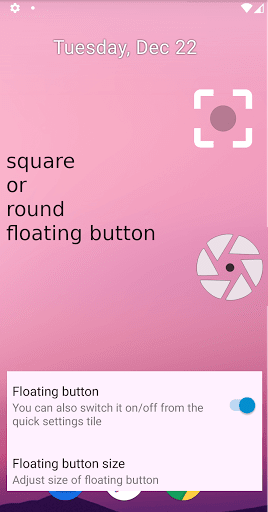
✓ Floating button/Overlay button like a chat bubble (Android 9+)
✓ Use as assist app to take a screenshot (long-press the Home button)
✓ Only take screenshot of a specific area of the …
Read the full description
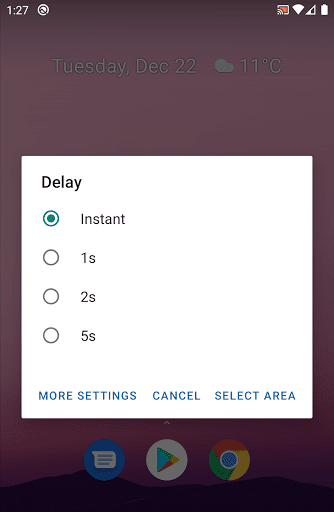
Adds a button/tile to the quick settings panel to take screenshots. After install you need to add the button/tile to your quick settings and then grant the permissions to record screen captures and save images to the internal storage. <h2>Features:</h2>✓ Take screenshots from the quick settings ✓ No root required ✓ Notification after a screenshot was taken (can be disabled) ✓ Immediately share, edit or delete a screenshot from the notification ✓ Edit the screenshot with the included image editor ✓ Floating button/Overlay button like a chat bubble (Android 9+) ✓ Use as assist app to take a screenshot (long-press the Home button) ✓ Only take screenshot of a specific area of the screen (long-press the tile) ✓ Delay taking a screenshot ✓ Store in any folder on any storage e.g. sd card ✓ Store in different file formats: png, jpg or webp ✓ Take automatic screenshots with apps like Tasker or MacroDroid ✓ Free, open-source, no advertising This is a fork of "Screenshot Tile [Root]" but it does not require root. Source code: <a href="https://www.google.com/url?q=https%3A%2F%2Fgithub.com%2Fcvzi%2FScreenshotTile&sa=D&sntz=1&usg=AOvVaw1-pNJScIiqKYVr5-ZD7e4p">github.com/cvzi/ScreenshotTile</a> Original app: <a href="https://www.google.com/url?q=https%3A%2F%2Fgithub.com%2Fipcjs%2FScreenshotTile&sa=D&sntz=1&usg=AOvVaw1-oSaesDBE3B8FK8XUbAgJ">github.com/ipcjs/ScreenshotTile</a> Open Source license is GNU GPLv3 <u>Note:</u> 🎦 When you take a screenshot, the <b>"Google Cast" icon</b> will appear in the status bar and it will be visible in the screenshot image. If you want to hide the icon, there is an explanation here: <a href="https://www.google.com/url?q=https%3A%2F%2Fgithub.com%2Fcvzi%2FScreenshotTile%23icon&sa=D&sntz=1&usg=AOvVaw0rELOKYpIkPfiTbAJPFyCA">github.com/cvzi/ScreenshotTile#icon</a> <h2>Permissions:</h2>❏ <i>android.permission.WRITE_EXTERNAL_STORAGE "Photos/Media/Files and Storage"</i> This is required to save the screenshot files on the internal storage of your device. ❏ <i>android.permission.FOREGROUND_SERVICE</i> Since Android 9/Pie this permission is required to take screenshots. It basically means that this app can run without showing itself. However the app will always show a notification when it is running. <h2>Automatic screenshots:</h2>If you want to automate screenshots from another app, e.g. MacroDroid or Tasker, you can find a step-by-step guide here: <a href="https://www.google.com/url?q=https%3A%2F%2Fgithub.com%2Fcvzi%2FScreenshotTile%23automatic-screenshots-with-broadcast-intents&sa=D&sntz=1&usg=AOvVaw3p2XXjvOSLEFXLgVYULJ5x">github.com/cvzi/ScreenshotTile#automatic-screenshots-with-broadcast-intents</a> <h2>Hiding the app icon:</h2>In the app settings you can hide the app icon from your launcher. You can still access the app by long pressing the tile in your quick settings. Unfortunately, Android 10 does not allow hiding an app anymore. <h2>🌎 Support and translations</h2>If there is a problem or you want to help translate this app into your language, please contact me on <a href="https://www.google.com/url?q=https%3A%2F%2Fgithub.com%2Fcvzi%2FScreenshotTile%2Fissues&sa=D&sntz=1&usg=AOvVaw2_Y5x832CbETpvCNDR1lMb">github.com/cvzi/ScreenshotTile/issues</a>, <a href="mailto:[email protected]">[email protected]</a> or contribute a translation on <a href="https://www.google.com/url?q=https%3A%2F%2Fcrowdin.com%2Fproject%2Fscreenshottile%2F&sa=D&sntz=1&usg=AOvVaw2q7H-ECK_NalLjXgyGNH_k">https://crowdin.com/project/screenshottile/</a> This app can access the <a href="https://support.google.com/googleplay/android-developer/answer/10964491">Accessibility Services API</a> which allows this app to record the screen. Data is neither collected nor shared by this app using the accessibility capabilities. Privacy Policy: https://cvzi.github.io/appprivacy.html?appname=Screenshot%20Tile%20[No%20root]
Installs, last 30 days Measured
Exact Google Play install counts, collected daily
Ratings
6,045 ratings, 133 reviews
- 5 ★55%
- 4 ★7.9%
- 3 ★2.8%
- 2 ★2.8%
- 1 ★32%
Recent reviews
Latest public reviews from the store
- 7 Jun 2025
This app and he accompanied server is phenomenal. Thank you for making this!
Top chart positions
Latest Google Play chart ranks by country, last 10 days
Not in any tracked top chart in the last 10 days.
Screenshot Tile [No root] history
Release, install milestones, listing and store changes
- Reached 1,000,000+ installs 23 Nov 2024
- Reached 500,000+ installs 10 Nov 2023
- Reached 100,000+ installs 31 Dec 2021
- First released on the store 22 Feb 2019
Update frequency
How often Screenshot Tile [No root] ships a new version, month by month
8 updates in the last 12 months. More often than most similar apps: they shipped a median of 0 updates in the same year.
Recent versions
Current version 2.21.4
- Version 2.21.426 Sep 2026
v2.21.4 * Automate taking a screenshot by starting an activity (added by @kunalagra) v2.20.1 * Option to copy screenshot to clipboard * Option to auto-select "Entire screen" in legacy method permission (Android 14+) v2.19.0 * Option to hide floating button behind front camera notch v2.18.1 * Option to drag floating button with short press instead of long press
- Version 2.21.36 Jul 2026
v2.21.3 * Automate taking a screenshot by starting an activity (added by @kunalagra) v2.20.1 * Option to copy screenshot to clipboard * Option to auto-select "Entire screen" in legacy method permission (Android 14+) v2.19.0 * Option to hide floating button behind front camera notch v2.18.1 * Option to drag floating button with short press instead of long press
- Version 2.21.213 Jun 2026
v2.21.2 * Automate taking a screenshot by starting an activity (added by @kunalagra) v2.20.1 * Option to copy screenshot to clipboard * Option to auto-select "Entire screen" in legacy method permission (Android 14+) v2.19.0 * Option to hide floating button behind front camera notch v2.18.1 * Option to drag floating button with short press instead of long press
- Version 2.21.111 Jun 2026
v2.21.1 * Automate taking a screenshot by starting an activity (added by @kunalagra) v2.20.1 * Option to copy screenshot to clipboard * Option to auto-select "Entire screen" in legacy method permission (Android 14+) v2.19.0 * Option to hide floating button behind front camera notch v2.18.1 * Option to drag floating button with short press instead of long press
Listing keywords
Words and phrases Screenshot Tile [No root] repeats most in its store listing
Top phrases: quick settings (5), take screenshots (4), take screenshot (3), android openmail cc (2), cuzi android openmail (2).
Highlighted words also appear in the title. Counts cover the title, short description and description.
Business model and tech
From the store listing and declared permissions
- Business model
- Free to download
- Sensitive access
- No sensitive permission declared
Compliance
What the listing and the app package show
- Store status
- Live
- Upkeep
- Updated 26 Sep 2026
- Registered in
- Germany
- Privacy policy
- Linked on the listing
- Advertising
- No ads declared
- In-app purchases
- None declared
- Age rating
- Everyone
Apps like Screenshot Tile [No root]
InConnectQuantumTech Limited516K installs★ 4.1
Afghan Flag Pashto KeyboardNenoSoft Technologies245K installs★ 4.24
List, Copy And InviteManuelitaGG145K installs★ 4.4
Digital Dashboard GPSluozirui628K installs★ 3.44
Recover Deleted Messages AppAllied Clicks126K installs★ 4.3
Battery Health TemperatureSimpleEvo Apps1.1M installs★ 4.09
MyScript Calculator 2MyScript301K installs★ 4.61
StaytrackBossjob13.4K installs★ 4.96
WiFi Extract كشف الواى فاىKharphonk1.9M installs★ 3.79
Screenshot Tile [No root]: questions and answers
How many downloads does Screenshot Tile [No root] have?
Screenshot Tile [No root] has 1,980,854 installs on Google Play, measured from the store's own count on 20 Nov 2026.
Who makes Screenshot Tile [No root]?
Screenshot Tile [No root] is published by cuzi, a developer based in DE.
When was Screenshot Tile [No root] last updated?
The latest version (2.21.4) was released on 26 Sep 2026.
Is Screenshot Tile [No root] free?
Yes. Screenshot Tile [No root] is free to download.
Is Screenshot Tile [No root] still available?
Yes. Screenshot Tile [No root] is live on Google Play as of 20 Nov 2026.
Track Screenshot Tile [No root] and its competitors
Watch any app for new versions, rating drops, chart moves and removals. Free plan, no card.