
Scrolio: Screen Time Control
Block distracting apps,limit doomscrolling & boost focus with screen time limits
- Installs
- 6
- Measured
- Rating
- —
- Ratings
- —
- Version
- Varies with device
- Released
- 25 Oct 2026
- Tracked since 10 Nov 2026
- Size
- —
Screenshots

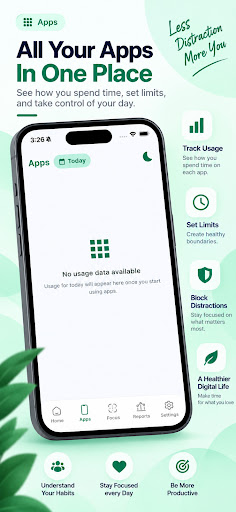


About Scrolio: Screen Time Control
The description on the store listing
Multiple ways to reduce screen time, block distracting apps, interrupt endless scrolling, and build healthier digital habits. Take back control of your phone and make time for what matters.
Pause before opening distracting apps:
Create a mindful pause before accessing selected apps. Take a moment to think before opening social media and other distracting apps.
Interrupt endless scrolling:
Set restrictions for supported apps and short-video feeds, including Shorts and Reels. Help yourself break the habit of continuous scrolling and spend less time on distractions.
Set daily app usage limits:
Choose how much time you want to spend on individual apps. Set daily usage goals …
Read the full description
Multiple ways to reduce screen time, block distracting apps, interrupt endless scrolling, and build healthier digital habits. Take back control of your phone and make time for what matters. Pause before opening distracting apps: Create a mindful pause before accessing selected apps. Take a moment to think before opening social media and other distracting apps. Interrupt endless scrolling: Set restrictions for supported apps and short-video feeds, including Shorts and Reels. Help yourself break the habit of continuous scrolling and spend less time on distractions. Set daily app usage limits: Choose how much time you want to spend on individual apps. Set daily usage goals and configure restrictions when your limits are reached. Customize restrictions by day and time: Create personalised schedules for different days of the week and specific hours. Set app restrictions around your work, study, sleep, and personal routines. Stay focused with mindful reminders: Use reminders and prompts to become more aware of your phone usage. Encourage yourself to pause, reflect, and decide whether opening an app is really necessary. Understand your screen-time habits: Explore daily and weekly usage insights to understand where your time goes. Identify distracting apps and monitor your progress toward healthier digital habits. Focus on what matters: Reduce unnecessary distractions, create focused periods, and build a healthier relationship with technology. Accessibility Service Disclosure Scrolio uses Android's AccessibilityService API to support its app-blocking and supported feed-blocking functionality. With your explicit permission, the service detects relevant interactions with supported apps and helps apply the restrictions you configure. Accessibility permission must be enabled manually in Android settings. You can disable it at any time through your device settings. Features that depend on this service may stop working when it is disabled. Scrolio uses this service only to provide its disclosed screen-time management and blocking functionality. Take control of your digital habits with Scrolio – Screen Time Control.
Installs Measured
Exact Google Play install counts, collected daily
Daily history starts once this app is in our daily install sample.
Ratings
- 5 ★0.0%
- 4 ★0.0%
- 3 ★0.0%
- 2 ★0.0%
- 1 ★0.0%
Recent reviews
Latest public reviews from the store
No reviews in our sample for this app yet.
Top chart positions
Latest Google Play chart ranks by country, last 10 days
Not in any tracked top chart in the last 10 days.
Scrolio: Screen Time Control history
Release, install milestones, listing and store changes
- First released on the store 25 Oct 2026
Listing keywords
Words and phrases Scrolio: Screen Time Control repeats most in its store listing
Top phrases: digital habits (3), distracting apps interrupt (2), healthier digital habits (2), interrupt endless scrolling (2), screen time control (2).
Highlighted words also appear in the title. Counts cover the title, short description and description.
Business model and tech
From the store listing and declared permissions
- Business model
- Free to downloadIn-app purchases
- Sensitive access
- No sensitive permission declared
Compliance
What the listing and the app package show
- Store status
- Live
- Privacy policy
- Linked on the listing
- Advertising
- No ads declared
- In-app purchases
- Offered
- Age rating
- Everyone
Apps like Scrolio: Screen Time Control
들어서 화면켜기Won3.5K installs★ 4.0
Height PredictionEcliptic App Ventures45.9K installs★ 2.4
Speicers`Pro VPNEldiablolucifer202021.2K installs★ 4.14
Lightning Tracker with AlertsYaksh Software4.3K installs★ 3.0
Mana Pathi (Unit Converter)Shirish Koirala2.2K installs★ 4.6
Multi-tab Calc - A simple app.Naoyuki Rikiji1.3K installs★ 5.0
Photo Recovery PlusBillApps7.1K installs★ 4.53
Just Silence. Scheduled.Akid Soft1.6K installs★ 5.0
- WoWp AssistantВиталий Робиновский2K installs★ 4.2
Scrolio: Screen Time Control: questions and answers
How many downloads does Scrolio: Screen Time Control have?
Scrolio: Screen Time Control has 6 installs on Google Play, measured from the store's own count on 10 Nov 2026.
Who makes Scrolio: Screen Time Control?
Scrolio: Screen Time Control is published by Coding Is Life.
Is Scrolio: Screen Time Control free?
Yes. Scrolio: Screen Time Control is free to download and offers in-app purchases.
Is Scrolio: Screen Time Control still available?
Yes. Scrolio: Screen Time Control is live on Google Play as of 10 Nov 2026.
Track Scrolio: Screen Time Control and its competitors
Watch any app for new versions, rating drops, chart moves and removals. Free plan, no card.