
Sculpt+
Powerful 3D modeling & painting. Sculpt characters and create 3D art on the go.
- Installs
- 2.50M
- Measured
- Rating
- 3.21
- Ratings
- 6.6K
- 840 reviews
- Version
- 2026.3.31
- Updated 31 Mar 2026
- Released
- 17 Feb 2018
- Tracked since 12 May 2026
- Size
- —
- Needs 4.1
Screenshots


About Sculpt+
The description on the store listing
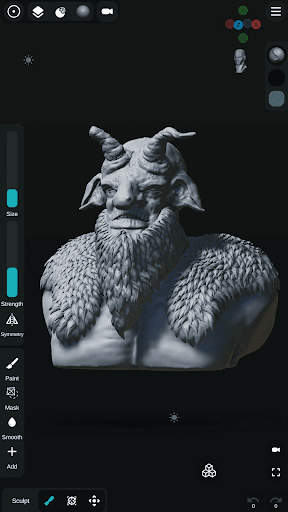
Unleash your creativity anywhere with Sculpt+, the ultimate digital 3D sculpting and painting app designed to bring desktop-level modeling tools directly to your smartphone or tablet.
Whether you are a professional 3D artist, a game developer designing characters, or a hobbyist exploring 3D printing, Sculpt+ provides a seamless, intuitive workflow for creating stunning 3D art on the go.
Build base meshes from scratch, sketch complex concepts, and detail your models with high-resolution sculpting and PBR rendering.
✨ POWERFUL SCULPTING & PAINTING
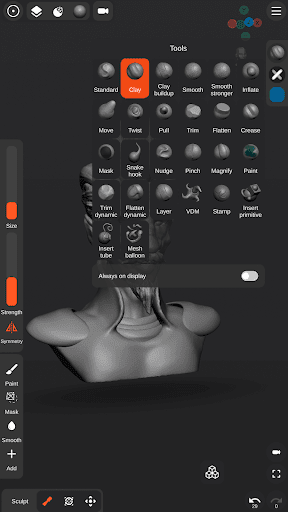
• Advanced Sculpting Brushes: Standard, Clay, Smooth, Mask, Inflate, Move, Trim, Flatten, Crease, and many more to shape your vision. …
Read the full description
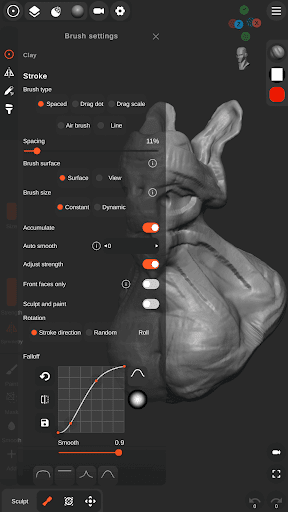
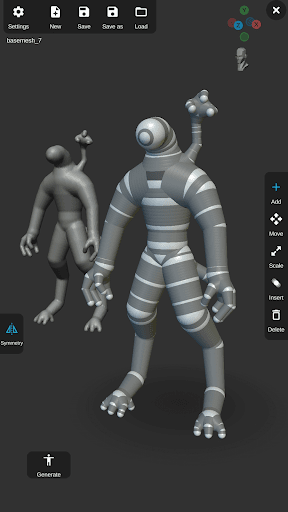
Unleash your creativity anywhere with Sculpt+, the ultimate digital 3D sculpting and painting app designed to bring desktop-level modeling tools directly to your smartphone or tablet. Whether you are a professional 3D artist, a game developer designing characters, or a hobbyist exploring 3D printing, Sculpt+ provides a seamless, intuitive workflow for creating stunning 3D art on the go. Build base meshes from scratch, sketch complex concepts, and detail your models with high-resolution sculpting and PBR rendering. ✨ POWERFUL SCULPTING & PAINTING • Advanced Sculpting Brushes: Standard, Clay, Smooth, Mask, Inflate, Move, Trim, Flatten, Crease, and many more to shape your vision. • Custom VDM Brushes: Use pre-made Vector Displacement Mesh (VDM) brushes or create your own custom brushes for intricate detailing. • Vertex Painting: Add color, texture, and life to your 3D models with high-quality vertex painting tools. • Stylus Support: Take full control with pressure-sensitivity support for precise brush size and strength. • Stroke Customization: Tweak falloff, alpha, and stroke behavior for perfect application. 🏗️ MESH BUILDING & BOOLEAN OPERATIONS • Base Mesh Builder: Inspired by zSpheres, sketch out full-body armatures and base meshes incredibly fast. • Voxel Remeshing & Subdivisions: Remesh your geometry instantly to maintain even topology, or subdivide for ultra-fine detailing. • Voxel Boolean Operations: Easily combine (Union), carve out (Subtraction), or intersect meshes. • Mesh Decimation: Optimize your polygon count for game engines or efficient 3D printing. • Multiple Primitives: Start instantly with Spheres, Cubes, Planes, Cones, Cylinders, Torus, and pre-made sculpting base meshes. 🎨 SCENE CUSTOMIZATION & RENDERING • PBR Rendering: Visualize your art in real-time with Physically Based Rendering. • Dynamic Lighting: Illuminate your scene using customizable Directional, Spot, and Point lights. • Reference Image Support: Easily import reference images directly into your workspace to guide your sculpting process. • Customizable UI: A modern, user-friendly interface designed specifically for mobile and tablets. Customize your layout and theme to fit your workflow. 📁 IMPORT & EXPORT WORKFLOWS • Import: Bring in 3D models (.OBJ, .STL), Custom Matcap textures, Custom Alpha textures for brushes, and HDRI textures for realistic PBR lighting. • Export for 3D Printing & Game Engines: Export your finished projects seamlessly as .OBJ, .STL, or .GLB files. • Share Your Art: Export high-quality Renders as JPEG or PNG (with transparent backgrounds), or generate 360-degree turntable GIFs to showcase your portfolio. • Auto-Save Protection: Never lose your progress. Your work is automatically saved in the background so you can focus entirely on creating. Start shaping your ideas today. Download Sculpt+ and turn your device into a portable 3D studio!
Installs, last 30 days Measured
Exact Google Play install counts, collected daily
Ratings
6,631 ratings, 840 reviews
- 5 ★39%
- 4 ★8.9%
- 3 ★13%
- 2 ★10%
- 1 ★28%
Recent reviews
Latest public reviews from the store
- 15 May 2026
I find this app very useful, but it's missing some basic functionalities like copying images from the board to the clipboard (so that you can copy-paste between boards) and merging boards. I have images in different boards that I want to use together in a new one and there's no simple way to do that without exporting/importing the images separately.
- 9 May 2026
Such a great app, so useful overall. However, the amount of work/time lost by everyone using the app, due to no autosave, had to be enormous. Please please please add this feature! Otherwise, excellent app
- 4 May 2026
I'm currently using the MovinkPad11 and having issues when i split screen the app, the top and bottom have this huge blank space. But this is a bug that seem to happen only on this type of devices, I hope it gets updated soon. Other than that everything work greats
- 30 Mar 2026
what i needed, thank you
What reviewers bring up
Topics mentioned in the latest 50 reviews, by how many reviews mention them
Liked in good reviews (31 reviews)
- pureref 5
- features 4
- other 4
- paid 4
- references 3
- drawing 3
- images 3
- hope 3
Raised in bad reviews (8 reviews)
- pay 4
Top chart positions
Latest Google Play chart ranks by country, last 10 days
Not in any tracked top chart in the last 10 days.
Sculpt+ history
Release, install milestones, listing and store changes
- Reached 1,000,000+ installs 9 Nov 2020
- Moved from Productivity to Art & Design 6 Mar 2020
- Reached 500,000+ installs 24 Jan 2019
- Reached 100,000+ installs 19 Sep 2018
- Reached 50,000+ installs 5 Sep 2018
- Moved from Art & Design to Productivity 22 Aug 2018
- Moved from Productivity to Art & Design 7 Aug 2018
- Reached 10,000+ installs 9 Jul 2018
Update frequency
How often Sculpt+ ships a new version, month by month
2 updates in the last 12 months. Less often than most similar apps: they shipped a median of 3 updates in the same year.
Recent versions
Current version 2026.3.31
- Version 2026.3.3130 Mar 2026
Minor bug fixes and improvements.
- Version 2026.328 Feb 2026
- Version 7.47 Nov 2025
- Version 7.319 Jul 2025
Listing keywords
Words and phrases Sculpt+ repeats most in its store listing
Top phrases: 3d printing (3), base meshes (3), models with high (2), 3d art (2), 3d models (2).
Highlighted words also appear in the title. Counts cover the title, short description and description.
Business model and tech
From the store listing and declared permissions
- Business model
- Free to downloadIn-app purchases
- Sensitive access
- No sensitive permission declared
Compliance
What the listing and the app package show
- Store status
- Live
- Upkeep
- Updated 31 Mar 2026
- Registered in
- France
- Privacy policy
- Linked on the listing
- Advertising
- No ads declared
- In-app purchases
- Offered
- Age rating
- Everyone
Apps like Sculpt+
Watermark On PhotoBhima Apps529K installs★ 4.02
iOS Emojis For StoryDharmisoft3.8M installs★ 3.98
Employee Card MakerMartian Studio558K installs★ 4.53
AR Tracing – Draw & PaintHypernova Limited5.5M installs★ 4.33
Da Vinci Eye: AR Art ProjectorDa Vinci Eye LLC662K installs★ 4.29
AI Video Generator-HiCutSongzan2.9M installs★ 3.03
1SStory - Story MakerDigital Marketing Tools885K installs★ 4.58
Cross Stitch:CollectionHappy coloring1.1M installs★ 4.27
Lyndi AI - Photo Video MakerLanie1.1M installs★ 4.21
Sculpt+: questions and answers
How many downloads does Sculpt+ have?
Sculpt+ has 2,503,912 installs on Google Play, measured from the store's own count on 19 Nov 2026.
Who makes Sculpt+?
Sculpt+ is published by Endvoid, a developer based in FR.
When was Sculpt+ last updated?
The latest version (2026.3.31) was released on 31 Mar 2026.
Is Sculpt+ free?
Yes. Sculpt+ is free to download and offers in-app purchases.
Is Sculpt+ still available?
Yes. Sculpt+ is live on Google Play as of 19 Nov 2026.
Track Sculpt+ and its competitors
Watch any app for new versions, rating drops, chart moves and removals. Free plan, no card.