
sDraw | Easy Drawing App
Draw, paint and edit images with layers and stylus support.
- Installs
- 1.40M
- Measured
- Rating
- 4.32
- Ratings
- 6.5K
- 68 reviews
- Version
- 10.2
- Updated 4 Nov 2026
- Released
- 31 Aug 2013
- Tracked since 10 May 2026
- Size
- 1 MB
- Needs 2.2
Screenshots
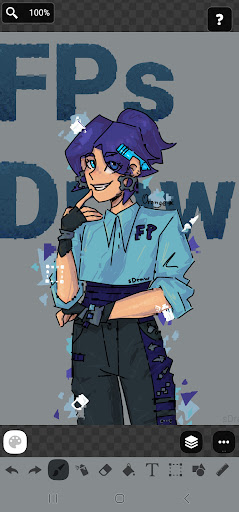
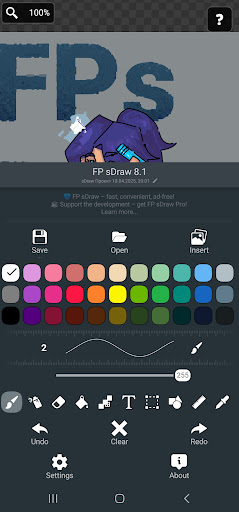
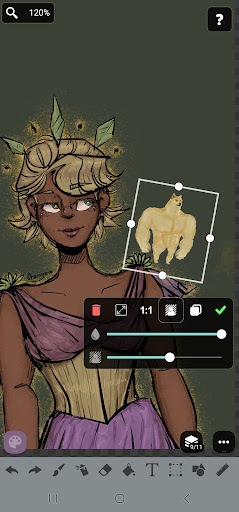
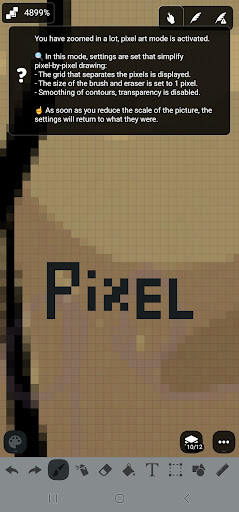


About sDraw | Easy Drawing App
The description on the store listing
sDraw is a tiny and fast drawing, painting and image editing app for sketching, pixel art, photo markup and quick edits. Supports stylus input, layers, blur, shapes, text and more - works offline without ads or clutter.
✅ Designed for people who need a fast and simple tool that opens instantly and stays out of the way.
Perfect for:
🎭 Creating memes or adding text to photos.
🧠 Sketching diagrams, notes and quick ideas.
🖼️ Marking or highlighting images.
🎨 Drawing pixel art, concepts and simple illustrations.
⚡ Making quick edits without opening heavy editors.
Why sDraw is worth having:
📦 Less than 1 MB.
⚡ Starts instantly.
🛑 No ads or distractions.
📱 Works even on …
Read the full description
sDraw is a tiny and fast drawing, painting and image editing app for sketching, pixel art, photo markup and quick edits. Supports stylus input, layers, blur, shapes, text and more - works offline without ads or clutter. ✅ Designed for people who need a fast and simple tool that opens instantly and stays out of the way. Perfect for: 🎭 Creating memes or adding text to photos. 🧠 Sketching diagrams, notes and quick ideas. 🖼️ Marking or highlighting images. 🎨 Drawing pixel art, concepts and simple illustrations. ⚡ Making quick edits without opening heavy editors. Why sDraw is worth having: 📦 Less than 1 MB. ⚡ Starts instantly. 🛑 No ads or distractions. 📱 Works even on very old phones. ✍️ Stylus support: sPen, Active Pen and more. 🧩 Flexible customizable UI. 🎨 Quick color shortcuts. 🛟 Automatic backup keeps drawings safe. 🔊 Volume buttons can trigger quick actions. 🚫 Doesn’t run in the background or waste resources. Drawing tools: 🪄 Layers. 🖼️ Insert from gallery. 🖍 Brush and eraser. 🌬 Airbrush. 🌫 Blur. 🌀 Liquify. 🏺 Fill and lasso fill. 🅰️ Text. ✂️ Selection tools. 🔳 Shapes and arrows. 📏 Ruler. 🎨 Eyedropper. 🧩 Mosaic. 🖱 Precision brush. 🎞 Speedpaint recording. 🎨 Pixel art support. The free version is fully functional with no essential features locked. Pro version adds a few extras: 💛 Support the developer. 🖼️ Option to remove the “sDraw” label from saved images. 🚫 Removes menu reminders about Pro. ⚡️ Full compatibility between free and Pro projects. 🍞 Tiny, fast and always ready when you need it 😊
Installs, last 30 days Measured
Exact Google Play install counts, collected daily
Ratings
6,456 ratings, 68 reviews
- 5 ★62%
- 4 ★18%
- 3 ★11%
- 2 ★1.4%
- 1 ★7.9%
Recent reviews
Latest public reviews from the store
No reviews in our sample for this app yet.
Top chart positions
Latest Google Play chart ranks by country, last 10 days
Not in any tracked top chart in the last 10 days.
sDraw | Easy Drawing App history
Release, install milestones, listing and store changes
- Moved from Tools to Art & Design 1 Mar 2023
- Reached 1,000,000+ installs 25 Jan 2023
- Reached 500,000+ installs 16 Dec 2018
- Reached 100,000+ installs 6 Jul 2016
- Reached 50,000+ installs 6 Aug 2014
- First released on the store 31 Aug 2013
Update frequency
How often sDraw | Easy Drawing App ships a new version, month by month
10 updates in the last 12 months. More often than most similar apps: they shipped a median of 3 updates in the same year.
Recent versions
Current version 10.2
- Version 9.722 Jul 2026
sDraw 9.7, 2026-07-21 - Text fits within the frame - History of added texts - Rounded corners for inserted images. - Canvas rotation lock button - Automatically open the last project - Settings reorganized. - ORA import/export (Krita, GIMP) - Text outline and frame size/color - Transparent fill = eraser lasso - Transparent color warning - Stronger stroke smoothing - Export to PDF - Many minor changes
- Version 9.622 Jun 2026
- Two-finger canvas rotation - Share button - Circular manual color picker mode - “Change layer hue” option - Improved mosaic preview - Fixed slider conflicts with scrolling - Vibration feedback when changing brush size - Rename projects from the project list - New canvas size settings - Turkish translation
- Version 9.527 May 2026
- New grid types: hexagonal, dots and crosses - Ability to move canvas in text, shapes, insert and selection tools - Hover indicator for many tools - Snapping shapes and images to canvas edges - Improved layers menu design - Improved settings previews - Tested on 36 devices: Android 2.3 - Android 16 - Fixed color distortion in liquify and blur tools - Fixed "open project" on Android 2.3 - Many small changes and fixes
- Version 9.47 May 2026
- New Blur tool - Fixed size indicator when hovering with a pen or cursor - Added size indicator when hovering with the precision brush - Updated Share behavior. If a project is already open — paste. If not — open as project. - Disabling hints now also disables them in settings and context menus - Fixed issues in behavior, text, and design
Listing keywords
Words and phrases sDraw | Easy Drawing App repeats most in its store listing
Top phrases: pixel art (3), quick edits (2), stylus support (2).
Highlighted words also appear in the title. Counts cover the title, short description and description.
Business model and tech
From the store listing and declared permissions
- Business model
- Free to download
- Sensitive access
- No sensitive permission declared
Compliance
What the listing and the app package show
- Store status
- Live
- Upkeep
- Updated 4 Nov 2026
- Privacy policy
- Linked on the listing
- Advertising
- No ads declared
- In-app purchases
- None declared
- Age rating
- Everyone
Apps like sDraw | Easy Drawing App
Watermark On PhotoBhima Apps529K installs★ 4.02
iOS Emojis For StoryDharmisoft3.8M installs★ 3.98
Employee Card MakerMartian Studio558K installs★ 4.53
AR Tracing – Draw & PaintHypernova Limited5.5M installs★ 4.33
Da Vinci Eye: AR Art ProjectorDa Vinci Eye LLC662K installs★ 4.29
AI Video Generator-HiCutSongzan2.9M installs★ 3.03
1SStory - Story MakerDigital Marketing Tools885K installs★ 4.58
Cross Stitch:CollectionHappy coloring1.1M installs★ 4.27
Lyndi AI - Photo Video MakerLanie1.1M installs★ 4.21
sDraw | Easy Drawing App: questions and answers
How many downloads does sDraw | Easy Drawing App have?
sDraw | Easy Drawing App has 1,404,810 installs on Google Play, measured from the store's own count on 19 Nov 2026.
Who makes sDraw | Easy Drawing App?
sDraw | Easy Drawing App is published by Fsoft Production.
When was sDraw | Easy Drawing App last updated?
The latest version (10.2) was released on 4 Nov 2026.
Is sDraw | Easy Drawing App free?
Yes. sDraw | Easy Drawing App is free to download.
Is sDraw | Easy Drawing App still available?
Yes. sDraw | Easy Drawing App is live on Google Play as of 19 Nov 2026.
Track sDraw | Easy Drawing App and its competitors
Watch any app for new versions, rating drops, chart moves and removals. Free plan, no card.