
Search.Work
Find odd jobs in houston easily with Search Work.
- Installs
- 35
- Measured
- Rating
- —
- Ratings
- —
- Version
- Varies with device
- Released
- 21 Sep 2022
- Tracked since 13 May 2026
- Size
- —
Also on App Store: Search Work, Search Work
Screenshots


About Search.Work
The description on the store listing
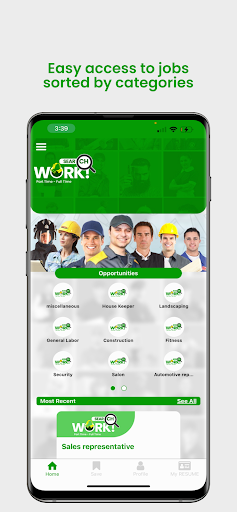
Welcome workers! If you're looking for cleaning, repairs, or other odd jobs in Houston, the Search Work App offers fast and dependable workers. It also serves as a platform to explore your next part-time or full-time job. Discovering the ideal person for the task is made simple with the Search Work App.
Utilizing the Search Work App: A Step-by-Step Guide
To initiate usage of the Search Work app, follow these instructions:
1. Download the application from either the Google Play Store or the iOS App Store.
2. Register an Account with Search Work:
-After installing successfully, create an account:
-Register as an employer or employee, depending on your needs.
-For job …
Read the full description
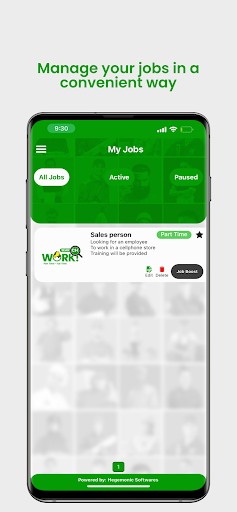
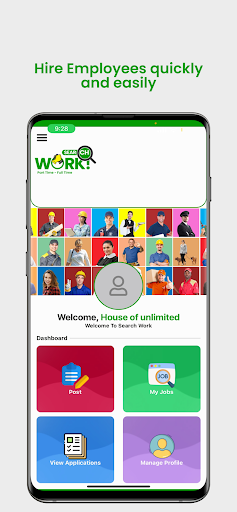
Welcome workers! If you're looking for cleaning, repairs, or other odd jobs in Houston, the Search Work App offers fast and dependable workers. It also serves as a platform to explore your next part-time or full-time job. Discovering the ideal person for the task is made simple with the Search Work App. Utilizing the Search Work App: A Step-by-Step Guide To initiate usage of the Search Work app, follow these instructions: 1. Download the application from either the Google Play Store or the iOS App Store. 2. Register an Account with Search Work: -After installing successfully, create an account: -Register as an employer or employee, depending on your needs. -For job seekers, choose an employee account. -For odd jobs in houston TX, select the employer account. 3. Mandatory Personal Information during Account Creation: As you complete the registration process for local odd jobs, provide the following essential details: - Genuine Profile Image - Full Legal Name - Email Address - Contact Phone Number - Date of Birth - Gender - Residential Address - State of Residence - City of Residence - Zip Code 4. Account Verification: After inputting all requisite information, finalize your account setup by verifying it through either your Gmail account or your phone number. Employer Account Features: Available Choices and Functionality Upon successful creation and login to your Search Work Employer account, you will gain access to a set of four distinct options, including odd jobs for teens: 1. Post a Job: When you decide to publish odd jobs in Houston or any new job, you will be required to provide comprehensive details to facilitate the identification of the most suitable candidate. These details encompass: - Job Title - Hourly Compensation - Nature of Job - Job Category - Job Subcategory - Preferred Language - Relevant Experience - Image Attachment - Detailed Job Description - Job Location - Number of Required Employees - Country - Residential Address - State - City - Zip Code Once you have meticulously entered all pertinent information, you can proceed to publish the job listing. 2. My Jobs: For a quick overview of the total count of your active job listings, including part-time odd jobs, this option serves as a convenient choice. 3. View Applications: The "View Applications" feature allows you to peruse the incoming applications for odd jobs in Houston or any posted job. This facilitates a clear understanding of the applicant pool in response to specific job offerings. 4. Manage Profile: Using the 'Manage Profile' function gives you control over your profile details, allowing updates for odd jobs in Houston or any other personal information. This tool is essential for keeping your profile accurate and up to date. Guidelines for Using Your Employee Account Effectively: Once your Search Work employee account is set up, follow these steps: Log in and choose a job category, such as odd side jobs, to simplify your job search. When you find the right opportunity, submit your application. Language Preference on Search Work: Yes, Search Work supports English and Spanish. To switch languages: 1. Open the Menu bar. 2. Find the language option in the upper-right corner and choose English or Spanish. Password Modification for Your Search Work Account: Of course, you can change your account password. Just follow these steps: 1. Open the Menu bar. 2. Find 'Account Management.' 3. Select the password change option, provide a reason, and confirm. 4. Your password will be updated, boosting account security. Account Suspension Feature for Search Work: If needed, you can temporarily pause your Search Work account activity using these steps: 1. Go to the Menu bar. 2. Find and select "Pause account." 3. This will suspend your account, pausing all activity. Remember, you can reactivate your account whenever you choose.
Installs since 17 Nov 2026 Measured
Exact Google Play install counts, collected daily
Daily history starts once this app is in our daily install sample.
Ratings
- 5 ★0.0%
- 4 ★0.0%
- 3 ★0.0%
- 2 ★0.0%
- 1 ★0.0%
Recent reviews
Latest public reviews from the store
- 26 Aug 2025
Finally a search engine, "Search the Right" that includes Newsmax, FINALLY. THANK YOU Thank you, Thank you. It took a bit to find it, the fun world of Google and its Play Store. The Good News, I have the app, AWESOME. Thank you "Search the Right" for being a real option. Cheers to your success and for all conservatives.
- 20 Mar 2025
You need a widget for a search bar on phome
- 7 Dec 2024
Great
Top chart positions
Latest Google Play chart ranks by country, last 10 days
Not in any tracked top chart in the last 10 days.
Search.Work history
Release, install milestones, listing and store changes
- First released on the store 21 Sep 2022
Update frequency
How often Search.Work ships a new version, month by month
0 updates in the last 12 months. Less often than most similar apps: they shipped a median of 1 updates in the same year.
Listing keywords
Words and phrases Search.Work repeats most in its store listing
Top phrases: search work (14), odd jobs (9), jobs in houston (6), menu bar find (3), bar find (3).
Highlighted words also appear in the title. Counts cover the title, short description and description.
Business model and tech
From the store listing and declared permissions
- Business model
- Free to download
- Sensitive access
- LocationCameraPhotos, videos and filesDraws over other appsAdvertising ID
23 permissions
2 special access, 6 sensitive, 15 standard
- Change system settingsWRITE_SETTINGSSpecial access
- Draw over other appsSpecial access
- Take photos and videosSensitive
- Change or delete shared storageSensitive
- Read shared storageSensitive
- Approximate locationSensitive
- Precise locationSensitive
- Show notificationsPOST_NOTIFICATIONSSensitive
- Read how it was installed (install referrer)BIND_GET_INSTALL_REFERRER_SERVICEStandard
- Read the advertising IDAD_IDStandard
- App icon badge countsBADGE_COUNT_READStandard
- Control vibrationStandard
Compliance
What the listing and the app package show
- Store status
- Live
- Registered in
- United States
- Privacy policy
- Linked on the listing
- Advertising
- No ads declared
- In-app purchases
- None declared
- Age rating
- Everyone
- Sensitive permissions
- 6 sensitive, 2 special access of 23
- Location access
- Yes, while in use
- Camera and microphone
- Camera
Apps like Search.Work
Great Clips ConnectGreat Clips19.3K installs★ 4.0
My NotebookArabic alphabet studio14.4K installs★ 5.0
DokandarDokandarltd8.2K installs★ 4.33
ELECTRICAL CONTRACTOR MagazineELECTRICAL CONTRACTOR Magazine17.2K installs★ 4.5
TicketManagerTicketManager12.2K installs★ 3.5
CrewConneXTA Connections15.1K installs★ 1.32
Flex Inventory ManagementUniGroup, Inc.5K installs★ 3.54
Unique Business WayPARAM COMPUTER3.3K installs★ 5.0
VeriTread CarrierVeriTread LLC12.5K installs★ 4.31
Search.Work: questions and answers
How many downloads does Search.Work have?
Search.Work has 35 installs on Google Play, measured from the store's own count on 17 Nov 2026.
Who makes Search.Work?
Search.Work is published by HEGEMONIC INC, a developer based in US.
Is Search.Work free?
Yes. Search.Work is free to download.
Is Search.Work still available?
Yes. Search.Work is live on Google Play as of 17 Nov 2026.
Track Search.Work and its competitors
Watch any app for new versions, rating drops, chart moves and removals. Free plan, no card.