
Secure Camera
Modern camera app focused on privacy and security with QR / barcode scanning.
- Installs
- 12.46M
- Measured
- Rating
- 3.88
- Ratings
- 17.4K
- 201 reviews
- Version
- 93
- Updated 1 Aug 2026
- Released
- 1 Mar 2022
- Tracked since 11 May 2026
- Size
- —
Screenshots


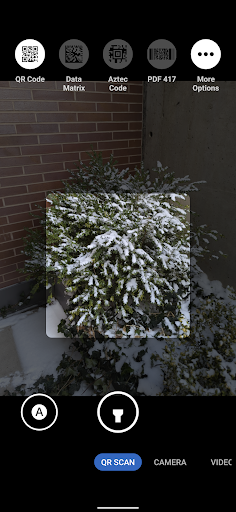

About Secure Camera
The description on the store listing
This is a modern camera app focused on privacy and security. It includes modes for capturing images, videos and QR / barcode scanning along with additional modes based on CameraX vendor extensions (Portrait, HDR, Night, Face Retouch and Auto) on <a href="https://developer.android.com/training/camerax/devices">devices where they're available</a>.
Modes are displayed as tabs at the bottom of the screen. You can switch between modes using the tab interface or by swiping left/right anywhere on the screen. The arrow button at the top opens the settings panel and you can close it by pressing anywhere outside the settings panel. You can also swipe down to open the settings and swipe up to close …
Read the full description
This is a modern camera app focused on privacy and security. It includes modes for capturing images, videos and QR / barcode scanning along with additional modes based on CameraX vendor extensions (Portrait, HDR, Night, Face Retouch and Auto) on <a href="https://developer.android.com/training/camerax/devices">devices where they're available</a>. Modes are displayed as tabs at the bottom of the screen. You can switch between modes using the tab interface or by swiping left/right anywhere on the screen. The arrow button at the top opens the settings panel and you can close it by pressing anywhere outside the settings panel. You can also swipe down to open the settings and swipe up to close it. Outside of the QR scanning mode, there's a row of large buttons above the tab bar for switching between the cameras (left), capturing images and starting/stopping video recording (middle) and opening the gallery (right). The volume keys can also be used as an equivalent to pressing the capture button. While recording a video, the gallery button becomes an image capture button for capturing images. The app has an in-app gallery and video player for images/videos taken with it. It currently opens an external editor activity for the edit action. Zooming via pinch to zoom or the zoom slider will automatically make use of the wide angle and telephoto cameras on Pixels and other devices supporting it. It will become more broadly supported over time. By default, continuous auto focus, auto exposure and auto white balance are used across the whole scene. Tapping to focus will switch to auto focus, auto exposure and auto white balance based on that location. The focus timeout setting determines the timeout before it switches back the default mode. The exposure compensation slider on the left allows manually tuning exposure and will automatically adjust shutter speed, aperture and ISO. Further configuration / tuning will be provided in the future. The QR scanning mode only scans within the scanning square marked on the screen. The QR code should be aligned with the edges of the square but can have any 90 degree orientation. Non-standard inverted QR codes are fully supported. It's a very quick and high quality QR scanner able to easily scan very high density QR codes from Pixels. Every 2 seconds, it will refresh auto focus, auto exposure and auto white balance on the scanning square. It has full support for zooming in and out. The torch can be toggled with the button at the bottom center. The auto toggle at the bottom left can be used to toggle scanning for all supported barcode types. Alternatively, you can select which barcode types it should scan via the menu at the top. It only scans QR codes by default since that provides quick and reliable scanning. Most other types of barcodes can result in false positives. Each enabled type will slow down the scanning and will make it more prone to false positives especially with difficult to scan barcodes such as a dense QR code. Camera permission is the only one that's required. Images and videos are stored via the Media Store API so media/storage permissions aren't required. The Microphone permission is needed for video recording by default but not when including audio is disabled. Location permission is only needed if you explicitly enabling location tagging, which is an experimental feature. By default, EXIF metadata is stripped for captured images and only includes the orientation. Stripping metadata for videos is planned but not supported yet. Orientation metadata isn't stripped since it's fully visible from how the image is displayed so it doesn't count as hidden metadata and is needed for proper display. You can toggle off stripping EXIF metadata in the More Settings menu opened from the settings dialog. Disabling metadata stripping will leave timestamp, phone model, exposure configuration and other metadata. Location tagging is disabled by default and won't be stripped if you enable it.
Installs, last 30 days Measured
Exact Google Play install counts, collected daily
Ratings
17,420 ratings, 201 reviews
- 5 ★65%
- 4 ★10%
- 3 ★7.0%
- 2 ★2.9%
- 1 ★15%
Recent reviews
Latest public reviews from the store
- 24 Jan 2023
Good application
Top chart positions
Latest Google Play chart ranks by country, last 10 days
- Countries ranked
- 2
- Best rank
- #62
- Top 10 placements
- 0
- of 3 chart placements
- Average rank
- #138
Best countries on Google Play
- 🇮🇳 India · Top free, Kids#62
- 🇧🇷 Brazil · Top free, Photography#193
Secure Camera history
Release, install milestones, listing and store changes
- Reached 10,000,000+ installs 26 Jan 2026
- Reached 5,000,000+ installs 22 Nov 2024
- Reached 1,000,000+ installs 23 Jun 2023
- Reached 500,000+ installs 8 Mar 2023
- Reached 100,000+ installs 27 Jul 2022
- Reached 50,000+ installs 29 Jun 2022
- Reached 10,000+ installs 20 Apr 2022
- Reached 5,000+ installs 23 Mar 2022
Update frequency
How often Secure Camera ships a new version, month by month
1 updates in the last 12 months. About as often as similar apps, which shipped a median of 1 updates in the same year.
Recent versions
Current version 93
- Version 931 Aug 2026
See https://github.com/GrapheneOS/Camera/releases/tag/93 for the full release notes.
- Version 901 Oct 2025
Notable changes in version 90: • drop unnecessary EIS availability check to avoid an exception in edge cases See https://github.com/GrapheneOS/Camera/releases/tag/90 for the full release notes.
Listing keywords
Words and phrases Secure Camera repeats most in its store listing
Top phrases: auto focus auto (3), auto white balance (3), exposure and auto (3), focus auto exposure (3), auto exposure (3).
Highlighted words also appear in the title. Counts cover the title, short description and description.
Business model and tech
From the store listing and declared permissions
- Business model
- Free to download
- Sensitive access
- No sensitive permission declared
Compliance
What the listing and the app package show
- Store status
- Live
- Upkeep
- Updated 1 Aug 2026
- Registered in
- Canada
- Privacy policy
- Linked on the listing
- Advertising
- No ads declared
- In-app purchases
- None declared
- Age rating
- Everyone
Apps like Secure Camera
SkyPic - Sky Photo EditorYawai1.2M installs★ 4.05
Gallery - Photo Gallery, AlbumHandy Tools Apps1.5M installs★ 4.46
Luminar: AI Photo EditorSkylum Software3.2M installs★ 4.43
Collage Photo MakerAsma Store3.2M installs★ 4.44
Night Camera Mode: Video PhotoSABAN2.7M installs★ 4.67
Beauty Camera V Camera, EditorVideo Recoder & Game Recorder & Editor Studio6.1M installs★ 3.86
Photo Resizer: resize imageRyoichi Fukugawa538K installs★ 4.58
AI Photo Enhancer & AI StudioZetfun Studio4.8M installs★ 4.03
Collage Maker - Selfie CameraWallet Passes Alliance7.3M installs★ 4.67
Secure Camera: questions and answers
How many downloads does Secure Camera have?
Secure Camera has 12,461,068 installs on Google Play, measured from the store's own count on 19 Nov 2026.
Who makes Secure Camera?
Secure Camera is published by GrapheneOS, a developer based in CA.
When was Secure Camera last updated?
The latest version (93) was released on 1 Aug 2026.
Is Secure Camera free?
Yes. Secure Camera is free to download.
Is Secure Camera still available?
Yes. Secure Camera is live on Google Play as of 19 Nov 2026.
Track Secure Camera and its competitors
Watch any app for new versions, rating drops, chart moves and removals. Free plan, no card.