
Secure Folder Hide Photo video
Securely hide and lock away personal photos, videos, Files & more.
- Installs
- 221K
- Measured
- Rating
- 4.4
- Ratings
- 815
- 20 reviews
- Version
- 3.4
- Updated 19 Jun 2026
- Released
- 25 Oct 2024
- Tracked since 13 May 2026
- Size
- —
Screenshots


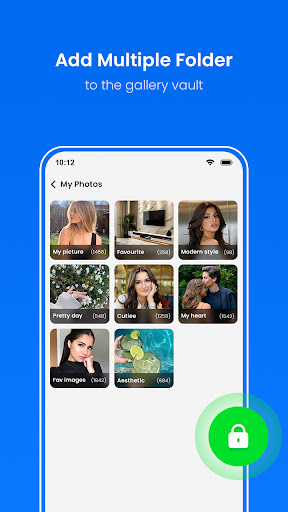
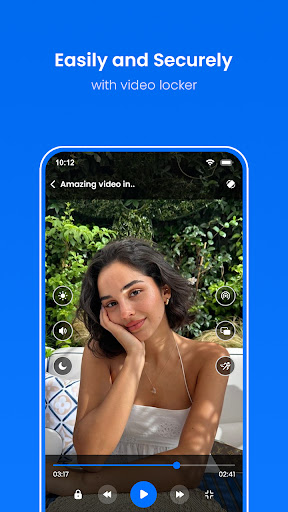


About Secure Folder Hide Photo video
The description on the store listing
Secure Folder: Private Vault 🔒 is the ultimate privacy app for Android users looking to protect their personal files, photos, videos, and more. With cutting-edge security features, you can lock away sensitive information and ensure only you have access to it. Whether it’s personal photos or important documents, your privacy is our priority.
Key Features:
📸 Hide Photos, Videos & Files: Securely hide and lock away personal files, including photos, videos, audio, documents, notes, and even recordings. Your confidential media will stay completely hidden from anyone using your device.
🔄 Change App Icon: Stay discreet by changing the app’s icon to something generic, like a calculator or …
Read the full description
Secure Folder: Private Vault 🔒 is the ultimate privacy app for Android users looking to protect their personal files, photos, videos, and more. With cutting-edge security features, you can lock away sensitive information and ensure only you have access to it. Whether it’s personal photos or important documents, your privacy is our priority. Key Features: 📸 Hide Photos, Videos & Files: Securely hide and lock away personal files, including photos, videos, audio, documents, notes, and even recordings. Your confidential media will stay completely hidden from anyone using your device. 🔄 Change App Icon: Stay discreet by changing the app’s icon to something generic, like a calculator or calendar. This ensures that your vault remains hidden, even in plain sight. 🌐 Private Browser: Browse the web securely with the built-in private browser. No browsing history, cookies, or search data will be saved, giving you full anonymity while you surf the internet. 🌑 Dark & Light Mode: Customize your app interface with either dark or light themes, offering a more personalized and visually comfortable experience. 📷 Intruder Selfie: Automatically capture a selfie of anyone trying to break into your vault. After a set number of failed login attempts, the app will secretly take a photo of the intruder and log the time and date of the attempt. 🛡️ Instant App Lock: For extra security, the app locks itself as soon as it’s minimized or closed, ensuring your files are always protected, even if you quickly switch between apps. ♻️ Backup & Restore: Safeguard your hidden files by backing them up within the app. You can easily restore your data even after uninstalling or reinstalling the app, giving you peace of mind that your important files are always safe. 🔑 Password Protection Options: Choose from multiple ways to lock your vault: PIN, pattern, or biometric authentication (fingerprint or face recognition). Customize the way you want to protect your data, ensuring only you have access. 🔐 Password Recovery: In case you forget your password, the app offers a secure password recovery option so you never lose access to your hidden files. 🗂️ Unhide Files Easily: Want to move your files back to your regular gallery or file manager? Unhide them with a simple click whenever you want to make your files visible again. 📤 Share Data Securely: Share your hidden files (photos, videos, or documents) directly from the app with trusted contacts. The app ensures that sharing is secure, maintaining the confidentiality of your data. 📝 Important Note: All of your hidden files are stored locally on your device, not in the cloud. This means that your data is completely private, but it’s important to back up your files before transferring to a new device or performing a factory reset to avoid losing them. With Secure Folder: Private Vault 🛡️, your sensitive files are protected by the highest level of security. Whether you’re looking to hide personal photos, videos, or important documents, this app ensures that only you can access them. Enjoy a range of customization options, including password types, themes, and backup features, all while keeping your data completely private. Protect your digital privacy now—download Secure Folder: Private Vault today!
Installs since 29 Aug 2026 Measured
Exact Google Play install counts, collected daily
Ratings
815 ratings, 20 reviews
- 5 ★75%
- 4 ★0.0%
- 3 ★13%
- 2 ★3.0%
- 1 ★9.3%
Recent reviews
Latest public reviews from the store
- 25 Apr 2026
Excellent app
- 26 Feb 2026
secure folder delete ho gaya
- 15 Feb 2026
good
- 28 Jan 2026
very good
What reviewers bring up
Topics mentioned in the latest 50 reviews, by how many reviews mention them
Liked in good reviews (31 reviews)
No topic comes up twice.
Raised in bad reviews (17 reviews)
- photos 4
- secure 3
- lost 3
- pictures 2
- support 2
- latest 2
- folder 2
- files 2
Top chart positions
Latest Google Play chart ranks by country, last 10 days
Not in any tracked top chart in the last 10 days.
Secure Folder Hide Photo video history
Release, install milestones, listing and store changes
- Removed from the store 7 Nov 2026
- Reached 100,000+ installs 18 Sep 2025
- Reached 50,000+ installs 23 May 2025
- First released on the store 25 Oct 2024
Update frequency
How often Secure Folder Hide Photo video ships a new version, month by month
9 updates in the last 12 months. More often than most similar apps: they shipped a median of 1 updates in the same year.
Recent versions
Current version 3.4
- Version 3.319 Jun 2026
- Fixed Issue ** Thank you for using Secure Folder**
- Version 3.221 May 2026
- Fixed Issue ** Thank you for using Secure Folder**
- Version 3.118 Apr 2026
- Fixed Issue ** Thank you for using Secure Folder**
- Version 3.013 Apr 2026
Listing keywords
Words and phrases Secure Folder Hide Photo video repeats most in its store listing
Top phrases: photos videos (6), hidden files (4), secure folder (4), folder private vault (3), secure folder private (3).
Highlighted words also appear in the title. Counts cover the title, short description and description.
Business model and tech
From the store listing and declared permissions
- Business model
- Free to downloadShows ads
- Sensitive access
- CameraPhone and callsPhotos, videos and filesDraws over other appsAdvertising ID
29 permissions
3 special access, 5 sensitive, 21 standard
- Change system settingsWRITE_SETTINGSSpecial access
- Draw over other appsSpecial access
- Manage all filesMANAGE_EXTERNAL_STORAGESpecial access
- Take photos and videosSensitive
- Change or delete shared storageSensitive
- Read shared storageSensitive
- Show notificationsPOST_NOTIFICATIONSSensitive
- Read phone status and identitySensitive
- Ad attribution (Privacy Sandbox)ACCESS_ADSERVICES_ATTRIBUTIONStandard
- Ad topics (Privacy Sandbox)ACCESS_ADSERVICES_TOPICSStandard
- Privacy Sandbox ads (custom audience)ACCESS_ADSERVICES_CUSTOM_AUDIENCEStandard
- Read how it was installed (install referrer)BIND_GET_INSTALL_REFERRER_SERVICEStandard
Compliance
What the listing and the app package show
- Store status
- Live
- Upkeep
- Updated 19 Jun 2026
- Registered in
- India
- Privacy policy
- Linked on the listing
- Advertising
- Shows ads
- In-app purchases
- None declared
- Age rating
- Everyone
- Sensitive permissions
- 5 sensitive, 3 special access of 29
- Location access
- No
- Camera and microphone
- Camera
Apps like Secure Folder Hide Photo video
USB OTG Checker: USB SupportDZApps Guru23.9K installs★ 4.33
How Long Widget - Time CounterRubén Mayayo196K installs★ 3.68
Lily - AI AgentSensor Notes Global55.5K installs★ 4.16
Sight BulbTrendmakers Inc327K installs★ 3.26
Europe VPN - Fast & SecureMASTERVNC196K installs★ 3.67
Pet ZeroChongyuan313K installs★ 2.48
LED Text ScrollerBlue Wave203K installs★ 3.5
FNKvision森泰(深圳)科技有限公司417K installs★ 3.8
Avaritia Mod for Minecraft PETOV MINORI72.5K installs★ 5.0
Secure Folder Hide Photo video: questions and answers
How many downloads does Secure Folder Hide Photo video have?
Secure Folder Hide Photo video has 220,675 installs on Google Play, measured from the store's own count on 21 Nov 2026.
Who makes Secure Folder Hide Photo video?
Secure Folder Hide Photo video is published by Infocus Apps, a developer based in IN.
When was Secure Folder Hide Photo video last updated?
The latest version (3.4) was released on 19 Jun 2026.
Is Secure Folder Hide Photo video free?
Yes. Secure Folder Hide Photo video is free to download, and it shows ads.
Is Secure Folder Hide Photo video still available?
Yes. Secure Folder Hide Photo video is live on Google Play as of 21 Nov 2026.
Track Secure Folder Hide Photo video and its competitors
Watch any app for new versions, rating drops, chart moves and removals. Free plan, no card.